
Symfony Mercure : EventSource不发送cookie
使用塞芬妮·默休尔,我想发送一个cookie授权:
- Symfony服务器:https://127.0.0.1:8000/
- 梅库雷中心:http://localhost:3000/.well-known/mercure
我使用以下命令启动Mercure服务器:
mercure/mercure.exe --jwt-key='...jwtToken...' --addr='localhost:3000' --allow-anonymous --cors-allowed-origins='https://127.0.0.1:8000'这就是我试图发送Cookie withCredentials: true的方式:
const url = new URL('http://localhost:3000/.well-known/mercure')
url.searchParams.append('topic', 'https://bubble.com/message')

const eventSource = new EventSource(url, { withCredentials: true })在当前页面https://127.0.0.1:8000/message中,在控制台中,我可以看到cookie:
set-cookie: mercureAuthorization=...cookieValue.;path=/.知名/合并;安全;httponly;samesite=lax
,但cookie从未发送给。在我的控制台网络选项卡中,我可以看到事件源请求http://localhost:3000/.well-known/mercure?topic=https%3A%2F%2Fbubble.com%2Fmessage,但cookie从未被传输。
我试图更改secure=false和samesite=none,但cookie从未被传输。
以下是来自事件源请求(Mercure Hub)的信息:
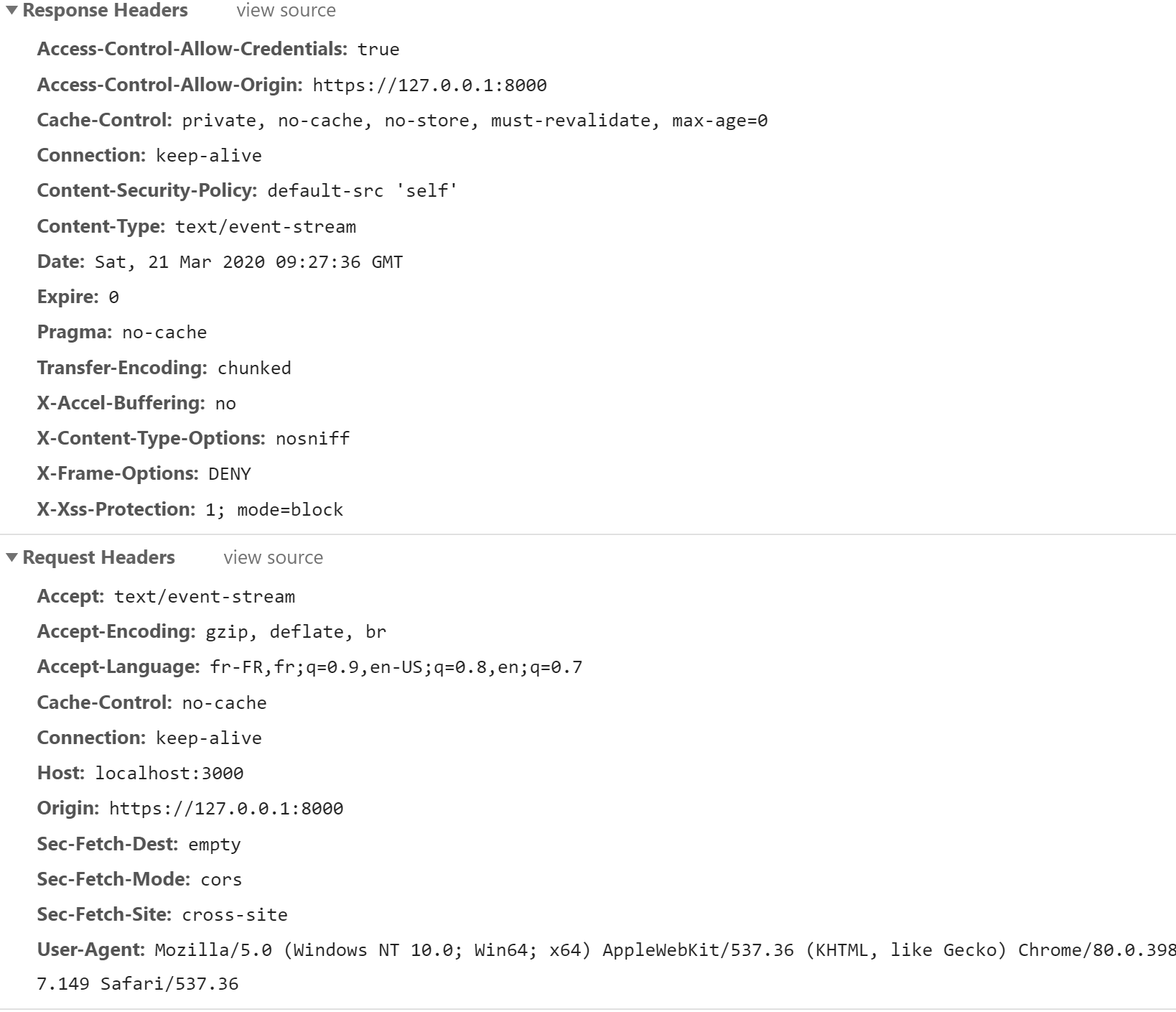
回答 1
Stack Overflow用户
发布于 2020-04-20 10:57:54
最近我花了几个小时让它在Chrome下工作(在Firefox中,我在创建和发送cookie方面没有任何问题):
- 反应: 127.0.0.1:3000
- Symfony API: 127.0.0.1:8000
- Mercure: 127.0.0.1:5000
请注意,我无法使用Localhost地址使其工作(没有设置/发送用于身份验证的cookie):
- 运行Mercure并为前端应用程序指定原产地(而不是“*”):
mercure --jwt-key=aVerySecretKey --addr=127.0.0.1:5000 --allow-anonymous --cors-allowed-origins=http://127.0.0.1:3000- 在React中,请设置Rest Api地址:
REACT_APP_SERVER_ROOT=http://127.0.0.1:8000 - 在Symfony中,设置配置如下:
###> MERCURE_JWT_KEY ###
MERCURE_JWT_KEY=aVerySecretKey
###< MERCURE_JWT_KEY ###

###> symfony/mercure-bundle ###
MERCURE_PUBLISH_URL=http://127.0.0.1:5000/.well-known/mercure
MERCURE_JWT_TOKEN=your_secret_jwt_token
###< symfony/mercure-bundle ###- 在Symfony中,创建CookieGenerator并生成Cookie,如下所示:
    $token = (new Builder())
    ->withClaim(
        'mercure',
         //Using UserId will help to define the targets on publish action
         ['subscribe' => ["http://127.0.0.1/user/{$user->getId()}"]]
    )
    ->getToken(new Sha256(), new Key($this->secret));

    //ATT: As you work in local environment Localhost, path needs to be ''
    //otherwise Chrome won't setup the cookie. In Firefox this seems not to be a problem
    return Cookie::create('mercureAuthorization', $token, 0, '');
//THIS WONT WORK: return Cookie::create('mercureAuthorization', $token, 0, '/.well-known/mercue');- 最后,在React中放置一个eventSource,它将自动发送创建的Cookie --请记住添加
{withCredentials: true}
     // URL is a built-in JavaScript class to manipulate URLs
     const url = new URL('http://127.0.0.1:5000/.well-known/mercure');
     url.searchParams.append('topic', 'http://127.0.0.1/your_topic/{id}') ;

     const eventSource = new EventSource(url, {withCredentials: true});
     eventSource.onmessage = event => {
         console.log(JSON.parse(event.data));
     }
希望这是有用的,并节省你的时间。
https://stackoverflow.com/questions/60786283
复制相似问题
腾讯云开发者

Copyright © 2013 - 2026 Tencent Cloud. All Rights Reserved. 腾讯云 版权所有
深圳市腾讯计算机系统有限公司 ICP备案/许可证号:粤B2-20090059  粤公网安备44030502008569号
腾讯云计算(北京)有限责任公司 京ICP证150476号 | 京ICP备11018762号