
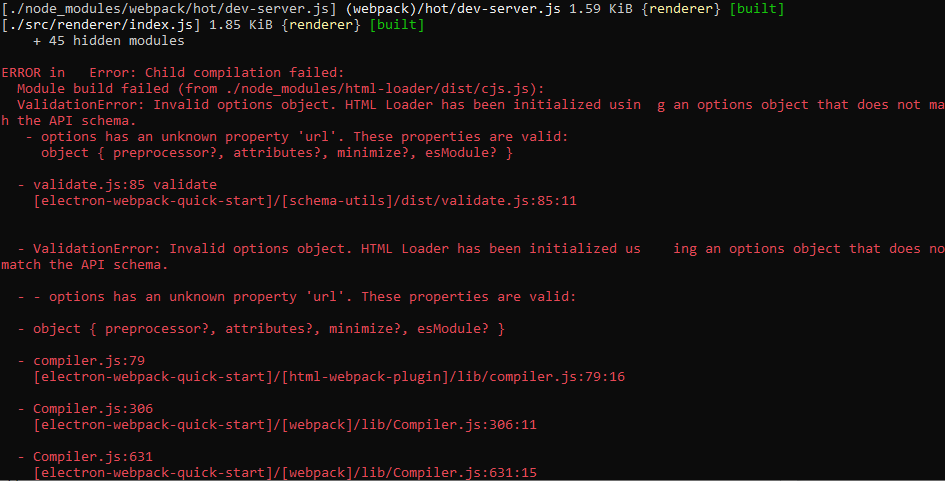
模块构建失败(来自./node_dist/html-加载程序/dist/cjs.js):
我试图让阿娃电子webpack和三个人快速起步,但是在这个过程中出了点问题。
以下是该项目的存储库:
https://github.com/etiennerin/ecsy-three-electron-ava-quick-start
只需尝试通过键入npm run dev来使用我的项目,就会得到以下错误消息:
我在用窗户。
我认为这个错误可能与我的webpack配置有关,奇怪的是,在我尝试了一些npm更新之前,这种配置似乎是有效的:
'use strict'

import { app, BrowserWindow } from 'electron'
import * as path from 'path'
import { format as formatUrl } from 'url'
import * as THREE from '../../node_modules/three/build/three.module.js';
//import {World} from '../../node_modules/ecsy/build/ecsy.module.js';

const isDevelopment = process.env.NODE_ENV !== 'production'

// global reference to mainWindow (necessary to prevent window from being garbage collected)
let mainWindow

function createMainWindow() {
  const window = new BrowserWindow({webPreferences: {nodeIntegration: true}})

  if (isDevelopment) {
    window.webContents.openDevTools()
  }

  if (isDevelopment) {
    window.loadURL(`http://localhost:${process.env.ELECTRON_WEBPACK_WDS_PORT}`)
  }
  else {
    window.loadURL(formatUrl({
      pathname: path.join(__dirname, 'index.html'),
      protocol: 'file',
      slashes: true
    }))
  }

  window.on('closed', () => {
    mainWindow = null
  })

  window.webContents.on('devtools-opened', () => {
    window.focus()
    setImmediate(() => {
      window.focus()
    })
  })

  return window
}

// quit application when all windows are closed
app.on('window-all-closed', () => {
  // on macOS it is common for applications to stay open until the user explicitly quits
  if (process.platform !== 'darwin') {
    app.quit()
  }
})

app.on('activate', () => {
  // on macOS it is common to re-create a window even after all windows have been closed
  if (mainWindow === null) {
    mainWindow = createMainWindow()
  }
})

// create main BrowserWindow when electron is ready
app.on('ready', () => {
  mainWindow = createMainWindow()
})
我最新的package.json:
{
  "name": "electron-webpack-quick-start",
  "version": "0.0.0",
  "license": "MIT",
  "scripts": {
    "start": "electron-webpack dev",
    "dev": "electron-webpack dev",
    "compile": "electron-webpack",
    "dist": "yarn compile && electron-builder",
    "dist:dir": "yarn dist --dir -c.compression=store -c.mac.identity=null",
    "test": "ava"
  },
  "dependencies": {
    "source-map-support": "^0.5.16"
  },
  "ava": {
    "files": [
      "spec/**/*"
    ],
    "require": [
      "esm"
    ]
  },
  "devDependencies": {
    "ava": "^3.5.1",
    "ecsy": "^0.2.3",
    "electron": "8.1.1",
    "electron-builder": "^22.4.1",
    "electron-webpack": "^2.7.4",
    "esm": "^3.2.25",
    "html-loader": "^1.0.0",
    "three": "^0.112.1",
    "webpack": "^4.42.0"
  }
}
非常感谢您的每一条建议!
回答 4
Stack Overflow用户
发布于 2020-03-24 01:15:21
我也遇到了同样的问题,但我已经通过查看.lock文件解决了它,html-loader现在是v1.0.02020.3.19更新的!请注意,这是一个完全重写的加载程序,它不是基于html-loader-v1.0.0-alpha,所以您需要在package.json文件中添加"html-loader": "1.0.0-alpha.0"到"devDependencies“中。
在第二步,您应该运行以下命令rm -rf node_module && rm -rf yarn.lock && yarn install
要了解更多细节,请查看此链接。
Stack Overflow用户
发布于 2020-03-22 15:45:54
你试过清理和重新安装吗?
rm -rf node_modules yarn.lock package-lock.json
npm install // or yarn
run webpackStack Overflow用户
发布于 2021-03-27 17:03:07
- 将
expose-loader从packages.json中删除, - 从.lock和模块中删除
rm -rf node_modules yarn.lock
- 然后重新安装依赖项减去公开加载程序。
yarn install
- 问题来自公开加载程序,请更改
config/webpack/environment to
const webpack = require("webpack")
environment.plugins.append("Provide", new webpack.ProvidePlugin({

  $: 'jquery',

  jQuery: 'jquery',

  Popper: ['popper.js', 'default']

  }))
这应该适用于rails 6
https://stackoverflow.com/questions/60801331
复制相似问题
腾讯云开发者

Copyright © 2013 - 2026 Tencent Cloud. All Rights Reserved. 腾讯云 版权所有
深圳市腾讯计算机系统有限公司 ICP备案/许可证号:粤B2-20090059  粤公网安备44030502008569号
腾讯云计算(北京)有限责任公司 京ICP证150476号 | 京ICP备11018762号