
拖动PictureBox
拖动PictureBox
提问于 2020-03-28 18:01:32
我想拖动一个PictureBox,而且我已经成功地做到了。但我的应用程序并没有Windows照片查看器那么顺利。我的意思是,两者之间的差别并不大,但很明显。我能做点什么让它少一点波折吗?这是我的简单代码:
int MOUSE_X = 0;
int MOUSE_Y = 0;

public Form1()
{
    InitializeComponent();
}

private void Form1_Load(object sender, EventArgs e)
{
    picBox.Image = Image.FromFile(@"D:\test_big.png");
    picBox.Width = 3300;
    picBox.Height = 5100;
}

private void picBox_MouseDown(object sender, MouseEventArgs e)
{
    if (e.Button == MouseButtons.Left)
    {
        MOUSE_X = e.X;
        MOUSE_Y = e.Y;
    }
}

private void picBox_MouseMove(object sender, MouseEventArgs e)
{
    if (e.Button == MouseButtons.Left)
    {
        picBox.Left = picBox.Left + (e.X - MOUSE_X);
        picBox.Top = picBox.Top + (e.Y - MOUSE_Y);
    }
}回答 1
Stack Overflow用户
回答已采纳
发布于 2020-03-28 21:41:13
这里有一个演示,演示了您的方法和评论中建议的方法。
测试您的代码会产生:
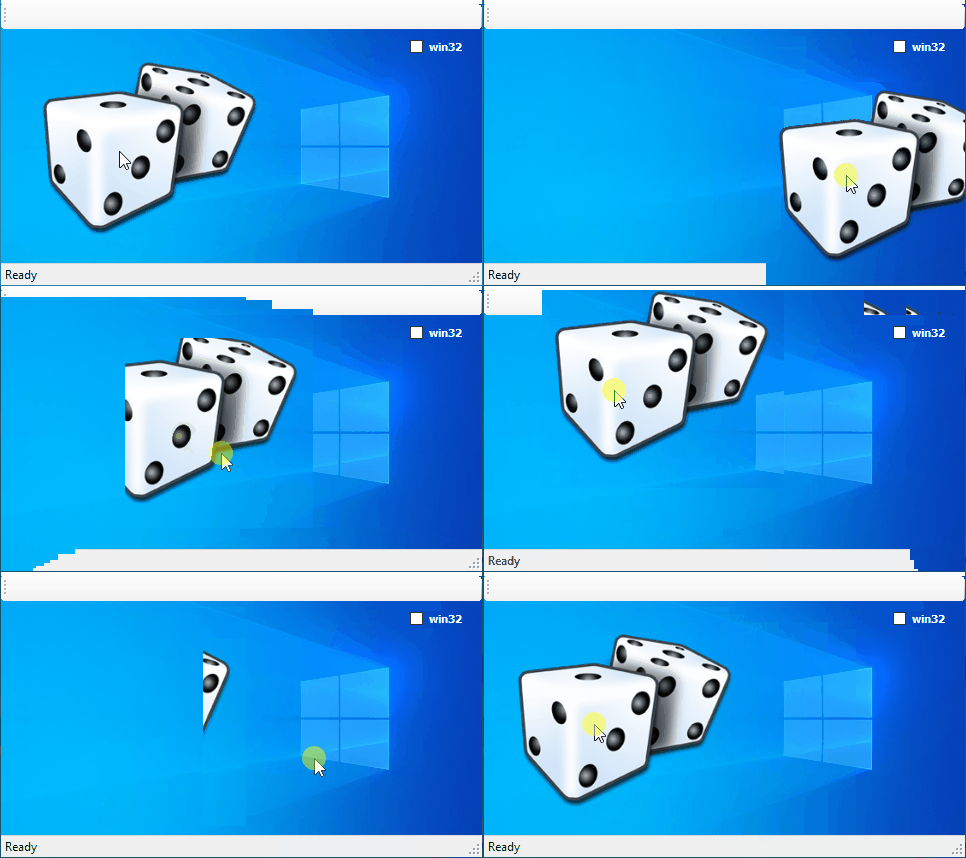
鉴于建议的守则:
using System.Runtime.InteropServices;
//...

private const int WM_SYSCOMMAND = 0x112;
private const int MOUSE_MOVE = 0xF012;

[DllImport("user32.dll")]
private static extern IntPtr SendMessage(
    IntPtr hWnd,
    int wMsg,
    IntPtr wParam,
    IntPtr lParam);

[DllImport("user32.dll")]
private static extern int ReleaseCapture(IntPtr hWnd);

private void picBox_MouseMove(object sender, MouseEventArgs e)
{
    if (!DesignMode && e.Button == MouseButtons.Left)
    {
        ReleaseCapture(picBox.Handle);
        SendMessage(picBox.Handle, WM_SYSCOMMAND, (IntPtr)MOUSE_MOVE, IntPtr.Zero);
    }
}
生产:
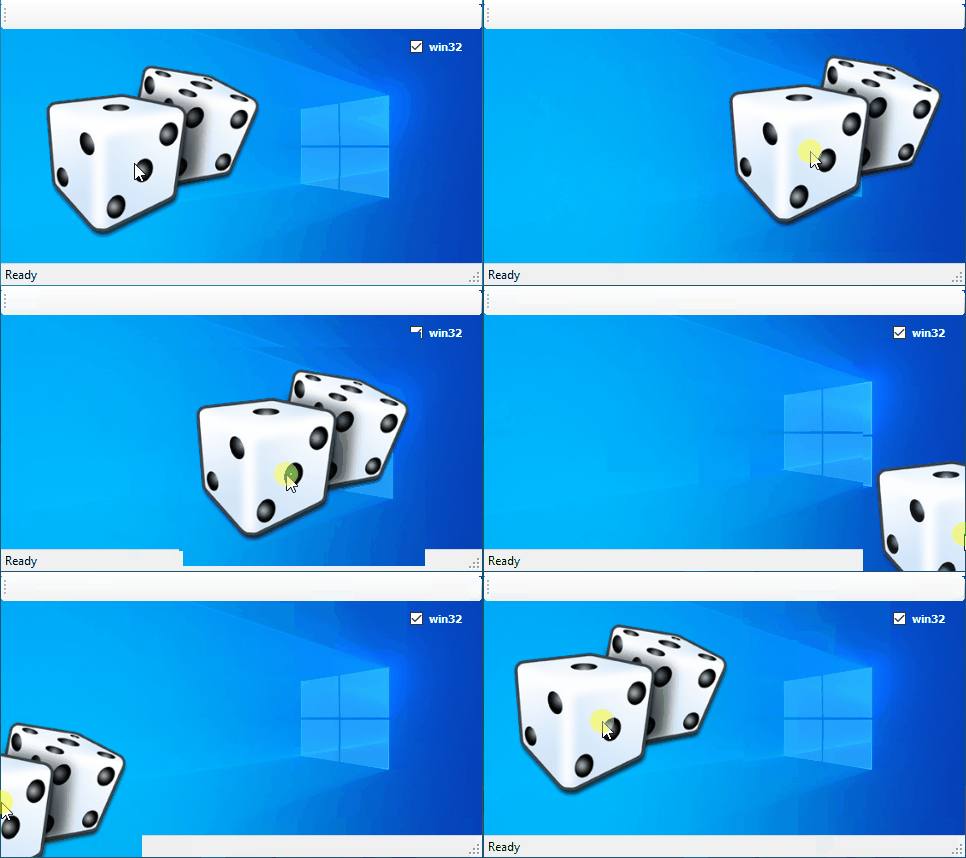
请注意,如果我可以这样说的话,我也会使用背景图像来使情况变得更糟。但是,如果没有背景图像,就很难检测到使用了哪些代码片段。
页面原文内容由Stack Overflow提供。腾讯云小微IT领域专用引擎提供翻译支持
原文链接:
https://stackoverflow.com/questions/60904806
复制相关文章
相似问题
腾讯云开发者

Copyright © 2013 - 2026 Tencent Cloud. All Rights Reserved. 腾讯云 版权所有
深圳市腾讯计算机系统有限公司 ICP备案/许可证号:粤B2-20090059  粤公网安备44030502008569号
腾讯云计算(北京)有限责任公司 京ICP证150476号 | 京ICP备11018762号