
Shinyproxy中Dash应用程序提供静态资产时的错误
我正在使用这些帖子中的信息在Shinyproxy上部署Dash应用程序:
https://lukesingham.com/how-to-deploy-plotlys-dash-using-shinyproxy/
尽管如此,当应该交付静态资产时,我还是会遇到一些错误:
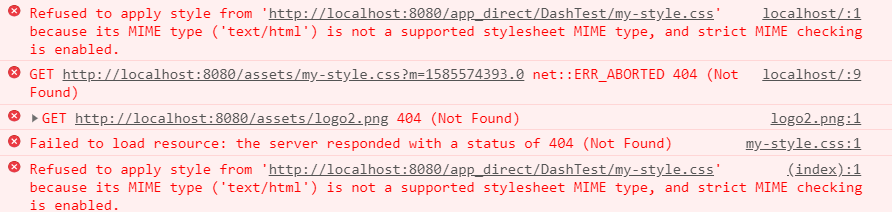
当我在码头集装箱运行破折号应用程序时,一切都很好。网站没有错误,静态资产被交付。
我的档案:
app.py
import dash
import dash_core_components as dcc
import dash_html_components as html

external_stylesheets = ['my-style.css']
app = dash.Dash(__name__, external_stylesheets=external_stylesheets)
app.layout = html.Div(children=[

     html.H1(children='Hello Dash'),

     html.Div(children='''
         Dash: A web application framework for Python.
     '''),

     html.Img(src='/assets/logo2.png'),

     dcc.Graph(
         id='example-graph',
         figure={
             'data': [
                 {'x': [1, 2, 3], 'y': [4, 1, 2], 'type': 'bar', 'name': 'SF'},
                 {'x': [1, 2, 3], 'y': [2, 4, 5], 'type': 'bar', 'name': u'Montréal'},
             ],
             'layout': {
                 'title': 'Dash Data Visualization'
             }
         }
      )
    ])

app.config.suppress_callback_exceptions = True
app.config.update({
     'routes_pathname_prefix': ''
   , 'requests_pathname_prefix': ''
})

if __name__ == '__main__':
    app.run_server(host='0.0.0.0', port=8050, debug=True)
application.yml
port: 8080
authentication: simple
admin-groups: admins
users:
- name: admin
  password: admin
  groups: admins
docker:
  url: http://localhost:2375
specs:
- id: DashTest
  display-name: Dash Demo Application
  container-cmd: ["python", "app.py"]
  container-image: shiny-dash-app
  port: 8050
  access-groups: admins
logging:
  file:
shinyproxy.log编辑:我的代码结构如下所示:
dash ├── dash_shinyproxy | ├── dashapp_shinyproxy | ├── Dockerfile | ├── app | ├── assets | ├── app.py
有人能帮我解决这个问题吗?有没有人推荐过如何为shinyproxy服务静态文件?
提前谢谢你。
回答 1
Stack Overflow用户
发布于 2020-04-01 08:55:40
my-style.css是本地文件吗?在这种情况下,无需在应用程序中指定,因为dash会自动为您找到它。如果是非本地的,请确保您拥有网络加载文件的权限。(使用全局链接作为示例在Google存储上托管。)
https://stackoverflow.com/questions/60958930
复制相似问题
腾讯云开发者

Copyright © 2013 - 2026 Tencent Cloud. All Rights Reserved. 腾讯云 版权所有
深圳市腾讯计算机系统有限公司 ICP备案/许可证号:粤B2-20090059  粤公网安备44030502008569号
腾讯云计算(北京)有限责任公司 京ICP证150476号 | 京ICP备11018762号