
不显示FLTK - Mac iOS图像
不显示FLTK - Mac iOS图像
提问于 2020-04-03 08:01:33
我在iOS Mojave 10.14.6上使用FLTK库(1.3.5版):我编写了这个简单的程序
#include <stdlib.h>
#include <FL/Fl.H>
#include <FL/platform.H>
#include <FL/Fl_Window.H>
#include <FL/Fl_JPEG_Image.H>
#include <FL/Fl_PNG_Image.H>
#include <FL/Fl_Box.H>

int main(int argc, char **argv) {

    Fl_Window *G_win = 0;
    G_win = new Fl_Window(650,650,"test");

    Fl_Box* BG = new Fl_Box(0,0,650,650);
    Fl_PNG_Image *bg = new Fl_PNG_Image("scheme.png");
    BG->image(bg);

    Fl_Box* text = new Fl_Box(250,20,150,20,"There should be an image down below. Is it so?");

    G_win->end();
    G_win->show(argc, argv);
    return Fl::run();
}
我用下面的Makefile (找到这里)编译它:
CC  = $(shell fltk-config --cc)
CXX = $(shell fltk-config --cxx)

CFLAGS   = $(shell fltk-config --cflags) -Wall -O3 -I/other/include/paths...
CXXFLAGS = $(shell fltk-config --cxxflags) -Wall -O3 -I/other/include/paths...

LINKFLTK = $(shell fltk-config --ldstaticflags)
LINKFLTK_GL = $(shell fltk-config --use-gl --ldstaticflags)
LINKFLTK_IMG = $(shell fltk-config --use-images --ldstaticflags)

STRIP      = strip
POSTBUILD  = fltk-config --post # Required on OSX, does nothing on other platforms, so safe to call

all: myApp

main.o: main.cpp
    $(CC) -c $< $(CCFLAGS)

myApp:  main.o
    $(CXX) -o $@ main.o  $(LINKFLTK_IMG) $(LINKFLTK_GL)
    $(STRIP) $@
$(POSTBUILD) $@ # only required on OSX, but call it anyway for portability因此,我得到了二进制myApp和应用程序myApp:当我在shell中键入./myApp时,每一个操作都很好(顶部图像),而双击图标就没有显示图像(底部图像)。
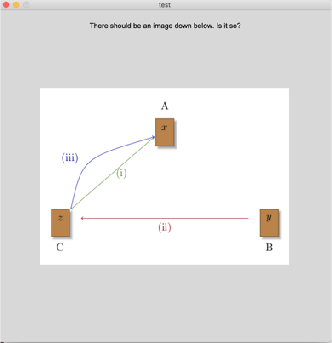

我在编译过程中没有错误,也没有警告。Makefile有什么问题吗?与Mac iOS有关吗?
回答 1
Stack Overflow用户
回答已采纳
发布于 2020-04-29 14:06:01
我想这很简单,因为FLTK试图从当前文件夹加载PNG文件。当您在shell中执行./myApp时,它在PNG文件所在的文件夹中运行。然而,当你双击时,你的现代道路是谁知道-在哪里。
最简单的“修复”是使用绝对路径(类似于"/home/youruser/work/myapp/scheme.png"),重新编译应用程序并运行它。-如果您提供了文件的完整路径,它就会工作。
页面原文内容由Stack Overflow提供。腾讯云小微IT领域专用引擎提供翻译支持
原文链接:
https://stackoverflow.com/questions/61007445
复制相关文章
相似问题
腾讯云开发者

Copyright © 2013 - 2026 Tencent Cloud. All Rights Reserved. 腾讯云 版权所有
深圳市腾讯计算机系统有限公司 ICP备案/许可证号:粤B2-20090059  粤公网安备44030502008569号
腾讯云计算(北京)有限责任公司 京ICP证150476号 | 京ICP备11018762号