
用两个线性函数和Python中的一个断点进行分段拟合
用两个线性函数和Python中的一个断点进行分段拟合
提问于 2020-04-03 17:10:18
我想用两个线性函数(破幂律)来拟合我的数据,其中一个是用户给定的断点。目前,我正在使用来自curve_fit模块的scipy.optimize函数。这是我的数据集频率,联合数据,错误
这是我的代码:
import numpy as np
from scipy.optimize import curve_fit
import matplotlib.pyplot as plt


freqs=np.loadtxt('binf11.dat')
binys=np.loadtxt('binp11.dat')
errs=np.loadtxt('bine11.dat')


def brkPowLaw(xArray, breakp, slopeA, offsetA, slopeB):
    returnArray = []
    for x in xArray:
        if x <= breakp:
            returnArray.append(slopeA * x + offsetA)
        elif x>breakp:
            returnArray.append(slopeB * x + offsetA)
    return returnArray

#define initial guesses, breakpoint=-3.2
a_fit,cov=curve_fit(brkPowLaw,freqs,binys,sigma=errs,p0=(-3.2,-2.0,-2.0,-2.0))


modelPredictions = brkPowLaw(freqs, *a_fit)


plt.errorbar(freqs, binys, yerr=errs, fmt='kp',fillstyle='none',elinewidth=1)
plt.xlim(-5,-2)
plt.plot(freqs,modelPredictions,'r')
第二线性函数的偏移量被设置为等于第一线性函数的偏移量。
它看起来很管用,但我觉得它很合适:
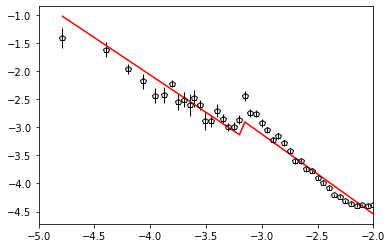
现在,我认为brkPowLaw函数中的条件应该足够了,但事实并非如此。我想要的是,用第一个线性方程把数据拟合到一个选定的临界点,然后从这个临界点再进行第二个线性拟合,但是没有驼峰,就像它在图中显示的那样,因为现在它看起来有两个断点,而不是一个和三个线性函数来拟合,这不是我所期望的,也不是我想要的。
我想要的是,当第一个线性拟合结束时,第二个线性拟合从第一个线性拟合结束的点开始。
我尝试过使用numpy.piecewise函数,但没有得到合理的结果,我研究了一些主题( 像这样或这 ),但是我没有设法使我的脚本工作。
谢谢您抽时间见我
回答 1
Stack Overflow用户
发布于 2020-04-08 13:53:21
这将是我的方法,不是线性而是二次函数。
import matplotlib.pyplot as plt
import numpy as np
from scipy.optimize import curve_fit

def soft_step(x, s): ### not my usual np.tanh() ...OMG
    return 1+ 0.5 * s * x / np.sqrt( 1 + ( s * x )**2 )

### for the looks of the data I decided to go for two parabolas with
### one discontinuity
def fit_func( x, a0, b0, c0, a1, b1, c1, x0, s ):
    out  = ( a0 * x**2 + b0 * x + c0 ) * ( 1 - soft_step( x - x0, s ) )
    out += ( a1 * x**2 + b1 * x + c1 ) * soft_step( x - x0, s )
    return out

### with global parameter for iterative fit
### if using least_squares one could avoid globals
def fit_short( x, a0, b0, c0, a1, b1, c1, x0 ):
    global stepwidth
    return fit_func( x, a0, b0, c0, a1, b1, c1, x0, stepwidth )

### getting data
xl = np.loadtxt( "binf11.dat" )
yl = np.loadtxt( "binp11.dat" )
el = np.loadtxt( "bine11.dat" )

### check for initial values
p0 = [ 0, -2,-11, 0, -2, -9, -3, 10 ]
xth = np.linspace( -5.5, -1.5, 250 )
yth = np.fromiter( ( fit_func(x, *p0 ) for x in xth ), np.float )

### initial fit
sol, pcov = curve_fit( fit_func, xl, yl, sigma=el, p0=p0, absolute_sigma=True )
yft = np.fromiter( ( fit_func( x, *sol ) for x in xth ), np.float )
sol=sol[: -1]

###iterating with fixed and decreasing softness in the step
for stepwidth in range(10,55,5):
    sol, pcov = curve_fit( fit_short, xl, yl, sigma=el, p0=sol, absolute_sigma=True )
    ### printing the step position
    print sol[-1]
yiter = np.fromiter( ( fit_short(x, *sol ) for x in xth ), np.float )
print sol

###plotting
fig = plt.figure()
ax = fig.add_subplot( 1, 1, 1 )
# ~ax.plot( xth, yth ) ### no need to show start parameters
ax.plot( xth, yft ) ### first fit with variable softness
ax.plot( xth, yiter ) ### last fit with fixed softness of 50
ax.errorbar( xl, yl, el, marker='o', ls='' ) ### data
plt.show()
这意味着:
-3.1762721614559712
-3.1804393481217477
-3.1822672190583603
-3.183493292415725
-3.1846976088390333
-3.185974760198917
-3.1872472903175266
-3.188427041827035
-3.1894705102541843
[ -0.78797351  -5.33255174 -12.48258537   0.53024954   1.14252783 -4.44589397  -3.18947051]
和
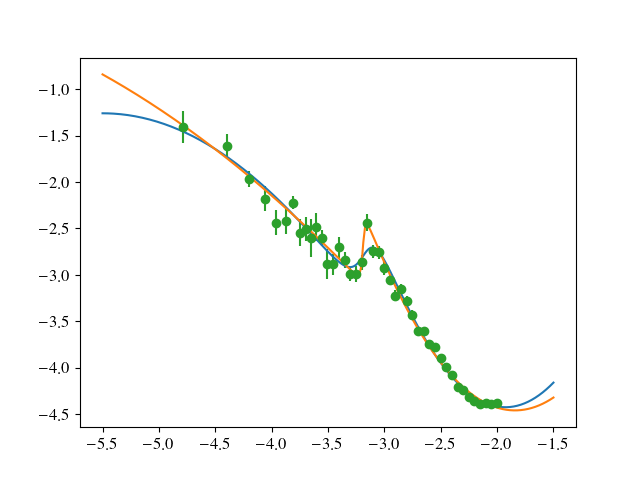
把跳跃速度定在-3.189
页面原文内容由Stack Overflow提供。腾讯云小微IT领域专用引擎提供翻译支持
原文链接:
https://stackoverflow.com/questions/61017000
复制相关文章
相似问题
腾讯云开发者

Copyright © 2013 - 2026 Tencent Cloud. All Rights Reserved. 腾讯云 版权所有
深圳市腾讯计算机系统有限公司 ICP备案/许可证号:粤B2-20090059  粤公网安备44030502008569号
腾讯云计算(北京)有限责任公司 京ICP证150476号 | 京ICP备11018762号