
如何在当前powershell目录中启动WSL终端?
如何在当前powershell目录中启动WSL终端?
提问于 2020-04-06 07:50:40
我可以打开一个powershell并键入
> Ubuntu 若要在windows 10上打开WSL ubuntu shell,这将始终带我到WSL主目录。我将如何在powershell当前所在的同一位置打开终端?
仅供参考。我需要这个来创建一个右击“开放终端在这里”类型的注册表键的窗口资源管理器。
回答 2
Stack Overflow用户
回答已采纳
发布于 2020-04-07 04:53:14
如果我们看看运行ubuntu.exe实际上做了什么:
PS C:\> ubuntu.exe /?
Launches or configures a Linux distribution.

Usage:
    <no args>
        Launches the user's default shell in the user's home directory.

    install [--root]
        Install the distribution and do not launch the shell when complete.
          --root
              Do not create a user account and leave the default user set to root.

    run <command line>
         Run the provided command line in the current working directory. If no
         command line is provided, the default shell is launched.

    config [setting [value]]
        Configure settings for this distribution.
        Settings:
          --default-user <username>
              Sets the default user to <username>. This must be an existing user.

    help
        Print usage information.
我们可以看到,默认情况下,它在主目录中启动WSL shell。如果我们想在PowerShell中打开的当前目录中运行它,我们需要指定run选项。所以完整的命令将是ubuntu.exe run。
另一种选择是只运行wsl.exe或bash.exe。默认情况下,这些命令将在当前工作目录中打开WSL。
注意:我们不需要在命令之后指定.exe。运行ubuntu、wsl和bash也同样有效。PowerShell知道如何在不指定扩展的情况下运行可执行文件。
Stack Overflow用户
发布于 2021-04-25 03:02:52
方法1:
wsl --set-default Ubuntu
- just类型
- 将Ubuntu设置为wsl默认发行版,您位于当前的Powershell目录
中。
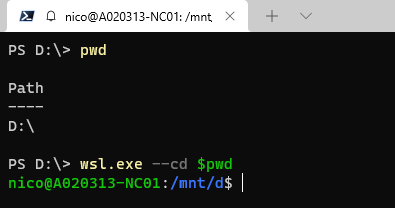
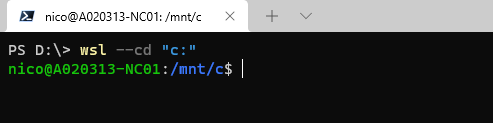
方法2:
打开其他文件夹
wsl.exe --cd $pwd或wsl.exe --cd "path"
页面原文内容由Stack Overflow提供。腾讯云小微IT领域专用引擎提供翻译支持
原文链接:
https://stackoverflow.com/questions/61055196
复制相关文章
相似问题
腾讯云开发者

Copyright © 2013 - 2026 Tencent Cloud. All Rights Reserved. 腾讯云 版权所有
深圳市腾讯计算机系统有限公司 ICP备案/许可证号:粤B2-20090059  粤公网安备44030502008569号
腾讯云计算(北京)有限责任公司 京ICP证150476号 | 京ICP备11018762号