
Vuexfire将Fi还原集合绑定到对象,而不是一个列表
Vuexfire将Fi还原集合绑定到对象,而不是一个列表
提问于 2020-04-08 09:53:36
我的Firestore数据库中有以下集合:
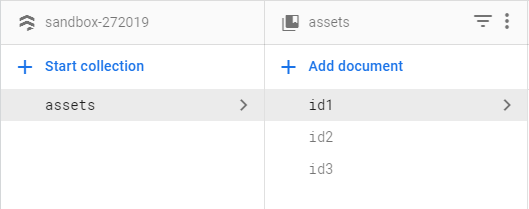
我可以用以下方法绑定到我的vuex商店:
state: {
  assets: [],
},

actions: {
  bindAssets: firestoreAction(({ bindFirestoreRef }) => {
    return bindFirestoreRef('assets', db.collection('assets'))
  }),
},然而,这将它们作为一个列表绑定到assets,即。
[
  {id: "id1" /* etc. */ },
  {id: "id2" /* etc. */ },
  {id: "id3" /* etc. */ },
]
在那里,我希望它被约束为:
{
  "id1": { /* etc. */ },
  "id2": { /* etc. */ },
  "id3": { /* etc. */ },
}
我怎样才能做到这一点?
回答 2
Stack Overflow用户
发布于 2020-04-08 13:13:05
如果要在对象中转换assets数组(通过绑定assets集合获得),如下所示
{
  "id1": { /* etc. */ },
  "id2": { /* etc. */ },
  "id3": { /* etc. */ },
}
下面的Vuex getter应该能做到这一点:
state: {
  assets: [],
},

actions: {
  bindAssets: firestoreAction(({ bindFirestoreRef }) => {
    return bindFirestoreRef('assets', db.collection('assets'))
  }),
},

getters: {
     assetsObj: state => {

         const arrayToObject = (array) =>
            array.reduce((obj, item) => {
                 obj[item.id] = item
                 return obj
            }, {})

        return arrayToObject(state.assets)

    }
}
更新您的评论(在聊天中):
如果只想绑定到一个文档,那么应该使用bindAssetDoc和assetDoc进行如下操作。
商店
state: {
    assets: [],
    assetDoc: null
},

mutations: vuexfireMutations,

actions: {
    bindAssetDoc: firestoreAction(({ bindFirestoreRef }, payload) => {
        return bindFirestoreRef('assetDoc', db.collection('assets').doc(payload.id))
    }),
    bindAssets: firestoreAction(({ bindFirestoreRef }) => {
        return bindFirestoreRef('assets', db.collection('assets'))
    })
}通过/asset/:assetId打开的组件
<script>
//...
export default {
  created() {
    console.log('OK1');
    this.$store
      .dispatch('bindAssetDoc', { id: this.$route.params.assetId });
  }
};
</script>Stack Overflow用户
发布于 2021-09-28 08:25:00
根据官方文件 of vuexfire,您需要使用{}而不是[]初始化状态。
state: {
  assets: {},  // instead of []
},页面原文内容由Stack Overflow提供。腾讯云小微IT领域专用引擎提供翻译支持
原文链接:
https://stackoverflow.com/questions/61097916
复制相关文章
相似问题
腾讯云开发者

Copyright © 2013 - 2026 Tencent Cloud. All Rights Reserved. 腾讯云 版权所有
深圳市腾讯计算机系统有限公司 ICP备案/许可证号:粤B2-20090059  粤公网安备44030502008569号
腾讯云计算(北京)有限责任公司 京ICP证150476号 | 京ICP备11018762号