
更改GridLayoutManager布局
更改GridLayoutManager布局
提问于 2020-04-10 20:40:14
我想达到的目标是:
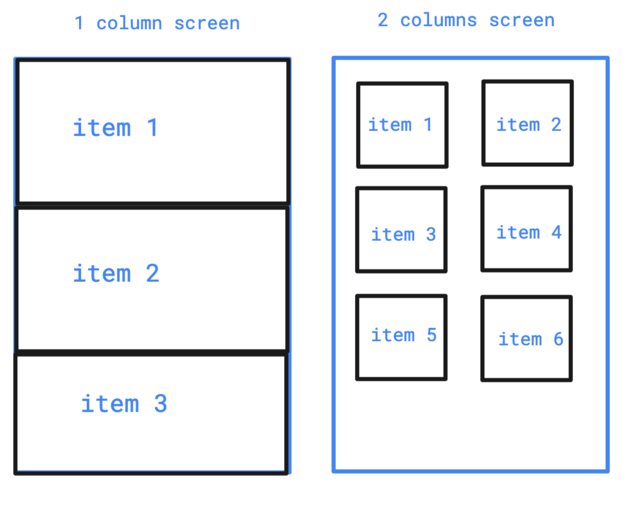
我所做的:
我有一个有1到5列的按钮,当用户循环在他想要的列数上时,布局会改变,但是所有的卡都粘在一起了。到目前为止,这就是我所能做的:https://imgur.com/a/CL4FZhY
我的项目
<LinearLayout
    xmlns:android="http://schemas.android.com/apk/res/android"
    xmlns:tools="http://schemas.android.com/tools"
    android:id="@+id/card"
    android:layout_width="match_parent"
    android:layout_height="wrap_content"
    android:orientation="vertical">
    <ImageView
        android:id="@+id/video_preview"
        android:layout_width="match_parent"
        android:layout_height="194dp"
        android:scaleType="centerCrop"
        tools:src="@drawable/img_error_v1"
        />
    <LinearLayout
        android:layout_width="match_parent"
        android:layout_height="wrap_content"
        android:orientation="vertical"
        android:padding="16dp">
        <TextView
            android:id="@+id/video_title"
            android:layout_width="wrap_content"
            android:layout_height="wrap_content"
            android:textAppearance="?attr/textAppearanceHeadline6"
            android:maxLines="1"
            tools:text="This is a really really really really really really really really really really really long title"
            />
        <TextView
            android:id="@+id/video_description"
            android:layout_width="wrap_content"
            android:layout_height="wrap_content"
            android:layout_marginTop="8dp"
            android:maxLines="1"
            android:textAppearance="?attr/textAppearanceBody2"
            android:textColor="?android:attr/textColorSecondary"
            tools:text="This is the URL for now"
            />
    </LinearLayout>
</LinearLayout>
我的问题是:
我怎样才能实现这种改变?我读过关于ItemDecoration的文章,但我不认为我能改变我的项目的layout_height。是否需要为每个列屏幕创建一个布局?
回答 2
Stack Overflow用户
回答已采纳
发布于 2020-04-11 11:11:07
Stack Overflow用户
发布于 2020-04-10 21:24:40
可以通过动态更改列表项根的边距来实现这一点,需要在适配器onBindViewHolder()函数中这样做。
GridLayoutManager.LayoutParams params = (GridLayoutManager.LayoutParams) holder.card.getLayoutParams();
            if (position % 2 == 0) {
                params.setMargins(dpTopixel(20), dpTopixel(10), dpTopixel(10), dpTopixel(5));
            } else {
                params.setMargins(dpTopixel(10), dpTopixel(10), dpTopixel(20), dpTopixel(5));
            }
            holder.card.setLayoutParams(params);
下面是将像素转换为dp的函数
private int dpTopixel(int dp) {
    float dip = (float) dp;
    Resources r = context.getResources();
    float px = TypedValue.applyDimension(
            TypedValue.COMPLEX_UNIT_DIP,
            dip,
            r.getDisplayMetrics()
    );
    return (int) px;
}
如果在两个屏幕上使用相同的适配器,则可以发送带有适配器构造函数的标志来阻止该代码。
页面原文内容由Stack Overflow提供。腾讯云小微IT领域专用引擎提供翻译支持
原文链接:
https://stackoverflow.com/questions/61148348
复制相关文章
相似问题
腾讯云开发者

Copyright © 2013 - 2026 Tencent Cloud. All Rights Reserved. 腾讯云 版权所有
深圳市腾讯计算机系统有限公司 ICP备案/许可证号:粤B2-20090059  粤公网安备44030502008569号
腾讯云计算(北京)有限责任公司 京ICP证150476号 | 京ICP备11018762号