
对象数组中的角9更新对象
对象数组中的角9更新对象
提问于 2020-04-12 07:32:28
正如标题所述,我需要更新数组中的一个值。
<div *ngFor="let item of data; let i = index" >
  <div class="full-w" fxLayout='row' fxLayoutAlign='start center' fxLayoutGap='12px'>
    <span class="title">Color: </span>
    <span>{{item.color}}</span>
  </div>
  <mat-divider class="full-w"> </mat-divider>

  <div *ngFor="let e of item.sizeQuantity; let j = index" fxLayout='row' fxLayoutAlign='space-between center'
    fxLayoutGap='12px'>
    <span class="title">Size: </span>
    <span class="size">{{e.size}}</span>
    <mat-form-field>
      <input matInput type="number" placeholder="Quantity" [value]="e.quantity" #quantity />
    </mat-form-field>

    <button mat-button (click)="updateQuantity(quantity.value, item, i, j)">Add</button>
  </div>
</div>
这是最初的数据
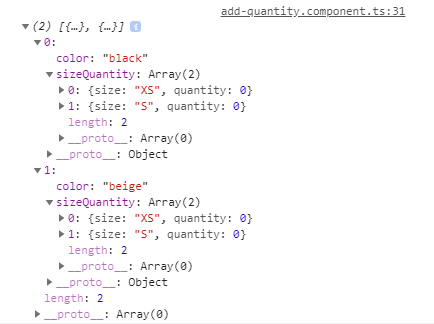
当我在一个字段中输入数据时,例如在black>xs下,它在beige>xs上也会发生变化(如果有blue>xs或更多,就会更新)。
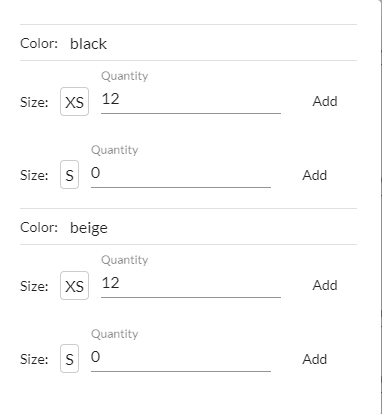
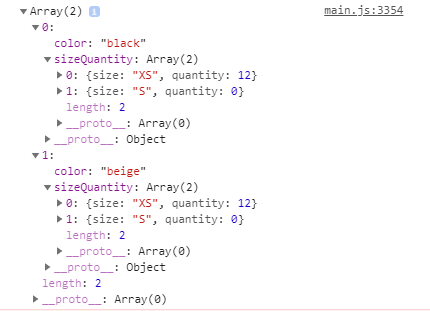
我尝试了几种方法,但它总是在每个位置更新值。
  updateQuantity(value, item, ind, j) {

    this.data.forEach(e => {
      if (e.color == item.color) {
        e.sizeQuantity[j].quantity = parseInt(value);
      }
    })
  }
或者像这样
  updateQuantity(value, item, ind, j) {
    this.data.find(e => e.color == item.color).sizeQuantity[j].quantity = parseInt(value);

  }
我是不是遗漏了什么?
//编辑:
数据创建如下所示:
       let quantity = [];
        let sizeQuantity = [];

        this.selectedSizes.forEach(e => {
          sizeQuantity.push({ size: e, quantity: 0 })
        })

        this.selectedColors.forEach(e => {
          quantity.push({ color: e, sizeQuantity })

        })

        this.dialog.open(AddQuantityComponent, {
          data: quantity
        })
其中,根据用户选择动态创建大小和颜色数组:
this.selectedColors  = ['black', 'beige', 'blue'];
this.selectedSizes = ['XS', 'S'];回答 1
Stack Overflow用户
回答已采纳
发布于 2020-04-12 09:29:13
quantity值以每种颜色更新,因为它们共享相同的sizeQuantity实例。这个方法的问题根源
this.selectedColors.forEach(e => {
  quantity.push({ color: e, sizeQuantity })
})在这里,必须从sizeQuantity创建一个深度副本,这意味着可以使用以下内容:
this.selectedColors.forEach(e => {
  let sq = JSON.parse(JSON.stringify(sizeQuantity));
  quantity.push({ color: e, sizeQuantity: sq });
});JSON序列化/反序列化用于创建深度复制是很棘手的,但这是最简单和最向后兼容的方法。有关创建深度副本的更多详细信息,请查看this stackoverflow conversation。
页面原文内容由Stack Overflow提供。腾讯云小微IT领域专用引擎提供翻译支持
原文链接:
https://stackoverflow.com/questions/61168163
复制相关文章
相似问题
腾讯云开发者

Copyright © 2013 - 2026 Tencent Cloud. All Rights Reserved. 腾讯云 版权所有
深圳市腾讯计算机系统有限公司 ICP备案/许可证号:粤B2-20090059  粤公网安备44030502008569号
腾讯云计算(北京)有限责任公司 京ICP证150476号 | 京ICP备11018762号