
显示和隐藏工具提示点击(Tipso.js)
我正在使用名为蒂普索的简单工具提示插件。
如何仅通过单击才能显示和隐藏工具提示?
$('.top').tipso();/* Tipso Bubble Styles */
.tipso_bubble,
.tipso_bubble>.tipso_arrow {
-webkit-box-sizing: border-box;
-moz-box-sizing: border-box;
box-sizing: border-box;
}
.tipso_bubble {
position: absolute;
text-align: center;
border-radius: 6px;
z-index: 9999;
}
.tipso_style {
cursor: help;
border-bottom: 1px dotted;
}
.tipso_title {
border-radius: 6px 6px 0 0;
}
.tipso_content {
word-wrap: break-word;
padding: 0.5em;
}
/* Tipso Bubble size classes - Similar to Foundation's syntax*/
.tipso_bubble.tiny {
font-size: 0.6rem;
}
.tipso_bubble.small {
font-size: 0.8rem;
}
.tipso_bubble.default {
font-size: 1rem;
}
.tipso_bubble.large {
font-size: 1.2rem;
width: 100%;
}
/* Tipso Bubble Div */
.tipso_bubble>.tipso_arrow {
position: absolute;
width: 0;
height: 0;
border: 8px solid;
pointer-events: none;
}
.tipso_bubble.top>.tipso_arrow {
border-top-color: #000;
border-right-color: transparent;
border-left-color: transparent;
border-bottom-color: transparent;
top: 100%;
left: 50%;
margin-left: -8px;
}
.tipso_bubble.bottom>.tipso_arrow {
border-bottom-color: #000;
border-right-color: transparent;
border-left-color: transparent;
border-top-color: transparent;
bottom: 100%;
left: 50%;
margin-left: -8px;
}
.tipso_bubble.left>.tipso_arrow {
border-left-color: #000;
border-top-color: transparent;
border-bottom-color: transparent;
border-right-color: transparent;
top: 50%;
left: 100%;
margin-top: -8px;
}
.tipso_bubble.right>.tipso_arrow {
border-right-color: #000;
border-top-color: transparent;
border-bottom-color: transparent;
border-left-color: transparent;
top: 50%;
right: 100%;
margin-top: -8px;
}
.tipso_bubble .top_right_corner,
.tipso_bubble.top_right_corner {
border-bottom-left-radius: 0;
}
.tipso_bubble .bottom_right_corner,
.tipso_bubble.bottom_right_corner {
border-top-left-radius: 0;
}
.tipso_bubble .top_left_corner,
.tipso_bubble.top_left_corner {
border-bottom-right-radius: 0;
}
.tipso_bubble .bottom_left_corner,
.tipso_bubble.bottom_left_corner {
border-top-right-radius: 0;
}<script src="https://cdnjs.cloudflare.com/ajax/libs/jquery/3.3.1/jquery.min.js"></script>
<script src="https://tipso.object505.com/tipso.js"></script>
<div id="banner-message">
<p>Hello World</p>
<span class="top tipso_style" data-tipso="This is a tooltip text">I want to show the tooltip on click and hide it on click as well.</span>
</div>
回答 2
Stack Overflow用户
发布于 2020-04-15 19:53:45
考虑添加一个显示或隐藏工具提示的click处理程序,这取决于它是否已经显示。Tipso文档建议使用类来指示何时显示工具提示;请参见题为“单击以显示/隐藏提示”的演示。
下面是一个点击事件的演示,它可以切换工具提示。它还包括mouseenter和mouseleave处理程序来更新“显示”类。
$('.top')
  .tipso()
  .on({
    mouseenter: function(e) {
      jQuery(this).addClass('typso-showing');
    },
    mouseleave: function(e) {
      jQuery(this).removeClass('typso-showing');
    },
    click: function(e) {
      let $this = jQuery(this);
      if ($this.hasClass('typso-showing')) {
        $this.removeClass('typso-showing');
        $this.tipso('hide');
      } else {
        $this.addClass('typso-showing');
        $this.tipso('show');
      }
    }
});/* Tipso Bubble Styles */
.tipso_bubble,
.tipso_bubble>.tipso_arrow {
-webkit-box-sizing: border-box;
-moz-box-sizing: border-box;
box-sizing: border-box;
}
.tipso_bubble {
position: absolute;
text-align: center;
border-radius: 6px;
z-index: 9999;
}
.tipso_style {
cursor: help;
border-bottom: 1px dotted;
}
.tipso_title {
border-radius: 6px 6px 0 0;
}
.tipso_content {
word-wrap: break-word;
padding: 0.5em;
}
/* Tipso Bubble size classes - Similar to Foundation's syntax*/
.tipso_bubble.tiny {
font-size: 0.6rem;
}
.tipso_bubble.small {
font-size: 0.8rem;
}
.tipso_bubble.default {
font-size: 1rem;
}
.tipso_bubble.large {
font-size: 1.2rem;
width: 100%;
}
/* Tipso Bubble Div */
.tipso_bubble>.tipso_arrow {
position: absolute;
width: 0;
height: 0;
border: 8px solid;
pointer-events: none;
}
.tipso_bubble.top>.tipso_arrow {
border-top-color: #000;
border-right-color: transparent;
border-left-color: transparent;
border-bottom-color: transparent;
top: 100%;
left: 50%;
margin-left: -8px;
}
.tipso_bubble.bottom>.tipso_arrow {
border-bottom-color: #000;
border-right-color: transparent;
border-left-color: transparent;
border-top-color: transparent;
bottom: 100%;
left: 50%;
margin-left: -8px;
}
.tipso_bubble.left>.tipso_arrow {
border-left-color: #000;
border-top-color: transparent;
border-bottom-color: transparent;
border-right-color: transparent;
top: 50%;
left: 100%;
margin-top: -8px;
}
.tipso_bubble.right>.tipso_arrow {
border-right-color: #000;
border-top-color: transparent;
border-bottom-color: transparent;
border-left-color: transparent;
top: 50%;
right: 100%;
margin-top: -8px;
}
.tipso_bubble .top_right_corner,
.tipso_bubble.top_right_corner {
border-bottom-left-radius: 0;
}
.tipso_bubble .bottom_right_corner,
.tipso_bubble.bottom_right_corner {
border-top-left-radius: 0;
}
.tipso_bubble .top_left_corner,
.tipso_bubble.top_left_corner {
border-bottom-right-radius: 0;
}
.tipso_bubble .bottom_left_corner,
.tipso_bubble.bottom_left_corner {
border-top-right-radius: 0;
}<script src="https://cdnjs.cloudflare.com/ajax/libs/jquery/3.3.1/jquery.min.js"></script>
<script src="https://tipso.object505.com/tipso.js"></script>
<div id="banner-message">
<p>Hello World</p>
<span class="top tipso_style" data-tipso="This is a tooltip text">I want to show the tooltip on click and hide it on click as well.</span>
</div>
似乎您想要删除Tipso的默认悬停行为,因此工具提示只显示在单击。一种方法是使用off()来删除Typso的处理程序,这些处理程序似乎用于"mouseover“和"mouseout”事件。然后添加自己的单击处理程序。
// define all tips
let $tips = $('.top');

// initialize tipso and configure handlers
$tips
  .tipso()
  .off('mouseover mouseout')
  .on('click', function() {

    let $this = $(this);
    let showing = $this.hasClass('typso-showing');

    $this
      .tipso(showing ? 'hide' : 'show')
      .toggleClass('typso-showing', !showing);

  });

// close on click outside
$(document).on('click', function(e) {
  if (!$tips.is(e.target)) {
    $tips.tipso('hide').removeClass('typso-showing');
  }
});/* Tipso Bubble Styles */
.tipso_bubble,
.tipso_bubble>.tipso_arrow {
-webkit-box-sizing: border-box;
-moz-box-sizing: border-box;
box-sizing: border-box;
}
.tipso_bubble {
position: absolute;
text-align: center;
border-radius: 6px;
z-index: 9999;
}
.tipso_style {
cursor: help;
border-bottom: 1px dotted;
}
.tipso_title {
border-radius: 6px 6px 0 0;
}
.tipso_content {
word-wrap: break-word;
padding: 0.5em;
}
/* Tipso Bubble size classes - Similar to Foundation's syntax*/
.tipso_bubble.tiny {
font-size: 0.6rem;
}
.tipso_bubble.small {
font-size: 0.8rem;
}
.tipso_bubble.default {
font-size: 1rem;
}
.tipso_bubble.large {
font-size: 1.2rem;
width: 100%;
}
/* Tipso Bubble Div */
.tipso_bubble>.tipso_arrow {
position: absolute;
width: 0;
height: 0;
border: 8px solid;
pointer-events: none;
}
.tipso_bubble.top>.tipso_arrow {
border-top-color: #000;
border-right-color: transparent;
border-left-color: transparent;
border-bottom-color: transparent;
top: 100%;
left: 50%;
margin-left: -8px;
}
.tipso_bubble.bottom>.tipso_arrow {
border-bottom-color: #000;
border-right-color: transparent;
border-left-color: transparent;
border-top-color: transparent;
bottom: 100%;
left: 50%;
margin-left: -8px;
}
.tipso_bubble.left>.tipso_arrow {
border-left-color: #000;
border-top-color: transparent;
border-bottom-color: transparent;
border-right-color: transparent;
top: 50%;
left: 100%;
margin-top: -8px;
}
.tipso_bubble.right>.tipso_arrow {
border-right-color: #000;
border-top-color: transparent;
border-bottom-color: transparent;
border-left-color: transparent;
top: 50%;
right: 100%;
margin-top: -8px;
}
.tipso_bubble .top_right_corner,
.tipso_bubble.top_right_corner {
border-bottom-left-radius: 0;
}
.tipso_bubble .bottom_right_corner,
.tipso_bubble.bottom_right_corner {
border-top-left-radius: 0;
}
.tipso_bubble .top_left_corner,
.tipso_bubble.top_left_corner {
border-bottom-right-radius: 0;
}
.tipso_bubble .bottom_left_corner,
.tipso_bubble.bottom_left_corner {
border-top-right-radius: 0;
}<script src="https://cdnjs.cloudflare.com/ajax/libs/jquery/3.3.1/jquery.min.js"></script>
<script src="https://tipso.object505.com/tipso.js"></script>
<div id="banner-message">
<p>Hello World</p>
<span class="top tipso_style" data-tipso="This is a tooltip text">I want to show the tooltip on click and hide it on click as well.</span>
</div>
Stack Overflow用户
发布于 2021-04-03 21:58:29
此外,如果在单击第一个工具提示的外部单击另一个工具提示,如何使其清除?
关于小提琴的例子展示了需要解决的问题。
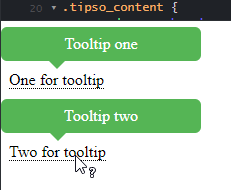
除了html之外,所有代码都与上面的showdev相同.
<span class="top tipso_style" data-tipso="Tooltip one">One for tooltip</span>
<br><br>
<br><br>
<span class="top tipso_style" data-tipso="Tooltip two">Two for tooltip></span>
编辑:
比如在https://jsfiddle.net/j4r3zybg/3/在let showing之后添加$tips.tipso('hide')怎么样?
let $this = $(this);
let showing = $this.hasClass('typso-showing');
$tips.tipso('hide')  // close all, prevent two showing
不,差不多。用户现在无法轻松地复制文本,而不需要在执行ctrl之前消失该工具提示。
https://stackoverflow.com/questions/61237126
复制相似问题
腾讯云开发者

Copyright © 2013 - 2026 Tencent Cloud. All Rights Reserved. 腾讯云 版权所有
深圳市腾讯计算机系统有限公司 ICP备案/许可证号:粤B2-20090059  粤公网安备44030502008569号
腾讯云计算(北京)有限责任公司 京ICP证150476号 | 京ICP备11018762号