
我在Firebase上的Vuetify SSR (通用)应用程序挂起
更新:我使用两个文件夹的方法:函数和src不工作。当firebase函数的文件夹位于src文件夹中时,我开始使用另一种方法。这种方法是由winzaa123用户:winzaa123 123/nuxt2 2-vuetify ssr-on-和我在Google上实现的。
我的步骤:从头开始准备项目
在src文件夹中创建一个Nuxt应用程序:
- 在src文件夹中使用
create-nuxt-app src创建一个Nuxt应用程序 - 选择包管理器Npm
- 选择UI框架Vuetify.js
- 选择渲染模式通用(SSR)
创建一个Firebase项目
- 使用
firebase init创建Firebase项目 - 选择Firebase宿主,Firebase函数,Firebase Firestore,Firebase存储,模拟器
- 使用公共目录?(公开)
- 配置为单页应用程序(y/N) -是的
在根文件夹中创建package.json文件
{
  "name": "test-nuxt",
  "version": "1.0.0",
  "description": "My fine Nuxt.js project",
  "author": "Alex Pilugin",
  "private": true,
  "scripts": {
    "postinstall": "cd functions && npm install",
    "dev": "cd src && npm run dev",
    "start": "cd src && npm run dev",
    "serve": "NODE_ENV=development firebase serve",
    "build": "cd src && npm run build",
    "build-deploy": "firebase deploy --only hosting,functions",
    "build-deployf": "firebase deploy --only functions",
    "build-deployh": "firebase deploy --only hosting"
  },
  "dependencies": {
    "nuxt": "^2.0.0"
  },
  "devDependencies": {
    "@nuxtjs/vuetify": "^1.0.0"
  }
}
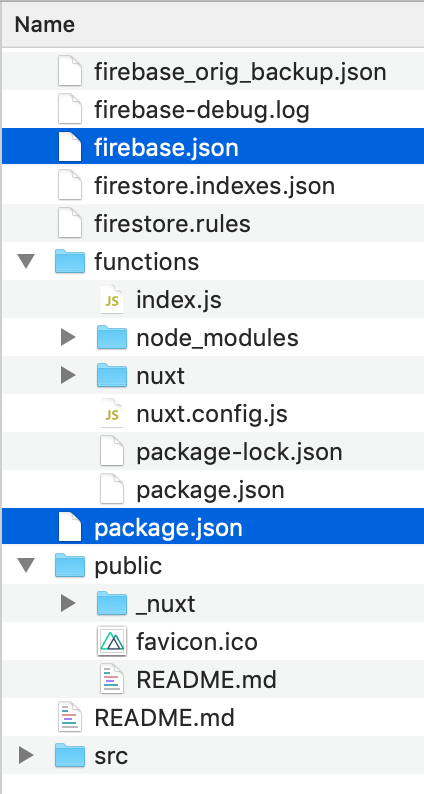
编辑firebase.json文件
{
  "functions": {
    "source": "functions",
    "predeploy": [
      "rm -rf functions/nuxt && npm --prefix src run build && mkdir -p functions/nuxt/dist && cp -r src/.nuxt/dist/ functions/nuxt/dist && cp src/nuxt.config.js functions/"
    ]
  },
  "hosting": {
    "public": "public",
    "predeploy": [
      "rm -rf public/* && mkdir -p public/_nuxt/ && cp -r functions/nuxt/dist/client/ public/_nuxt/ && cp -a src/static/. public/"
    ],
    "ignore": [
      "firebase.json",
      "**/.*",
      "**/node_modules/**"
    ],
    "rewrites": [
      {
        "source": "**",
        "function": "nuxtssr"
      }
    ]
  },
  "firestore": {
    "rules": "firestore.rules",
    "indexes": "firestore.indexes.json"
  },
  "storage": {
    "rules": "storage.rules"
  }
}您可以看到,我计划将src/.nuxt/dist/client的内容复制到public/_nuxt文件夹中。我是这么做的,因为我在src/.nuxt/dist/server/client.manifest.json里面找到了"publicPath": "/_nuxt/"
Nest步骤是编辑函数/index.js文件
const functions = require('firebase-functions');

const { Nuxt } = require("nuxt");
//const { Nuxt } = require("nuxt-start");

const config = {
  ssrLog: true,
  dev: true, // Don't start in dev mode.
  debug: true, //<----------------------- Debug logs
  buildDir: "nuxt",
  build: {
    //publicPath: ''
    //publicPath: '/_nuxt/',   //Default: '/_nuxt/' <-- content of .nuxt/dist/client
    /*
    ** You can extend webpack config here
    */
    extend ( config, { isDev, isClient, isServer } ) {
      if ( isServer ) {
        config.externals = {
          '@firebase/app': 'commonjs @firebase/app',
          '@firebase/firestore': 'commonjs @firebase/firestore',
          //etc...
        }
      }
    }
  }
}

const nuxt = new Nuxt(config);

let isReady = false;

async function handleRequest(req, res) {
  console.log("nuxtssr is running...");

  if (!isReady) {
    console.log("isReady: " + isReady);
    try {
      console.log("waiting for nuxt.ready().......");
      isReady = await nuxt.ready();
      console.log("nuxt is ready");
    } catch (error) {
      console.log("ERROR.....................");
      console.log(error);
      //throw new functions.https.HttpsError('error in Nuxt', error);
      process.exit(1);
    }
  }
  console.log("waiting for nuxt.render().......");

  /*
  * res.set('Cache-Control', 'public, max-age=1, s-maxage=1');
  * await nuxt.render(req, res);
  */

  res.set("Cache-Control", "public, max-age=300, s-maxage=600");
  return new Promise((resolve, reject) => {
    console.log("before nuxt.render......");
    nuxt.render(req, res, promise => {
      console.log("inside nuxt.render......");
      promise.then(resolve).catch(reject);
    });
  });
}

exports.nuxtssr = functions.https.onRequest(handleRequest);我使用$ npm start在本地启动应用程序:
Nuxt.js v2.12.2
Running in development mode (universal)
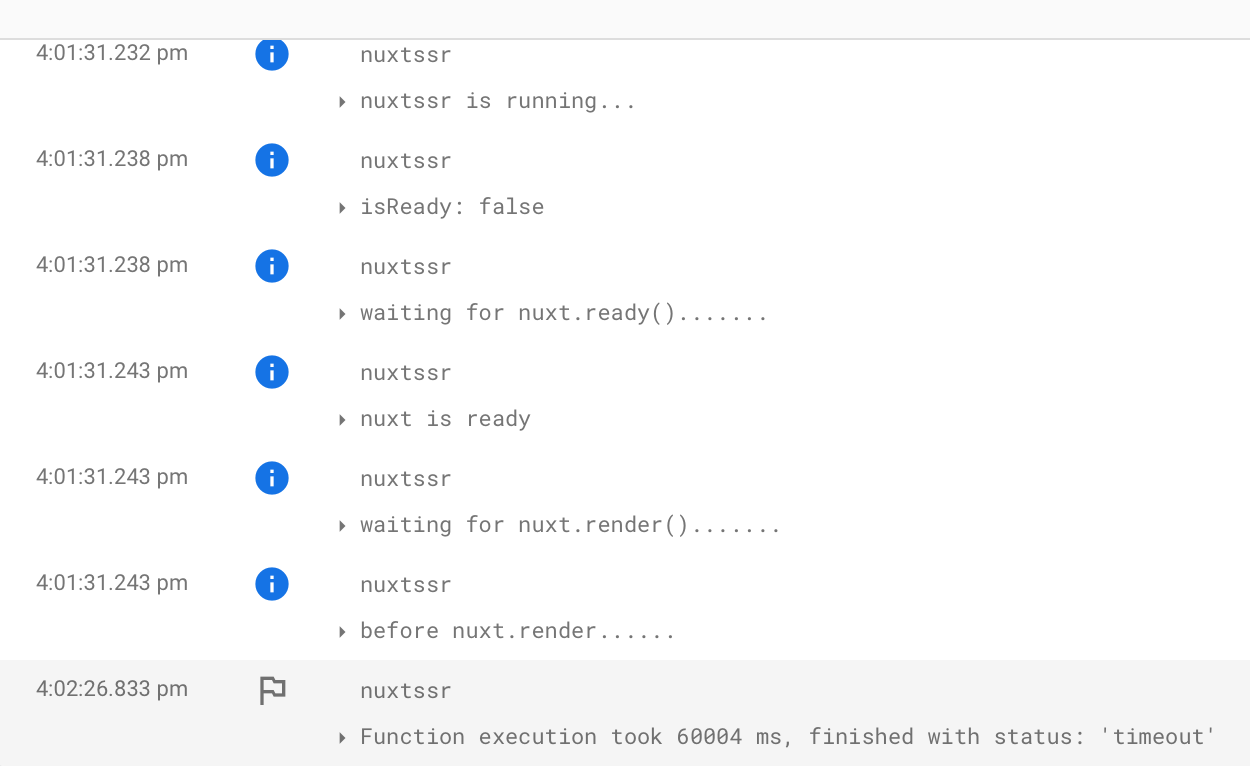
Listening on: http://localhost:3000/我使用$ firebase deploy命令部署应用程序,但看不到任何前端。我的申请要挂了。
回答 1
Stack Overflow用户
发布于 2020-04-15 19:19:53
据我所知,防火墙托管仅用于静态文件。如果您试图执行SSR,这意味着服务器正在运行,并且服务器端正在进行一些处理。您可能需要将其作为“无服务器”应用程序部署到Google函数中。举个例子,看看本教程。
尽管如此,我对Nuxt并不十分熟悉,但我可以看到,如果您部署到正确的位置,您可能需要做两件不同的事情。
首先,hosting.public属性在firebase.json中应该是指向包含已构建项目的文件夹的路径。由于您已经说过您的项目是在public/_nuxt中构建的,所以您可能需要更改此属性以匹配,即在firebase.json中
{
  ...
  "hosting": {
    "public": "public/_nuxt",
    ...
  },
  ...
}
值得注意的是,在常规(即非Nuxt) Vue项目中,项目是在dist/文件夹中构建的,所以在我的firebase.json文件中有"public": "dist"。尽管如此,我从未在firebase上主持过Nuxt项目,所以它的结构可能不是这样的。
其次,您可能需要在运行nuxt build或nuxt generate之前运行firebase deploy,以便将项目构建到目标目录中。firebase deploy命令实际上只是将文件上传到Google平台上的一种奇特的方式。
希望这能有所帮助!
https://stackoverflow.com/questions/61232143
复制相似问题
腾讯云开发者

Copyright © 2013 - 2026 Tencent Cloud. All Rights Reserved. 腾讯云 版权所有
深圳市腾讯计算机系统有限公司 ICP备案/许可证号:粤B2-20090059  粤公网安备44030502008569号
腾讯云计算(北京)有限责任公司 京ICP证150476号 | 京ICP备11018762号