
色端并排差在巨蟒中被打破
我正在尝试构建一个python应用程序,以快速生成在python中并行的颜色差异。我的问题是,我可以从linux并行生成,但是不管我尝试过什么命令破坏,python下的diffs都会失败(请参阅下面的尝试)。
如果我运行与linux的差异(在wsltty下),这是正确的行为。请注意,我从PuTTY获得了相同的输出:
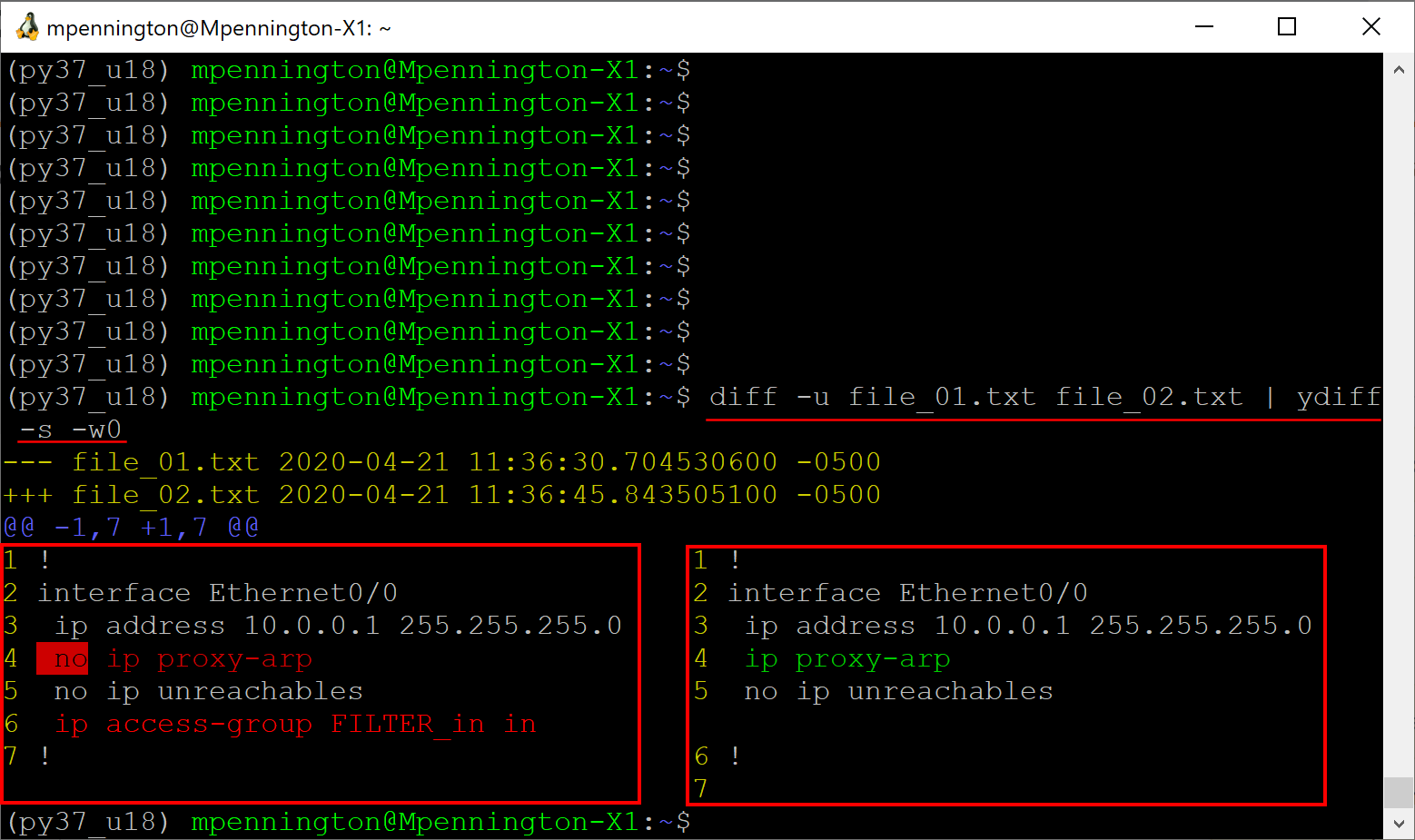
当我运行与python脚本的差异时,这是典型的不需要的行为..。
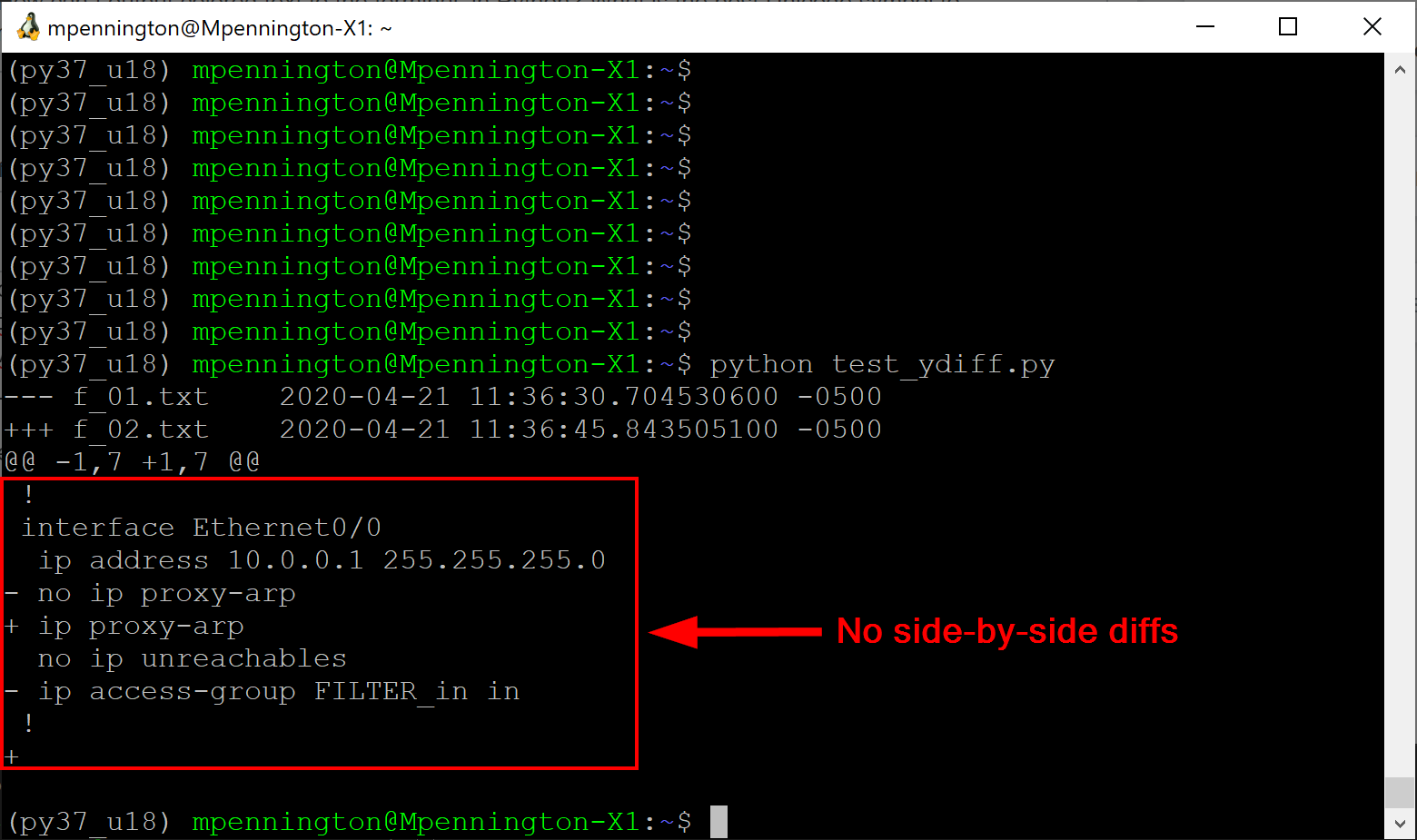
问题:
- 为什么下面的python尝试不能生成并行的差异?
- ,我能做什么(在python下)来呈现输出,就像我可以从CLI (上面的屏幕快照)?
。
下面的python脚本包含了我试图使python并行呈现的差异工作的尝试.总之,我尝试过多次尝试Popen(),以及subprocess.run()和os.system().
# filename: test_ydiff.py
from subprocess import run, Popen, PIPE
import shlex, os, pydoc

TEST_01 = True
TEST_02 = True
TEST_03 = True
if TEST_01:
    cmd_01_input   = "diff -u f_01.txt f_02.txt"
    cmd_01_output  = "ydiff -s"
    proc_01_input  = Popen(shlex.split(cmd_01_input),
                                    stdout=PIPE)
    proc_01_output = Popen(shlex.split(cmd_01_output),
        stdin=proc_01_input.stdout, stdout=PIPE)
    stdout_str, stdin_str = proc_01_output.communicate()
    print(stdout_str.decode('utf-8'))

if TEST_02:
    cmd_02_shell    = "diff -u f_01.txt f_02.txt | ydiff -s"
    proc_02_shell   = Popen(cmd_02_shell, shell=True, stdout=PIPE)
    stdout_str, stdin_str = proc_02_shell.communicate()
    print(stdout_str.decode('utf-8'))

if TEST_03:
    run("/usr/bin/diff -u ./f_01.txt ./f_02.txt|/home/mpennington/venv/py37_u18/bin/ydiff -s")
第一个要分发的文本文件:
# filename: f_01.txt
!
interface Ethernet0/0
 ip address 10.0.0.1 255.255.255.0
 no ip proxy-arp
 no ip unreachables
 ip access-group FILTER_in in
!
第二个待分发的文本文件:
# filename: f_02.txt
!
interface Ethernet0/0
 ip address 10.0.0.1 255.255.255.0
 ip proxy-arp
 no ip unreachables
!
我在Ubuntu 18下运行Python 3.7.6 .我有ydiff==1.1 (github:ydiff)
回答 2
Stack Overflow用户
发布于 2020-06-16 20:10:26
这是其中一个设置问题。当然,快速查看ydiff.py会显示它正在检查sys.stdout.isatty() (又名os.isatty(2)),并用来确定stdout是否通过管道传输到某个命令。然后,您可以决定剥离颜色格式,这就是ydiff对您所做的。
"diff -u f_01.txt f_02.txt | ydiff -s " --这是,而不是,在os.system调用期间通过管道传输到命令,但是,在任何subprocess命令中都是,因为您使用的是stdout=PIPE。
例如,如果您将测试脚本的输出管道传输到less,您将发现subprocess方法也将无法工作,因为您现在已经向测试的stdout添加了一个管道,从而使ydiff.py有了一个到less的管道。
好的无聊的部分结束:阅读ydiff.py的选项处理显示它有一个-颜色的选项,它这样解析。
if (opts.color == 'always' or
    (opts.color == 'auto' and sys.stdout.isatty())):
    markup_to_pager(stream, opts)
else:
    # pipe out stream untouched to make sure it is still a patch
    byte_output = (sys.stdout.buffer if hasattr(sys.stdout, 'buffer')
               else sys.stdout)
    for line in stream:
        byte_output.write(line)
因此,您可以将其添加到命令行以使其工作。
if TEST_02:
    cmd_02_shell    = "diff -u f_01.txt f_02.txt | ydiff -s --color='always'"
好的问题,尽管我喜欢ydiff.py的输出
小编辑这里:
不知道你是否意识到,但ydiff是一个可怕的显示git差异也。要想在你的回购部里试一试,就这么做。接受一个可选文件到diff。
$ ydiff -s [my_git_file] 如果你问我的话很酷。
Stack Overflow用户
发布于 2020-04-21 18:28:36
运行在os.system()下似乎至少修复了不同的颜色渲染.但我还没有弄明白为什么os.system()会修复它。
import os

TEST_04 = True
if TEST_04:
os.system("diff -u f_01.txt f_02.txt | ydiff -s")https://stackoverflow.com/questions/61350007
复制相似问题
腾讯云开发者

Copyright © 2013 - 2026 Tencent Cloud. All Rights Reserved. 腾讯云 版权所有
深圳市腾讯计算机系统有限公司 ICP备案/许可证号:粤B2-20090059  粤公网安备44030502008569号
腾讯云计算(北京)有限责任公司 京ICP证150476号 | 京ICP备11018762号