
如何绘制NSPopupButtonCell高亮图像
如何绘制NSPopupButtonCell高亮图像
提问于 2020-04-23 02:57:36
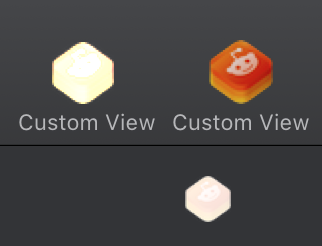
我有NSPopupButton内部的NSToolbar,有borderder = false,是有一些颜色烧伤混合时,突出显示。如果我使用bordered = true,图像将被绘制成很好的深色覆盖。
我试图用与bordered=true相同的方式绘制突出显示的状态。
PS: NSButtonCell和bordered = false一起工作。
我可以通过让bordered = true和重写drawBezel来实现这种行为,但是我想知道
我试过的事情:
- highlightsBy
- interiorBackgroundStyle
- setCellAttribute
-
class ToolbarPopUpButtonCell : NSPopUpButtonCell {

  override var isHighlighted: Bool {
      get { return true }
      set { super.isHighlighted = newValue }
  }

  override func drawImage(withFrame cellFrame: NSRect, in controlView: NSView) {
      super.drawImage(withFrame: cellFrame, in: controlView)
  }


  //used in case bordered = true so we do nothing
  override func drawBezel(withFrame frame: NSRect, in controlView: NSView) {

  }

  //doesn't work
  override var interiorBackgroundStyle: NSView.BackgroundStyle
      {
      return .raised
  }
}

  class ToolbarPopUpButton: NSPopUpButton {

  override func awakeFromNib() {
      cell?.setCellAttribute(.cellLightsByBackground, to: 1)
  }

  override var intrinsicContentSize: NSSize {
      return NSMakeSize(32 + 5, 32)
  }
}注意右边的图像,它适用于bordered = false (NSButtonCell)
回答 1
Stack Overflow用户
发布于 2020-04-23 06:52:59
我发现的唯一的黑客就是画一个地下细胞。仍在寻求更好的解决方案。
- (void)drawImageWithFrame:(NSRect)cellFrame inView:(NSView *)controlView
{
    NSImage *image = [self image];
    NSButtonCell *swapCell = [[NSButtonCell alloc] initImageCell:image];
    [swapCell setHighlighted:[self isHighlighted]];
    [swapCell drawImage:image withFrame:cellFrame inView:controlView];
}页面原文内容由Stack Overflow提供。腾讯云小微IT领域专用引擎提供翻译支持
原文链接:
https://stackoverflow.com/questions/61378583
复制相关文章
相似问题
腾讯云开发者

Copyright © 2013 - 2026 Tencent Cloud. All Rights Reserved. 腾讯云 版权所有
深圳市腾讯计算机系统有限公司 ICP备案/许可证号:粤B2-20090059  粤公网安备44030502008569号
腾讯云计算(北京)有限责任公司 京ICP证150476号 | 京ICP备11018762号