
Azure DevOps CI管道中$(DevOps)的替代
我有以下情况:
一个SQL项目,我在其中安装了nuget包。这个包(仅仅是一个PS脚本)负责解压缩DB所需的DACPACs,使用对相对于解决方案文件夹的路径的引用(查找包/和dacpacs/文件夹并浏览它从.sln文件中提取的项目)。这被称为预构建事件。
在构建整个解决方案时,将按预期定义$(SolutionDir) (本地和ADO)。
在构建测试项目时,$(SolutionDir)要么是‘,要么是’*‘未定义的*’。同样,正如预期的那样,因为msbuild在构建单个项目时不了解解决方案。我可以接受当地的警告,没问题。
问题是:在Azure DevOps中,有什么“神奇”的东西可以用来制作这个作品吗?
我可以尝试各种黑客,如果有人知道这样的方法,虽然我想要一个干净的解决方案。
迄今已尝试过:
1)添加以下PropertyGroup:
<PropertyGroup>
  <SolutionDir Condition="'$(SolutionDir)' == '' Or '$(SolutionDir)' == '*Undefined*'">.\</SolutionDir>
</PropertyGroup>
去测试项目。
2)以下建议:Prebuild event in Visual Studio replacing $(SolutionDir) with *Undefined*
没有效果。
回答 1
Stack Overflow用户
发布于 2020-04-24 09:33:44
如果您的文件夹结构类似于:
1. Azure Devops Repos包含解决方案文件夹(其中存在xx.sln文件)。
2.这些项目位于同一个解决方案文件夹下。
你可以试试我的剧本:
  <PropertyGroup>
    <ProjectFolder>$([System.IO.Directory]::GetParent($(ProjectDir)))</ProjectFolder>
    <MySolutionDir>$([System.IO.Directory]::GetParent($(ProjectFolder)))\</MySolutionDir>
</PropertyGroup>$(MySolutionDir)表示sln文件和项目文件夹存在的路径。和$(SolutionDir)一样,它也有\。所以它的格式看起来像SomePath\。
建议将我的脚本插入到PreBuild事件的脚本之上。类似于:
  <PropertyGroup>
    <ProjectFolder>$([System.IO.Directory]::GetParent($(ProjectDir)))</ProjectFolder>
    <MySolutionDir>$([System.IO.Directory]::GetParent($(ProjectFolder)))\</MySolutionDir>
    It's recommended to add my script and PreBuildEvent in same propertyGroup, and mine should be in the first.
    <PreBuildEvent>echo $(MySolutionDir)</PreBuildEvent>
  </PropertyGroup>
Edit1:
您还可以在此添加条件:
  <PropertyGroup>
    <ProjectFolder>$([System.IO.Directory]::GetParent($(ProjectDir)))</ProjectFolder>
    <MySolutionDir>$([System.IO.Directory]::GetParent($(ProjectFolder)))\</MySolutionDir>
    <SolutionDir Condition="xxxx">$(MySolutionDir)</SolutionDir>
    It's recommended to add my script and PreBuildEvent in same propertyGroup, and mine should be in the first.
    <PreBuildEvent>echo $(MySolutionDir)</PreBuildEvent>
  </PropertyGroup>
Edit2:
嗯,我现在可以在我这一边重复这个问题了。这是一种非常奇怪的行为,我不确定这一行为的根本原因。但是,一个快速的解决方法是创建一个新的PropertyGroup来插入我们的自定义脚本,而不是从默认模板将它插入到现有的PropertyGroup中:
它曾经是:
  ....
  <PropertyGroup>
    <VisualStudioVersion Condition="'$(VisualStudioVersion)' == ''">11.0</VisualStudioVersion>
    <!-- Default to the v11.0 targets path if the targets file for the current VS version is not found -->
    <SSDTExists Condition="Exists('$(MSBuildExtensionsPath)\Microsoft\VisualStudio\v$(VisualStudioVersion)\SSDT\Microsoft.Data.Tools.Schema.SqlTasks.targets')">True</SSDTExists>
    <VisualStudioVersion Condition="'$(SSDTExists)' == ''">11.0</VisualStudioVersion>
    <ProjectFolder>$([System.IO.Directory]::GetParent($'(ProjectDir)'))</ProjectFolder>
    <ParentFolder>$([System.IO.Directory]::GetParent($'(ProjectFolder)'))\</ParentFolder>
    <SolutionDir Condition=" '$(SolutionDir)' == '' Or '$(SolutionDir)' == '*Undefined*' ">$(ParentFolder)</SolutionDir>
    <PreBuildEvent>echo $(SolutionDir)</PreBuildEvent>
  </PropertyGroup>
  <Import Condition="'$(SQLDBExtensionsRefPath)' != ''" Project="$(SQLDBExtensionsRefPath)\Microsoft.Data.Tools.Schema.SqlTasks.targets" />
  <Import Condition="'$(SQLDBExtensionsRefPath)' == ''" Project="$(MSBuildExtensionsPath)\Microsoft\VisualStudio\v$(VisualStudioVersion)\SSDT\Microsoft.Data.Tools.Schema.SqlTasks.targets" />
  <ItemGroup>
    <Folder Include="Properties" />
  </ItemGroup>
  <ItemGroup>
    <Build Include="test.sql" />
  </ItemGroup>
  <PropertyGroup>
    <PreBuildEvent>echo $(SolutionDir)</PreBuildEvent>
  </PropertyGroup>
</Project>
现在改为:
  <PropertyGroup>
    <VisualStudioVersion Condition="'$(VisualStudioVersion)' == ''">11.0</VisualStudioVersion>
    <!-- Default to the v11.0 targets path if the targets file for the current VS version is not found -->
    <SSDTExists Condition="Exists('$(MSBuildExtensionsPath)\Microsoft\VisualStudio\v$(VisualStudioVersion)\SSDT\Microsoft.Data.Tools.Schema.SqlTasks.targets')">True</SSDTExists>
    <VisualStudioVersion Condition="'$(SSDTExists)' == ''">11.0</VisualStudioVersion>
  </PropertyGroup>
  <Import Condition="'$(SQLDBExtensionsRefPath)' != ''" Project="$(SQLDBExtensionsRefPath)\Microsoft.Data.Tools.Schema.SqlTasks.targets" />
  <Import Condition="'$(SQLDBExtensionsRefPath)' == ''" Project="$(MSBuildExtensionsPath)\Microsoft\VisualStudio\v$(VisualStudioVersion)\SSDT\Microsoft.Data.Tools.Schema.SqlTasks.targets" />
  <ItemGroup>
    <Folder Include="Properties" />
  </ItemGroup>
  <ItemGroup>
    <Build Include="test.sql" />
  </ItemGroup>
  <PropertyGroup>
    <ProjectFolder>$([System.IO.Directory]::GetParent($(ProjectDir)))</ProjectFolder>
    <ParentFolder>$([System.IO.Directory]::GetParent($(ProjectFolder)))\</ParentFolder>
    <SolutionDir Condition=" '$(SolutionDir)' == '' Or '$(SolutionDir)' == '*Undefined*' ">$(ParentFolder)</SolutionDir>
    <PreBuildEvent>echo $(SolutionDir)</PreBuildEvent>
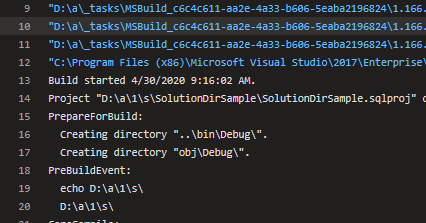
</PropertyGroup>另外,删除$(ProjectDir)中的额外$(ProjectDir)。它应该是$(ProjectDir)而不是$'(ProjectDir)'和$'(ProjectFolder)'。我还看到您有两个PreBuildEvent属性,只需将其保留在我们的自定义脚本中。在完成上述步骤之后,您的项目现在在我这边运行得很好:
https://stackoverflow.com/questions/61402896
复制相似问题
腾讯云开发者

Copyright © 2013 - 2026 Tencent Cloud. All Rights Reserved. 腾讯云 版权所有
深圳市腾讯计算机系统有限公司 ICP备案/许可证号:粤B2-20090059  粤公网安备44030502008569号
腾讯云计算(北京)有限责任公司 京ICP证150476号 | 京ICP备11018762号