
Vuetify.js v-数据表动态模板
Vuetify.js v-数据表动态模板
提问于 2020-04-25 10:00:32
在我的Vue.js项目中,我有一个v数据表。
如果单元格内容是true,我想用绿色check_circle图标替换。
为什么这段代码不起作用?
<template v-for="header in headers" v-slot:item[header.value]="{ item }">
    <v-icon v-if="item[header.value]" color="green">check_circle</v-icon>
</template>
现在的桌子是:
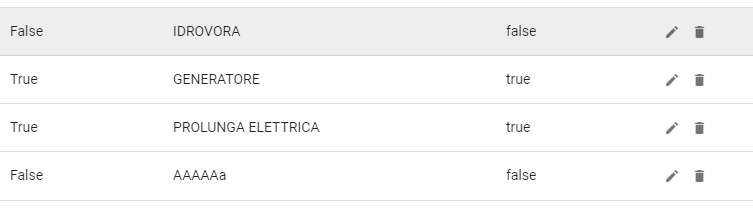
编辑1
<v-data-table
    :loading="loading"
    :headers="headers"
    :items="items"
    :items-per-page="items_per_page"
    :search="search"
    no-data-text="Non ci sono elementi"
    no-results-text="Non ci sono elementi filtrati"
    loading-text="Caricamento in corso..."
    :footer-props="footerProps"
    class="elevation-1">


    <template v-for="header in headers" v-slot:item[header.value]="{ item }">
        <v-icon v-if="item[header.value]" color="green">check_circle</v-icon>
        <v-icon v-else color="red">cancel</v-icon>
    </template>


    <template v-slot:item.actions="{ item }">
        <v-icon
            small
            class="mr-2"
            @click="editItem(item)"
        >mdi-pencil</v-icon>
        <v-icon
            small
            @click="deleteItem(item)"
        >mdi-delete</v-icon>
    </template>

    <template v-slot:top>
        <v-toolbar flat color="white">
            <v-spacer></v-spacer>
            <v-dialog v-model="dialog" max-width="500px">
                <template v-slot:activator="{ on }">
                    <v-btn color="primary" dark class="mb-2" @click="newItem" v-on="on">New Item</v-btn>
                </template>
                <v-card>
                    <v-card-title>
                        <span class="headline">{{ formTitle }}</span>
                    </v-card-title>

                    <v-card-text>
                        <v-container>
                            <!-- modifica elemento -->
                            <v-row v-if="editedIndex > -1">
                                <v-col v-for="(key,i) in keys_visible" :key="key" v-show="headers_visible[i].visible == true" cols="12" sm="6" md="4">
                                    <v-text-field v-if="headers_visible[i].type == 'varchar'" v-model="editedItem[key]" :label="headers_visible[i].text" :disabled="!headers_visible[i].editable"></v-text-field>
                                    <v-switch v-else-if="headers_visible[i].type == 'bit'" v-model="editedItem[key]" :label="headers_visible[i].text"></v-switch>
                                </v-col>
                            </v-row>
                        </v-container>
                    </v-card-text>

                    <v-card-actions>
                        <v-spacer></v-spacer>
                        <v-btn color="blue darken-1" text @click="close">Cancel</v-btn>
                        <v-btn color="blue darken-1" text @click="save">Save</v-btn>
                    </v-card-actions>
                </v-card>
            </v-dialog>
        </v-toolbar>
    </template>

    <template v-slot:no-data>
        <v-btn color="primary" @click="initialize">Reset</v-btn>
    </template>

</v-data-table>headers是这样的:
headers: [
        {
          text: 'Dessert (100g serving)',
          align: 'start',
          sortable: false,
          value: 'name',
        },
        { text: 'Calories', value: 'calories' },
        { text: 'Fat (g)', value: 'fat' },
        { text: 'Carbs (g)', value: 'carbs' },
        { text: 'Protein (g)', value: 'protein' },
        { text: 'Actions', value: 'actions', sortable: false },
]item是这样的:
item: {
        cleaned: true,
        name: '',
        usable: 0,
        ...
}回答 1
Stack Overflow用户
发布于 2020-04-25 12:10:24
要动态迭代所有项的头,需要使用body插槽.
   <template v-slot:body="{ items }">
      <tr v-for="idx in items">
        <td v-for="header in headers" class="text-left font-weight-black">
          <v-icon v-if="idx[header.value]" color="green">check_circle</v-icon>
        </td>
      </tr>
</template>演示:https://codeply.com/p/W0vKEyRGRO
另见:Vuetify Datatable - Enable content editing on all columns
页面原文内容由Stack Overflow提供。腾讯云小微IT领域专用引擎提供翻译支持
原文链接:
https://stackoverflow.com/questions/61423938
复制相关文章
相似问题
腾讯云开发者

Copyright © 2013 - 2026 Tencent Cloud. All Rights Reserved. 腾讯云 版权所有
深圳市腾讯计算机系统有限公司 ICP备案/许可证号:粤B2-20090059  粤公网安备44030502008569号
腾讯云计算(北京)有限责任公司 京ICP证150476号 | 京ICP备11018762号