
如何使用WinAPI调用从这个标签读取文本?
如何使用WinAPI调用从这个标签读取文本?
提问于 2020-04-29 19:49:27
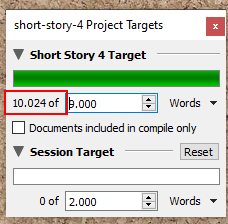
有一个窗口,我想从其中读取一个特定的文本(在下面的屏幕截图中的10.024)使用WinAPI调用。
这是这个窗口在Spy++中的样子:
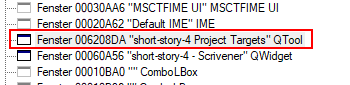
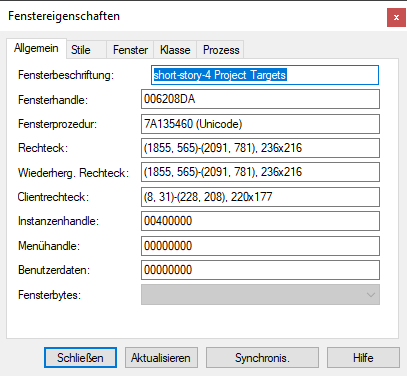
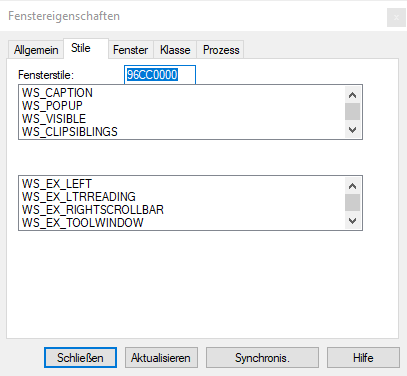
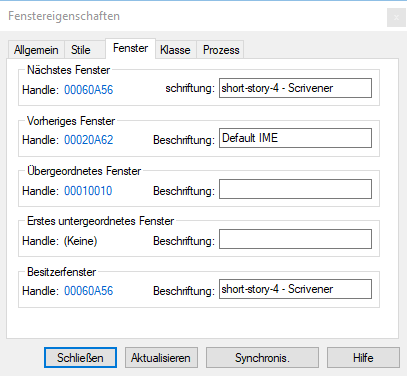
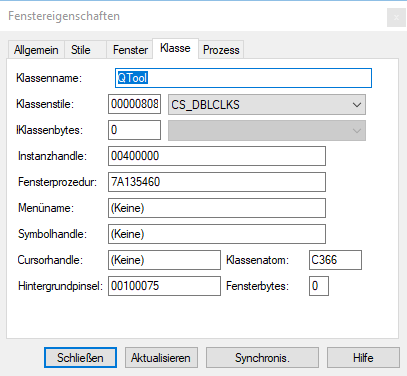
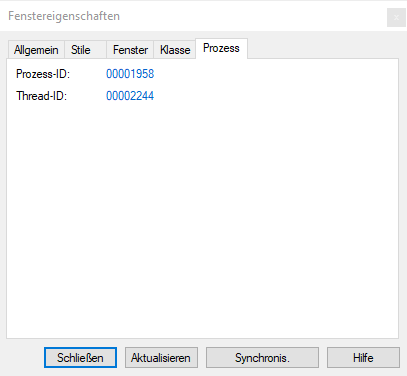
要从该标签读取值,首先确定窗口的句柄:
private TargetWindowInfo FindScrivenerWindow()
{
    IntPtr targetWindowHandle = new IntPtr(0);
    String windowTitle = "";
    Process[] scrivenerProcesses = Process.GetProcessesByName("scrivener");
    if (scrivenerProcesses.Length < 1)
    {
        return null; // Scrivener is not started
    }
    foreach (var handle in EnumerateProcessWindowHandles(scrivenerProcesses.First().Id))
    {
        StringBuilder message = new StringBuilder(1000);
        SendMessage(handle, WM_GETTEXT, message.Capacity, message);
        String curWindowTitle = message.ToString();

        if (curWindowTitle.EndsWith("Project Targets"))
        {
            bool windowVisible = IsWindowVisible(handle);

            if (windowVisible)
            {
                windowTitle = curWindowTitle;
                targetWindowHandle = handle;

                var result = new TargetWindowInfo();

                result.ProjectName = windowTitle.Substring(0, windowTitle.IndexOf(" Project Targets"));
                result.Handle = handle;
                return result;
            }

        }
    }
    return null;
}


var targetWindowInfo = FindScrivenerWindow();然后我尝试应用这个答案从窗口读取所有字符串,希望在其中找到所需的字符串(10.024) (targetWindowInfo.Handle是FindScrivenerWindow的结果):
List<WinText> windows = new List<WinText>();

//find the "first" window
IntPtr hWnd = targetWindowInfo.Handle;

while (hWnd != IntPtr.Zero)
{
    //find the control window that has the text
    IntPtr hEdit = FindWindowEx(hWnd, IntPtr.Zero, null, null);

    //initialize the buffer.  using a StringBuilder here
    System.Text.StringBuilder sb = new System.Text.StringBuilder(255);  // or length from call with GETTEXTLENGTH

    //get the text from the child control
    int RetVal = SendMessage(hEdit, WM_GETTEXT, sb.Capacity, sb);

    windows.Add(new WinText() { hWnd = hWnd, Text = sb.ToString() });

    //find the next window
    hWnd = FindWindowEx(IntPtr.Zero, hWnd, "scrivener", null);
}

//do something clever
windows.OrderBy(x => x.Text).ToList().ForEach(y => Console.Write("{0} = {1}\n", y.hWnd, y.Text));

Console.Write("\n\nFound {0} window(s).", windows.Count);windows总是有一个元素,文本是一个空字符串。
我怎样才能读出标签的价值?考虑到窗口的属性,有可能吗?
更新1: UI自动化检查标签的下列值:
How found:  Selected from tree...
Name:   ""
BoundingRectangle:  {l:1437 t:455 r:1484 b:475}
IsEnabled:  true
IsOffscreen:    false
IsKeyboardFocusable:    false
HasKeyboardFocus:   false
AccessKey:  ""
ProcessId:  6488
ProviderDescription:    "[pid:6488,providerId:0x0 Main(parent link):Microsoft: MSAA Proxy (unmanaged:uiautomationcore.dll)]"
IsPassword: false
HelpText:   ""
IsDialog:   false
LegacyIAccessible.ChildId:  0
LegacyIAccessible.DefaultAction:    "SetFocus"
LegacyIAccessible.Description:  ""
LegacyIAccessible.Help: ""
LegacyIAccessible.KeyboardShortcut: ""
LegacyIAccessible.Name: ""
LegacyIAccessible.Role: Client (0xA)
LegacyIAccessible.State:    normal (0x0)
LegacyIAccessible.Value:    ""
IsAnnotationPatternAvailable:   false
IsDragPatternAvailable: false
IsDockPatternAvailable: false
IsDropTargetPatternAvailable:   false
IsExpandCollapsePatternAvailable:   false
IsGridItemPatternAvailable: false
IsGridPatternAvailable: false
IsInvokePatternAvailable:   false
IsItemContainerPatternAvailable:    false
IsLegacyIAccessiblePatternAvailable:    true
IsMultipleViewPatternAvailable: false
IsObjectModelPatternAvailable:  false
IsRangeValuePatternAvailable:   false
IsScrollItemPatternAvailable:   false
IsScrollPatternAvailable:   false
IsSelectionItemPatternAvailable:    false
IsSelectionPatternAvailable:    false
IsSpreadsheetItemPatternAvailable:  false
IsSpreadsheetPatternAvailable:  false
IsStylesPatternAvailable:   false
IsSynchronizedInputPatternAvailable:    false
IsTableItemPatternAvailable:    false
IsTablePatternAvailable:    false
IsTextChildPatternAvailable:    false
IsTextEditPatternAvailable: false
IsTextPatternAvailable: false
IsTextPattern2Available:    false
IsTogglePatternAvailable:   false
IsTransformPatternAvailable:    false
IsTransform2PatternAvailable:   false
IsValuePatternAvailable:    false
IsVirtualizedItemPatternAvailable:  false
IsWindowPatternAvailable:   false
IsCustomNavigationPatternAvailable: false
IsSelectionPattern2Available:   false
FirstChild: [null]
LastChild:  [null]
Next:   ""
Previous:   ""
Other Props:    Object has no additional properties
Children:   Container has no children
Ancestors:  "short-story-4 Project Targets" Fenster
    "short-story-4 - Scrivener" Fenster
    "Desktop 1" Bereich
[ No Parent ]回答 1
Stack Overflow用户
回答已采纳
发布于 2020-05-12 09:32:06
如果不使用异国情调和昂贵的技术,比如DLL注入,就不可能阅读该领域的文本,这可能是过头了。简单地制作窗口的屏幕截图、裁剪图像的相关部分并在其上运行OCR要便宜得多。
页面原文内容由Stack Overflow提供。腾讯云小微IT领域专用引擎提供翻译支持
原文链接:
https://stackoverflow.com/questions/61510451
复制相关文章
相似问题
腾讯云开发者

Copyright © 2013 - 2026 Tencent Cloud. All Rights Reserved. 腾讯云 版权所有
深圳市腾讯计算机系统有限公司 ICP备案/许可证号:粤B2-20090059  粤公网安备44030502008569号
腾讯云计算(北京)有限责任公司 京ICP证150476号 | 京ICP备11018762号