
无法导入大猩猩/mux (github.com/ gorilla/mux @v1.7.4:在go.mod中显式要求,但在供应商/Modes.txt中未标记为显式)
在Go中,我正在尝试简单的数据库连接。我需要进口gorilla/mux,但我不能。
我用的是VS代码。在cd到我的项目目录之后,我创建了main.go并运行了go get -u github.com/gorilla/mux
这里是main.go
package main

import (
    "database/sql"
    "fmt"
    "github.com/gorilla/mux"
    _ "github.com/lib/pq"
)

const (
    host     = "localhost"
    port     = 3000
    user     = "postgres"
    password = "postgres"
    dbname   = "test1"
)

func main() {
    psqlInfo := fmt.Sprintf("host=%s port=%d user=%s "+
        "password=%s dbname=%s sslmode=disable",
        host, port, user, password, dbname)

    db, err := sql.Open("postgres", psqlInfo)
    if err != nil {
        panic(err)
    }
    defer db.Close()

    err = db.Ping()
    if err != nil {
      panic(err)
    }

    fmt.Println("Successfully connected!")
}[请注意,执行go get -u github.com/gorilla/mux终端后显示
C:\Go\src\github.com\IamFrost\go-rest-api>go get -v -u github.com/gorilla/mux
go: golang.org/x/text upgrade => v0.3.2
go: golang.org/x/crypto upgrade => v0.0.0-20200429183012-4b2356b1ed79
go: golang.org/x/sys upgrade => v0.0.0-20200430082407-1f5687305801
go: golang.org/x/net upgrade => v0.0.0-20200425230154-ff2c4b7c35a0
go: downloading golang.org/x/sys v0.0.0-20200430082407-1f5687305801
golang.org/x/sys/cpu
golang.org/x/crypto/chacha20poly1305
crypto/tls
]
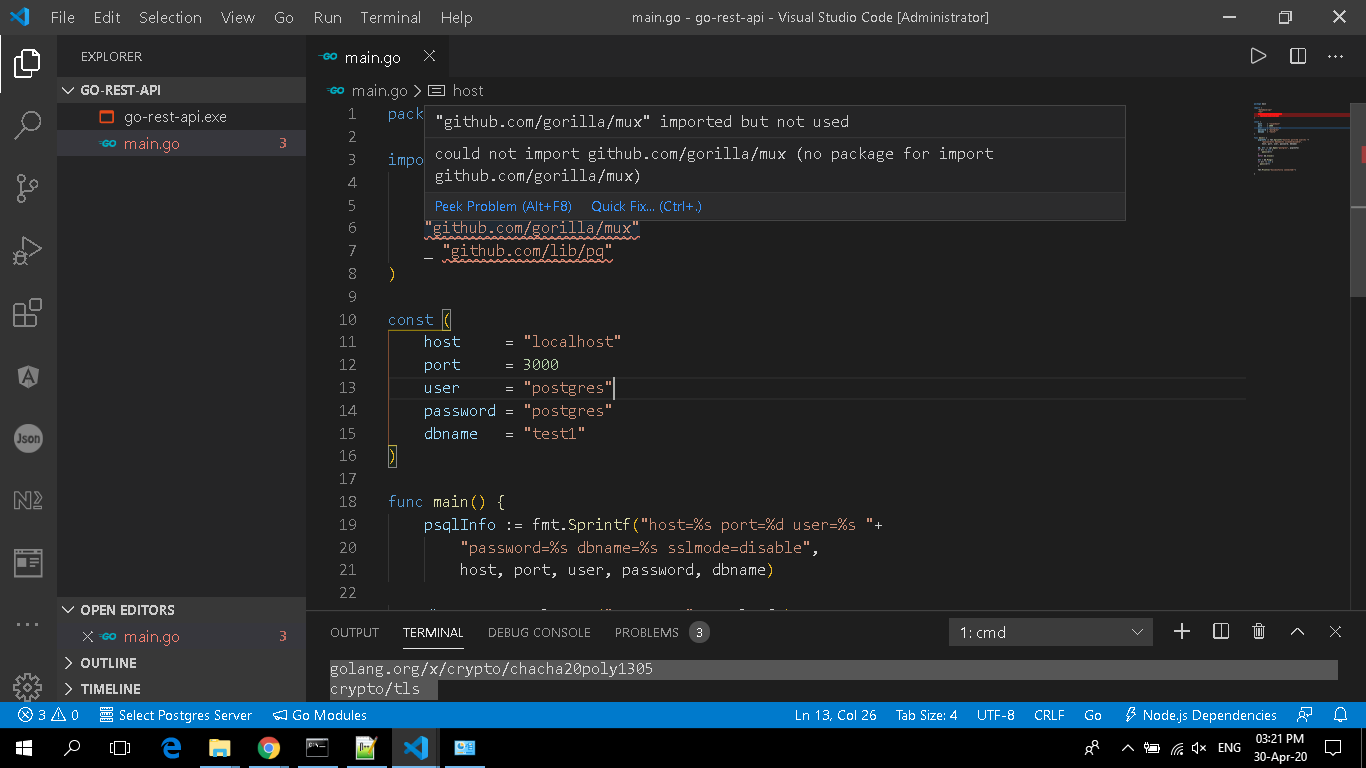
听着,我在迷你地图上没有其他语法错误。在红色标记下,当我放鼠标时,悬停的文字,对我来说很有趣:
1)imported but not used
但下一行
2)no package for import github.com/gorilla/mux)
哈哈,这不是违背了吗?
有人请解释一下为什么会发生这种情况
然而,
go build在终端中的应用
这是终点站:
C:\Go\src\github.com\IamFrost\go-rest-api>go build
go: inconsistent vendoring in C:\Go\src:
        github.com/gorilla/mux@v1.7.4: is explicitly required in go.mod, but not marked as explicit in vendor/modules.txt
        github.com/lib/pq@v1.4.0: is explicitly required in go.mod, but not marked as explicit in vendor/modules.txt
        golang.org/x/crypto@v0.0.0-20200429183012-4b2356b1ed79: is explicitly required in go.mod, but not marked as explicit in vendor/modules.txt
        golang.org/x/net@v0.0.0-20200425230154-ff2c4b7c35a0: is explicitly required in go.mod, but not marked as explicit in vendor/modules.txt
        golang.org/x/sys@v0.0.0-20200430082407-1f5687305801: is explicitly required in go.mod, but not marked as explicit in vendor/modules.txt
        golang.org/x/crypto@v0.0.0-20200128174031-69ecbb4d6d5d: is marked as explicit in vendor/modules.txt, but not explicitly required in go.mod
        golang.org/x/net@v0.0.0-20191126235420-ef20fe5d7933: is marked as explicit in vendor/modules.txt, but not explicitly required in go.mod
        golang.org/x/sys@v0.0.0-20200201011859-915c9c3d4ccf: is marked as explicit in vendor/modules.txt, but not explicitly required in go.mod

run 'go mod vendor' to sync, or use -mod=mod or -mod=readonly to ignore the vendor directory
注:我也做了“去模式供应商”,但没有改变。
有人告诉我为什么我不能导入gorilla/mux或pq。
我还能做什么?
(请解释一下这是什么意思?is explicitly required in go.mod, but not marked as explicit in vendor/modules.txt)
回答 4
Stack Overflow用户
发布于 2020-05-12 15:58:07
我不知道为什么会起作用(我是初学者)。我在网上发现了一些东西,不知怎么起作用了。以下是如何:
1)这是我的go目录C:\Go\。但是我在桌面文件夹中创建了这个项目。
2)然后在C:\Go\src (这是精确的文件夹C:\Go\src\github.com\ github_username\ project_name )下重新创建了该项目。
3)然后我在main.go粘贴了所有的代码
4)最终从终端go mod vendor
5)然后是go build
6)然后是go run main.go
7)它终于起作用了
我想知道它为什么会起作用。我非常感谢你的评论:为什么他们强迫我进入C:\Go\src。我已经在环境变量中设置了GOPATH C:\Go\,GOBIN C:\Go\bin。
Stack Overflow用户
发布于 2021-04-21 11:57:06
以下是我为自己修复的方法:
go get ./...
go mod vendor如果您的Go版本小于1.13,那么您应该在上面的命令中添加GO111MODULE=on。
Stack Overflow用户
发布于 2020-10-22 03:42:56
在最近发布的Golang (我认为是1.11以后)中,GOPATH变量发生了变化。我的理解是,如果GOPATH不会是$HOME/go,你只需要设置这个。
Go在$HOME/go/src/中查找项目,例如,我的Golang项目位于$Home/go/src/github.com/< your _github_userid>`目录中,等等。
如果要使用项目的不同位置,仍然可以将GOPATH设置为不同的目录。
我的shell文件包含以下内容,可以同时容纳一组和不设置的GOPATH。
出口PATH="$PATH:$(go env GOPATH)/bin“
您可以在GOPATH环境文档上获得更多信息。
https://stackoverflow.com/questions/61520388
复制相似问题
腾讯云开发者

Copyright © 2013 - 2026 Tencent Cloud. All Rights Reserved. 腾讯云 版权所有
深圳市腾讯计算机系统有限公司 ICP备案/许可证号:粤B2-20090059  粤公网安备44030502008569号
腾讯云计算(北京)有限责任公司 京ICP证150476号 | 京ICP备11018762号