
如何在YCbCr模式下正确读取图像?
如何在YCbCr模式下正确读取图像?
提问于 2020-05-03 03:45:47
如何知道是否正确读取了YCbCr模式下的PNG图像?我得到不同的像素值,这是令人困惑的。
def convert_rgb_to_ycbcr(img):
    y = 16. + (64.738 * img[:, :, 0] + 129.057 * img[:, :, 1] + 25.064 * img[:, :, 2]) / 255.
    cb = 128. + (-37.945 * img[:, :, 0] - 74.494 * img[:, :, 1] + 112.439 * img[:, :, 2]) / 255.
    cr = 128. + (112.439 * img[:, :, 0] - 94.154 * img[:, :, 1] - 18.285 * img[:, :, 2]) / 255.
    return np.array([y, cb, cr]).transpose([1, 2, 0])


# method 1 - read as YCbCr directly
img = scipy.misc.imread(path, mode='YCbCr').astype(np.float)
print(img[0, :5, 0])
# returns [32. 45. 68. 78. 92.]

# method 2 - read as RGB and convert RGB to YCbCr
img = scipy.misc.imread(path, mode='RGB').astype(np.float)
img = convert_rgb_to_ycbcr(img)
print(img[0, :5, 0])
# returns[44.0082902  55.04281961 75.1105098  83.57022745 95.44837255]
我想使用方法1,因为code已经为我处理了转换,但是我找不到它的源代码。所以我自己定义了转换函数,但是得到了不同的像素值。
回答 1
Stack Overflow用户
回答已采纳
发布于 2020-05-03 04:27:13
在最新的枕版本中,不推荐使用imread。然而,它使用Image.convert从PIL转换模式。
详细信息:
https://pillow.readthedocs.io/en/3.1.x/handbook/concepts.html#concept-modes
https://github.com/scipy/scipy/blob/v0.18.0/scipy/misc/pilutil.py#L103-L155
我更改了您的convert_rgb_to_ycbcr(img)函数,它给出了相同的结果。
Conversion formula from RGB to YCbCr
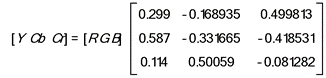

import scipy.misc # scipy 1.1.0
import numpy as np

def convert_rgb_to_ycbcr(im):
    xform = np.array([[.299, .587, .114], [-.1687, -.3313, .5], [.5, -.4187, -.0813]])
    ycbcr = im.dot(xform.T)
    ycbcr[:,:,[1,2]] += 128
    return np.uint8(ycbcr)


# method 1 - read as YCbCr directly
img = scipy.misc.imread('test.jpg', mode='YCbCr').astype(np.float)
print(img[0, :5, 0])
# returns [32. 45. 68. 78. 92.]

# method 2 - read as RGB and convert RGB to YCbCr
img = scipy.misc.imread('test.jpg', mode='RGB').astype(np.float)
img = convert_rgb_to_ycbcr(img)
print(img[0, :5, 0]) [165. 165. 165. 166. 167.]
[165 165 165 166 167]页面原文内容由Stack Overflow提供。腾讯云小微IT领域专用引擎提供翻译支持
原文链接:
https://stackoverflow.com/questions/61569397
复制相关文章
相似问题
腾讯云开发者

Copyright © 2013 - 2026 Tencent Cloud. All Rights Reserved. 腾讯云 版权所有
深圳市腾讯计算机系统有限公司 ICP备案/许可证号:粤B2-20090059  粤公网安备44030502008569号
腾讯云计算(北京)有限责任公司 京ICP证150476号 | 京ICP备11018762号