
如何以编程方式改变C#中的图片压缩?
如何以编程方式改变C#中的图片压缩?
提问于 2020-05-04 11:28:06
如何编程在C#?中使用MS Office 2016
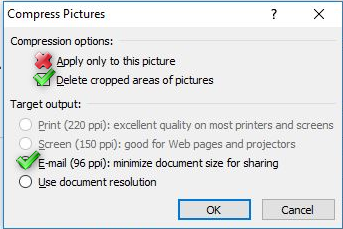
。
要插入图像,我使用以下代码:
        DialogResult result;
        OpenFileDialog ofd = new OpenFileDialog();
        ofd.Title = "Choose image file";
        result = ofd.ShowDialog();

        if (result == DialogResult.OK)
        {
            //GetInstance().ActiveSheet.Shapes.AddPicture(ofd.FileName, MsoTriState.msoFalse, MsoTriState.msoCTrue, 10, 10, -1, -1);
            GetInstance().ActiveSheet.Shapes.AddPicture2(ofd.FileName, MsoTriState.msoFalse, MsoTriState.msoCTrue, 10, 10, -1, -1, 1);
            Excel.Shape newShape = GetInstance().ActiveSheet.Shapes.Item(GetInstance().ActiveSheet.Shapes.Count);
            newShape.ZOrder(MsoZOrderCmd.msoSendToBack);
            newShape.Placement = Excel.XlPlacement.xlMoveAndSize;
        }
然后我有我的形象作为形状。也许有一种方法可以对形状进行图像压缩?
回答 1
Stack Overflow用户
发布于 2020-05-04 13:37:58
有几种方法可以完成这项工作:
- 在这里输入链接描述提供了最后一个参数
compress,它允许指定插入时是否应该压缩图片。您可以使用以下值:
- `msoPictureCompressDocDefault` - The picture is compressed or not depending on the settings for the document.
- `msoPictureCompressFalse`    -   The picture is not compressed.
- `msoPictureCompressTrue` -   The picture will be compressed.
- 在将图像添加到.net文档之前,可以使用Excel类缩小图像大小:
/// <summary>
/// Resize the image to the specified width and height.
/// </summary>
/// <param name="image">The image to resize.</param>
/// <param name="width">The width to resize to.</param>
/// <param name="height">The height to resize to.</param>
/// <returns>The resized image.</returns>
public static Bitmap ResizeImage(Image image, int width, int height)
{
    var destRect = new Rectangle(0, 0, width, height);
    var destImage = new Bitmap(width, height);

    destImage.SetResolution(image.HorizontalResolution, image.VerticalResolution);

    using (var graphics = Graphics.FromImage(destImage))
    {
        graphics.CompositingMode = CompositingMode.SourceCopy;
        graphics.CompositingQuality = CompositingQuality.HighQuality;
        graphics.InterpolationMode = InterpolationMode.HighQualityBicubic;
        graphics.SmoothingMode = SmoothingMode.HighQuality;
        graphics.PixelOffsetMode = PixelOffsetMode.HighQuality;

        using (var wrapMode = new ImageAttributes())
        {
            wrapMode.SetWrapMode(WrapMode.TileFlipXY);
            graphics.DrawImage(image, destRect, 0, 0, image.Width,image.Height, GraphicsUnit.Pixel, wrapMode);
        }
    }

    return destImage;
}
您可能会发现更多的方法和信息:
页面原文内容由Stack Overflow提供。腾讯云小微IT领域专用引擎提供翻译支持
原文链接:
https://stackoverflow.com/questions/61591152
复制相关文章
相似问题
腾讯云开发者

Copyright © 2013 - 2026 Tencent Cloud. All Rights Reserved. 腾讯云 版权所有
深圳市腾讯计算机系统有限公司 ICP备案/许可证号:粤B2-20090059  粤公网安备44030502008569号
腾讯云计算(北京)有限责任公司 京ICP证150476号 | 京ICP备11018762号