
google部署无法执行编辑插入调用,错误: Post https://www.googleapis.com/androidpublisher/v3/applications/
我一直在尝试这个部署到google (https://www.bitrise.io/integrations/steps/google-play-deploy)的教程,但没有成功。
在某种程度上,我得到了一个错误Failed to perform edit insert call, error: Post https://www.googleapis.com/androidpublisher/v3/applications/org.aacctt.[REDACTED]/edits?alt=json&prettyPrint=false: metadata: GCE metadata "instance/service-accounts/default/token?scopes=https%3A%2F%2Fwww.googleapis.com%2Fauth%2Fandroidpublisher" not defined
已经试图找出令牌作用域的问题,但没有发现任何有用的东西。知道有什么不对劲吗?
原木碎片:
+------------------------------------------------------------------------------+

| (9) google-play-deploy@3                                                     |
+------------------------------------------------------------------------------+
| id: google-play-deploy                                                       |
| version: 3.0.2                                                               |
| collection: https://github.com/bitrise-io/bitrise-steplib.git                |
| toolkit: go                                                                  |
| time: 2020-05-04T17:39:34Z                                                   |
+------------------------------------------------------------------------------+
|                                                                              |
Getting configuration
Configs:
- JSONKeyPath: *****
- PackageName: org.aacctt.[REDACTED]
- AppPath: /bitrise/deploy/app-release-bitrise-signed.apk\n
- ExpansionfilePath:
- Track: internal
- UserFraction: 0
- WhatsnewsDir:
- MappingFile:
Found .apk file: /bitrise/deploy/app-release-bitrise-signed.apk
Configuration read successfully
Authenticating
Authenticated client created
Create new edit
Failed to perform edit insert call, error: Post https://www.googleapis.com/androidpublisher/v3/applications/org.aacctt.[REDACTED]/edits?alt=json&prettyPrint=false: metadata: GCE metadata "instance/service-accounts/default/token?scopes=https%3A%2F%2Fwww.googleapis.com%2Fauth%2Fandroidpublisher" not defined
|                                                                              |
+---+---------------------------------------------------------------+----------+
| x | google-play-deploy@3 (exit code: 1)                           | 12.45 sec|
+---+---------------------------------------------------------------+----------+
| Issue tracker: https://github.com/bitrise-io/steps-google-play-deploy/issues |
| Source: https://github.com/bitrise-io/steps-google-play-deploy               |
+---+---------------------------------------------------------------+----------+回答 2
Stack Overflow用户
发布于 2020-07-17 09:40:11
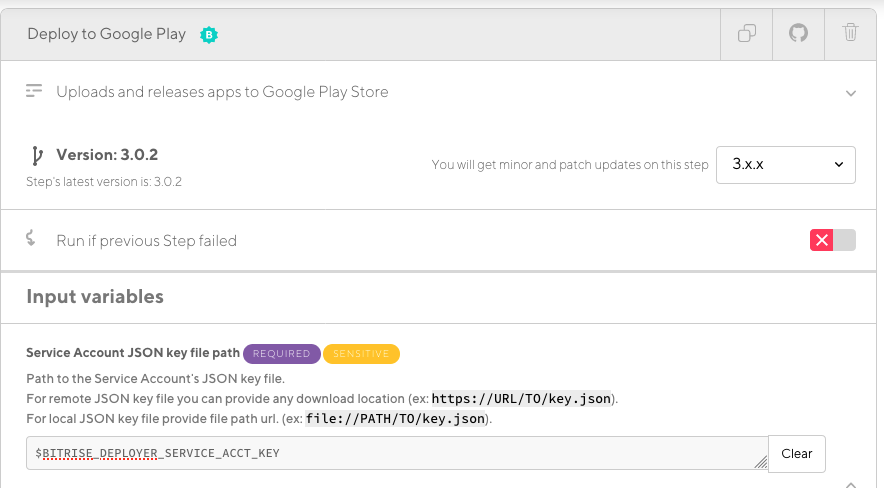
我也经历了这个错误,结果是对于我的情况,我没有设置Play Store服务帐户密钥文件路径的正确路径。服务帐户需要对进入Play Store控制台的Bitrise进行身份验证。
解决方案是将BITRISE_DEPLOYER_SERVICE_ACCT_KEY env的值设置为包含json的有效URL。一种方法是将帐户密钥直接上传到Bitrise (到Code选项卡下的区域),并在工作流的“”步骤中引用结果URL。
我想您还可以将json文件存储在GCS这样的安全环境中,并将env var设置为文件URL
Stack Overflow用户
发布于 2021-04-02 13:34:36
提示:如果@kip2 2的答案不起作用:尝试一个预定的错误路径,首先验证是否发生了相同的错误。
如果这不是问题所在呢?创建一个新的服务帐户并授予对它的正确访问权限。对我们来说,这条线出了问题:
填写授予用户访问此服务帐户的服务帐户用户角色和服务帐户管理员角色字段
因为我们从Fastlane迁移到Bitrise,而Fastlane不需要Service account admins权限(我不知道Bitrise为什么会这么做)。
然后再次授予play存储中的访问权限,并授予帐户admin permission,以确保权限配置中没有任何问题。
https://stackoverflow.com/questions/61599046
复制相似问题
腾讯云开发者

Copyright © 2013 - 2026 Tencent Cloud. All Rights Reserved. 腾讯云 版权所有
深圳市腾讯计算机系统有限公司 ICP备案/许可证号:粤B2-20090059  粤公网安备44030502008569号
腾讯云计算(北京)有限责任公司 京ICP证150476号 | 京ICP备11018762号