
NativeScript - ios如何在键盘出现时调整视图
我正在用NativeScript 6.4.1和角8构建一个应用程序。
我一直在使用Android,如果我们在'android:windowSoftInputMode="adjustResize"'文件中设置了AndroidManifest,如果键盘打开:How to adjust layout when soft keyboard appears,布局就会调整。
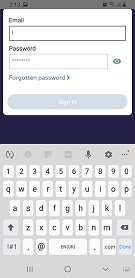
我已经提供了我的示例代码。我有一个带有文本字段的登录页面。当键盘出现时,我想要压缩视图。
参见图片以获得所需的结果
我更改了AndroidManifest文件:https://github.com/NativeScript/NativeScript/issues/5088#issuecomment-353394591
并侦听示例代码中看到的页面事件layoutChanged事件。
它对Android很有用。
我的问题:是否存在与iOS类似的行为?
以下是我为iOS所做的研究:
我尝试使用这个强烈推荐的插件:https://www.npmjs.com/package/nativescript-iqkeyboardmanager
虽然它阻止键盘覆盖文本字段,但它无助于压缩我的视图。
https://developer.apple.com/documentation/uikit/uikeyboarddidshownotification?language=objc

https://github.com/NativeScript/NativeScript/issues/2907

https://stackoverflow.com/questions/26070242/move-view-with-keyboard-using-swift
有许多键盘事件,我们可以听和响应。
例如:
UIKeyboardWillShowNotification
Posted immediately prior to the display of the keyboard.

UIKeyboardDidShowNotification
Posted immediately after the display of the keyboard.

UIKeyboardWillHideNotification
Posted immediately prior to the dismissal of the keyboard.

UIKeyboardDidHideNotification
Posted immediately after the dismissal of the keyboard.

UIKeyboardWillChangeFrameNotification
Posted immediately prior to a change in the keyboard’s frame.

UIKeyboardDidChangeFrameNotification
Posted immediately after a change in the keyboard’s frame.

UIKeyboardAnimationDurationUserInfoKey
UIKeyboardIsLocalUserInfoKey
UIKeyboardCenterBeginUserInfoKey
UIKeyboardFrameEndUserInfoKey
这将允许我在键盘显示和隐藏时设置一个布尔值,就像我在示例代码中所做的那样。我可以隐藏图像等等。
然而,它并没有像Android那样压缩布局。
我在这里读到了一些其他的答案,它们也推荐监听键盘事件:How to show complete List when keyboard is showing up in SwiftUI
当键盘显示时,我如何压缩布局?
下面是我的示例代码的存储库:
https://github.com/aubrey-fowler/KeyBoardHelp

回答 1
Stack Overflow用户
发布于 2020-05-05 14:54:05
IQKeyboardManager不改变任何视图的帧大小,而是使用位置偏移量。
我还没有对其进行测试,但理论上可以通过添加一个侦听视图移动的回调来做到这一点。它可能不会很好地发挥视图抵消业务,它可能会造成不稳定的看法。
import { isIOS } from 'tns-core-modules/platform/platform';
if (isIOS) {
    IQKeyboardManager.sharedManager().movedDistanceChanged = (delta: number) => {
        console.log(`IQKeyboardManager (moved distance): ${delta}`);
    };
}请记住添加到您的references.d.ts中以获得IQKeyboardManager类定义:
/// <reference path="./node_modules/nativescript-iqkeyboardmanager/index.d.ts" />https://stackoverflow.com/questions/61615485
复制相似问题
腾讯云开发者

Copyright © 2013 - 2026 Tencent Cloud. All Rights Reserved. 腾讯云 版权所有
深圳市腾讯计算机系统有限公司 ICP备案/许可证号:粤B2-20090059  粤公网安备44030502008569号
腾讯云计算(北京)有限责任公司 京ICP证150476号 | 京ICP备11018762号