
与使用CSS对齐按钮的斗争
与使用CSS对齐按钮的斗争
提问于 2020-05-05 20:34:01
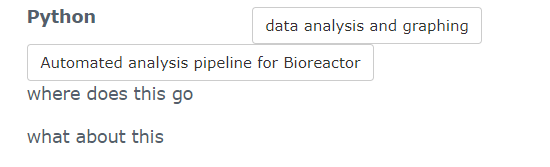
我想对两个按钮的数据分析和图形绘制和自动分析管道的生物反应器。
有关完整代码,请参见此处:https://github.com/Betaglutamate/online-cv/blob/master/_includes/skills.html
/*
 * Template Name: Orbit - Responsive Resume/CV Template for Developers
 * Version: 1.0
 * Author: Xiaoying Riley
 * Twitter: @3rdwave_themes
 * License: Creative Commons Attribution 3.0 License
 * Website: http://themes.3rdwavemedia.com/
*/


/* styles.css */


/* ======= Base ======= */

body {
  font-family: 'Roboto', sans-serif;
  color: #545E6C;
  background: #f5f5f5;
  font-size: 14px;
  padding: 30px;
  -webkit-font-smoothing: antialiased;
  -moz-osx-font-smoothing: grayscale;
}

h1,
h2,
h3,
h4,
h5,
h6 {
  font-weight: 700;
}

a {
  color: #2d7788;
  -webkit-transition: all 0.4s ease-in-out;
  -moz-transition: all 0.4s ease-in-out;
  -ms-transition: all 0.4s ease-in-out;
  -o-transition: all 0.4s ease-in-out;
}

a:hover {
  text-decoration: underline;
  color: #1a454f;
}

a:focus {
  text-decoration: none;
}

p {
  line-height: 1.5;
}

.wrapper {
  background: #42A8C0;
  max-width: 960px;
  margin: 0 auto;
  position: relative;
  -webkit-box-shadow: 0px 2px 4px rgba(0, 0, 0, 0.1);
  -moz-box-shadow: 0px 2px 4px rgba(0, 0, 0, 0.1);
  box-shadow: 0px 2px 4px rgba(0, 0, 0, 0.1);
}

.sidebar-wrapper {
  background: #42A8C0;
  position: absolute;
  right: 0;
  width: 240px;
  height: 100%;
  min-height: 800px;
  color: #fff;
}

.contact-info {
  font-size: 13px;
}

.container {
  display: inline;
  /* or inline-flex */
  padding: 0em;
}

.sidebar-wrapper a {
  color: #fff;
}

.sidebar-wrapper .profile-container {
  padding: 30px;
  background: rgba(0, 0, 0, 0.2);
  text-align: center;
  color: #fff;
}

.sidebar-wrapper .name {
  font-size: 32px;
  font-weight: 900;
  margin-top: 0;
  margin-bottom: 10px;
}

.sidebar-wrapper .tagline {
  color: rgba(255, 255, 255, 0.6);
  font-size: 16px;
  font-weight: 400;
  margin-top: 0;
  margin-bottom: 0;
}

.sidebar-wrapper .profile {
  margin-bottom: 15px;
}

.sidebar-wrapper .contact-list .fa {
  margin-right: 5px;
  font-size: 18px;
  vertical-align: middle;
}

.sidebar-wrapper .contact-list li {
  margin-bottom: 15px;
}

.sidebar-wrapper .contact-list li:last-child {
  margin-bottom: 0;
}

.sidebar-wrapper .contact-list .email .fa {
  font-size: 14px;
}

.sidebar-wrapper .container-block {
  padding: 30px;
}

.sidebar-wrapper .container-block-title {
  text-transform: uppercase;
  font-size: 16px;
  font-weight: 700;
  margin-top: 0;
  margin-bottom: 15px;
}

.sidebar-wrapper .degree {
  font-size: 14px;
  margin-top: 0;
  margin-bottom: 5px;
}

.sidebar-wrapper .education-container .item {
  margin-bottom: 15px;
}

.sidebar-wrapper .education-container .item:last-child {
  margin-bottom: 0;
}

.sidebar-wrapper .education-container .meta {
  color: rgba(255, 255, 255, 0.6);
  font-weight: 500;
  margin-bottom: 0px;
  margin-top: 0;
}

.sidebar-wrapper .education-container .time {
  color: rgba(255, 255, 255, 0.6);
  font-weight: 500;
  margin-bottom: 0px;
}

.sidebar-wrapper .languages-container .lang-desc {
  color: rgba(255, 255, 255, 0.6);
}

.sidebar-wrapper .languages-list {
  margin-bottom: 0;
}

.sidebar-wrapper .languages-list li {
  margin-bottom: 10px;
}

.sidebar-wrapper .languages-list li:last-child {
  margin-bottom: 0;
}

.sidebar-wrapper .interests-list {
  margin-bottom: 0;
}

.sidebar-wrapper .interests-list li {
  margin-bottom: 10px;
}

.sidebar-wrapper .interests-list li:last-child {
  margin-bottom: 0;
}

.main-wrapper {
  background: #fff;
  padding: 60px;
  padding-right: 300px;
}

.main-wrapper .section-title {
  text-transform: uppercase;
  font-size: 20px;
  font-weight: 500;
  color: #2d7788;
  position: relative;
  margin-top: 0;
  margin-bottom: 20px;
}

.main-wrapper .section-title .fa {
  width: 30px;
  height: 30px;
  margin-right: 8px;
  display: inline-block;
  color: #fff;
  -webkit-border-radius: 50%;
  -moz-border-radius: 50%;
  -ms-border-radius: 50%;
  -o-border-radius: 50%;
  border-radius: 50%;
  -moz-background-clip: padding;
  -webkit-background-clip: padding-box;
  background-clip: padding-box;
  background: #2d7788;
  text-align: center;
  padding-top: 8px;
  font-size: 16px;
  position: relative;
  top: -2px;
}

.main-wrapper .section {
  margin-bottom: 60px;
}

.main-wrapper .experiences-section .item {
  margin-bottom: 30px;
}

.main-wrapper .upper-row {
  position: relative;
  overflow: hidden;
  margin-bottom: 2px;
}

.main-wrapper .job-title {
  color: #3F4650;
  font-size: 16px;
  margin-top: 0;
  margin-bottom: 0;
  font-weight: 500;
}

.main-wrapper .time {
  position: absolute;
  right: 0;
  top: 0;
  color: #97AAC3;
}

.main-wrapper .company {
  margin-bottom: 10px;
  color: #97AAC3;
}

.main-wrapper .project-title {
  font-size: 16px;
  font-weight: 400;
  margin-top: 0;
  margin-bottom: 5px;
}

.main-wrapper .projects-section .intro {
  margin-bottom: 30px;
}

.main-wrapper .projects-section .item {
  margin-bottom: 15px;
}

.skillset .item {
  margin-bottom: 15px;
  overflow: hidden;
}

.skillset .level-title {
  font-size: 14px;
  margin-top: 0;
  margin-bottom: 12px;
}

.level-title {
  display: inline-block
}

.skillset .level-bar {
  height: 12px;
  background: #f5f5f5;
}

.skillset .level-bar-inner {
  height: 12px;
  background: #7bc2d3;
}

.footer {
  padding: 30px;
  padding-top: 60px;
}

.footer .copyright {
  line-height: 1.6;
  color: #545E6C;
  font-size: 13px;
}

.footer .fa-heart {
  color: #fb866a;
}


/* Extra small devices (phones, less than 768px) */

@media (max-width: 767px) {
  .sidebar-wrapper {
    position: static;
    width: inherit;
  }
  .main-wrapper {
    padding: 30px;
  }
  .main-wrapper .time {
    position: static;
    display: block;
    margin-top: 5px;
  }
  .main-wrapper .upper-row {
    margin-bottom: 0;
  }
}


/* Small devices (tablets, 768px and up) */


/* Medium devices (desktops, 992px and up) */

@media (min-width: 992px) {
  .skillset .level-title {
    display: inline-block;
    float: left;
    width: 30%;
    margin-bottom: 0;
  }
  .skillset .level-bar {
    display: inline-block;
    width: 70%;
    float: left;
    position: relative;
    top: 1px;
  }
}


/* Large devices (large desktops, 1200px and up) */


/* Ex-Large devices (large desktops, 1200px and up) */


/*
used for profile image
*/

.profile-img {
  max-width: 100px;
  margin-bottom: 15px;
  border: 0px solid #fff;
  border-radius: 100%;
  box-shadow: 0 1px 1px rgba(0, 0, 0, 0.1);
}<div class="item">
<h3 class="level-title">Python</h3>
<!-- modal start here -->
<div class="container">
<div id="python-modal-profile" class="modal fade" aria-labelledby="my-modalLabel" aria-hidden="true" tabindex="-1" role="dialog">
<div class="modal-dialog" data-dismiss="modal">
<div class="modal-content">
<div class="modal-header">
<button type="button" class="close" data-dismiss="modal">×</button>
<h4 class="modal-title">Automated Analysis Pipeline for Bioreactor</h4>
</div>
<div class="modal-body">
<img src="/online-cv/assets/images/Bioreactor.svg" class="img-responsive" style="width: 100%;">
<div class="details">
<p class="mt-3"><strong>Building an automated analysis software for our custom built bioreactor</strong> </p>
<p>
Generating growth curves for bacteria manually is a time-consuming and tedious activity performed by laboratories across the world. Using bioreactors can automate this process. However, these are very expensive putting this technology out of reach for
many smaller laboratories. Our lab designed a modular bioreactor to make this technology affordable for everyone. I designed an <a href="https://github.com/Betaglutamate/Bioreactor" target="_blank">analysis program that</a> takes raw text files output by the bioreactor and automatically calculates and graphs the growth rates.
</p>
</div>
</div>
<div class="modal-footer">
<button type="button" class="btn btn-default" data-dismiss="modal">Close</button>
</div>
</div>
</div>
</div>
<a href="/online-cv/assets/documents/Plotly_example.html" target="_blank" class="btn btn-default btn-sm" role="button" aria-disabled="true">data analysis and graphing</a>
<button id="show-img" type="button" class="btn btn-default btn-sm project" data-toggle="modal" data-target="#python-modal-profile">Automated analysis pipeline for Bioreactor</button>
</div>
<!-- //modal button ends here -->
where does this go
</div>
what about this
<!-- //Modal item -->
回答 1
Stack Overflow用户
回答已采纳
发布于 2020-05-05 21:00:02
我在JSFiddle中包含了一个非常基本的示例,因为您的示例中有那么多代码。)下一次我将建议一个小的示例,这样我们就更容易调试您的问题:https://stackoverflow.com/help/minimal-reproducible-example
示例
如果你想让两个按钮在一起,你可以使用柔性盒来实现,所以它也有一个更好的响应行为:https://jsfiddle.net/8tgm5yo6/。
示例
<div class="example">
  <h3 class="example_title">I am some title</h3>
  <div class="example_buttons">
  <button class="example_button" type="button">I am a button</button>
  <button class="example_button" type="button">I am a button</button>
  </div>
</div>
示例CSS
.example {
  width: 100%;
  display: flex;
  flex-flow: row wrap;
  justify-content: flex-start;
  align-items: center;
}

.example_title {
  flex: 0 1 auto;
}

.example_buttons {
  margin: 0 0 0 auto;
  flex: 1 1 auto;

  display: inline-flex;
  flex-flow: row wrap;
  justify-content: flex-end;
  align-items: center;
}

.example_button {
  margin: 0.4em 0.2em;
}
另外还有一点,也没有足够的空间来对齐彼此旁边的按钮。您可以缩短按钮内容或稍微增加容器大小,但是增加一点额外的空间,因为浏览器呈现HTML和CSS的方式不完全相同,可能会有几个像素不同。
增加容器宽度
您可以将容器宽度设置为1070,以使按钮适合:
.wrapper {
    max-width: 1070px;
}
当然,这个问题在较小的屏幕(平板电脑/手机)或调整大小的浏览器上仍然存在。
页面原文内容由Stack Overflow提供。腾讯云小微IT领域专用引擎提供翻译支持
原文链接:
https://stackoverflow.com/questions/61622574
复制相关文章
相似问题
腾讯云开发者

Copyright © 2013 - 2026 Tencent Cloud. All Rights Reserved. 腾讯云 版权所有
深圳市腾讯计算机系统有限公司 ICP备案/许可证号:粤B2-20090059  粤公网安备44030502008569号
腾讯云计算(北京)有限责任公司 京ICP证150476号 | 京ICP备11018762号