
所需QtLocation OSM密钥
我正在使用OSM和这里地图插件的QML应用程序。我在ComboBox中使用ComboBox来显示地图提供程序在地图区域支持的地图类型。这里,地图插件与"here.app_id"和"here.token"参数一起工作。但对于OSM插件、地形、中转等地砖,除了街道地图瓷砖外,显示"API键所需“。我从thunderforest.com那里得到了API密钥。当使用该参数时,它仍然显示“所需的API密钥”:
   ComboBox {
            id: selectmap
            width: parent.width
            model:map.supportedMapTypes
            textRole:"description"
            onCurrentIndexChanged:{
                map.activeMapType = map.supportedMapTypes[currentIndex]
            }
        }
    Plugin {
            id: pluginOSM
            name: "osm"
            PluginParameter {
                name: "osm.mapping.providersrepository.address";
                // name: "osm.geocoding.host"; (also didn't work)
                value: "https://tile.thunderforest.com/transport/{z}/{x}/{y}.png?apikey=<my_api_key>" }
        }
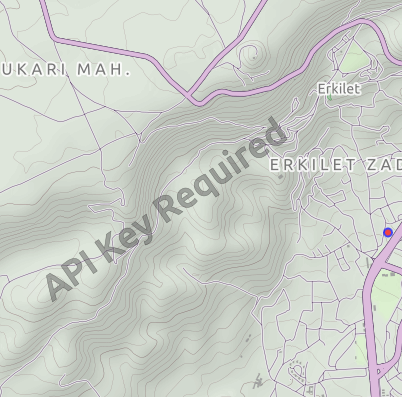
我还从http://maps-redirect.qt.io/osm/5.8/站点下载了地形文件参数,用于qrc,如下所示:
import QtQuick 2.6
import QtQuick.Controls 2.0
import QtLocation 5.12
import QtPositioning 5.12
ApplicationWindow{
    id: root
    width: 500
    height: 700
    visible: true
    Flickable {
        height: parent.height
        width: parent.width
        clip: true
        boundsBehavior: Flickable.StopAtBounds
        contentHeight: Math.max(mapColumn.implicitHeight, height)+50
        ScrollBar.vertical: ScrollBar {}
        z: 2
        Column{
            anchors.horizontalCenter: parent.horizontalCenter
            id:mapColumn
            spacing: 5
            anchors.fill : parent
            Row{
                anchors.horizontalCenter: parent.horizontalCenter
                spacing:25
                id:maprow
                Rectangle{
                width:mapColumn.width
                height:mapColumn.height/2

                Map {
                    id:map
                    anchors.fill: parent
                    plugin: Plugin {
                        name: "osm"
                        PluginParameter {
                            name: "osm.mapping.host";
                            value: "qrc:/terrain"
                        }
                    }
                }

          }
          }

          Column{
              id: combos
              spacing: 10
              width: parent.width
              anchors.verticalCenter: root.verticalCenter
                  Row{
                      anchors.horizontalCenter: parent.horizontalCenter
                      spacing:1
                      Label{ text:"Map Type: " }
                      // Map Types
                      ComboBox {
                          id: selectmap
                          width: 200
                          model:map.supportedMapTypes
                          textRole:"description"
                          onCurrentIndexChanged: map.activeMapType = map.supportedMapTypes[currentIndex]

                      }
                  }
          }
      }
    }
}在地形文件中,我更新了参数,因为"UrlTemplate" : "https://tile.thunderforest.com/landscape/{z}/{x}/{y}.png?apikey=<api-key>",不起作用,自定义地图视图是空的。是否可以用API键删除它?谢谢
回答 2
Stack Overflow用户
发布于 2020-06-23 09:03:01
(复制自我在这里的博客文章:http://blog.mikeasoft.com/2020/06/22/qt-qml-maps-using-the-osm-plugin-with-api-keys/)
这并不明显,但在深入研究了OSM插件的工作方式之后,我发现了一种机制,通过这种机制可以将API密钥提供给需要的服务器。
在初始化OSM插件时,它与Qt提供者存储库进行通信,该存储库告诉它要为每个映射类型使用什么URL。提供者存储库的位置可以通过osm.mapping.providersrepository.address OSM插件属性进行自定义,所以我们需要做的就是使用我们的API建立自己的提供者存储库,其中包含我们的API密钥作为参数。存储库本身就是JSON文件的集合,其中包含特定的名称(自行车、自行车租赁、徒步旅行、徒步旅行、夜间运输、夜间转乘、卫星、街道、街道租赁、地形、地形租用、中转、过境租赁),每个名称对应于一种地图类型。*-hires文件为贴片提供了两倍于正常分辨率的URL,用于高DPI显示。
例如,这是由默认Qt提供程序存储库提供的循环文件:
{
    "UrlTemplate" : "http://a.tile.thunderforest.com/cycle/%z/%x/%y.png",
    "ImageFormat" : "png",
    "QImageFormat" : "Indexed8",
    "ID" : "thf-cycle",
    "MaximumZoomLevel" : 20,
    "MapCopyRight" : "<a href='http://www.thunderforest.com/'>Thunderforest</a>",
    "DataCopyRight" : "<a href='http://www.openstreetmap.org/copyright'>OpenStreetMap</a> contributors"
}
为了向我们的平铺请求提供API密钥,我们可以简单地修改UrlTemplate:
"UrlTemplate" : "http://a.tile.thunderforest.com/cycle/%z/%x/%y.png?apikey=YOUR_API_KEY",自动存储库设置
我在这里创建了一个使用自定义API键建立完整存储库的简单工具:https://github.com/Elleo/qt-osm-map-providers
- 首先从https://www.thunderforest.com/docs/apikeys/获得API密钥
- 下一个克隆我的存储库:
git clone https://github.com/Elleo/qt-osm-map-providers.git - Run:
./set_api_keys.sh your_api_key(用步骤1中获得的密钥替换your_api_key ) - 将文件从这个存储库复制到您的the服务器(例如,存储库)
- 将osm.mapping.providersrepository.address属性设置为指向步骤4中的位置设置(请参阅下面的QML示例)
QML实例
下面是一个快速示例QML应用程序,它将利用我们设置的自定义存储库:
import QtQuick 2.7
import QtQuick.Controls 2.5
import QtLocation 5.10

ApplicationWindow {

    title: qsTr("Map Example")
    width: 1280
    height: 720

    Map {
        anchors.fill: parent
        zoomLevel: 14
        plugin: Plugin {
            name: "osm"
            PluginParameter { name: "osm.mapping.providersrepository.address"; value: "http://www.mywebsite.com/osm_repository" }
            PluginParameter { name: "osm.mapping.highdpi_tiles"; value: true }
        }
        activeMapType: supportedMapTypes[1] // Cycle map provided by Thunderforest
    }

}
Stack Overflow用户
发布于 2021-12-03 14:14:52
与Mike类似的另一个想法是在您自己的应用程序中创建服务器,这样您就不必设置web服务器了。
这里有一个示例实现,它支持雷暴森林API密钥,并允许将MapTiler用于卫星地图:
https://github.com/f4exb/sdrangel/blob/master/plugins/feature/map/osmtemplateserver.h
这台服务器将在一个免费的IP端口上启动,因此不应该与其他应用程序发生冲突。您只需要将osm.mapping.providersrepository.address设置为http://127.0.0.1:port/
https://stackoverflow.com/questions/61689939
复制相似问题
腾讯云开发者

Copyright © 2013 - 2026 Tencent Cloud. All Rights Reserved. 腾讯云 版权所有
深圳市腾讯计算机系统有限公司 ICP备案/许可证号:粤B2-20090059  粤公网安备44030502008569号
腾讯云计算(北京)有限责任公司 京ICP证150476号 | 京ICP备11018762号