
动态导入:我遗漏了什么吗?
我有一个使用Webpack作为包包的React项目,我将我的包分成两个块--主代码库main.js和供应商包vendor.js。
构建这些包后,main.js为45 is,vendor.js为651 is。
一个特定的供应商库是225 in,似乎是供应商导入中最严重的犯罪行为。
我在文件顶部的一个页面组件中导入这个库:
import React from 'react';
import { ModuleA, ModuleB } from 'heavyPackage'; // 225kb import

...

const Page = ({ setThing }) => {

...

};
为了尝试将这个重导入加载到一个单独的包中,我尝试使用动态导入来导入这些模块。
在Page组件中,直到调用特定函数才实际使用这些模块,因此我尝试在该范围内而不是在文件顶部导入模块:
import React from 'react';

...

const Page = ({ setThing }) => {

  ...

  const handleSignIn = async () => {
    const scopedPackage = await import('heavyPackage');
    const { moduleA, moduleB } = scopedPackage;

    // use moduleA & moduleB normally here
  };

};
出于某种原因,我想Webpack会聪明地领会我在这里要做的事情,把这个沉重的包分成它自己的块,只有在需要的时候才会下载,但是得到的包是一样的--一个45 up的main.js和651 up的vendor.js。我在这里的思路是正确的,可能我的Webpack配置被取消了,还是我对动态导入的思考是错误的?
编辑我已经将Webpack配置为使用splitChunks拆分包。下面是我是如何配置这个的:
  optimization: {
    chunkIds: "named",
    splitChunks: {
      cacheGroups: {
        commons: {
          chunks: "initial",
          maxInitialRequests: 5,
          minChunks: 2,
          minSize: 0,
        },
        vendor: {
          chunks: "initial",
          enforce: true,
          name: "vendor",
          priority: 10,
          test: /node_modules/,
        },
      },
    },
},回答 2
Stack Overflow用户
发布于 2020-05-16 19:11:50
React 18的更新:不再需要下面的代码来拆分块/动态加载组件。相反,您可以使用悬念React.lazy实现类似的结果(这只适用于React组件,因此任何node_module导入都需要在这个动态加载的组件中导入):
const ProfilePage = React.lazy(() => import(‘./ProfilePage’);//延迟加载<悬念fallback={}> ]
@Ernesto的答案提供了一种通过使用react-loadable和babel-dynamic-import插件来拆分代码的方法,但是,如果您的Webpack版本是v4+ (并且有一个自定义Webpack配置设置为SplitChunks),那么您只需要使用神奇的注释和自定义的React组件。
来自文档
通过向导入添加神奇的注释,我们可以做一些事情,比如命名块或选择不同的模式。有关这些神奇注释的完整列表,请参阅下面的代码,然后解释这些注释的功能。//单一目标 导入( /* webpackChunkName:“my-chunk name”*/ /* webpackMode:“惰性”*/‘模块’);//多个可能的目标 导入( /* webpackInclude: /.json$ / * / /* webpackExclude: //name.json$ / * / /* webpackChunkName:“my-chunk name”*/ /* webpackMode:“懒惰”*/ /* webpackPrefetch: true */ /* webpackPreload: true */
./locale/${language});
因此,可以创建一个可重用的LazyLoad组件,如下所示:
import React, { Component } from "react";
import PropTypes from "prop-types";

class LazyLoad extends Component {
  state = {
    Component: null,
    err: "",
  };

  componentDidMount = () => this.importFile();

  componentWillUnmount = () => (this.cancelImport = true);

  cancelImport = false;

  importFile = async () => {
    try {
      const { default: file } = await import(
        /* webpackChunkName: "[request]" */
        /* webpackMode: "lazy" */
        `pages/${this.props.file}/index.js`
      );

      if (!this.cancelImport) this.setState({ Component: file });
    } catch (err) {
      if (!this.cancelImport) this.setState({ err: err.toString() });
      console.error(err.toString());
    }
  };

  render = () => {
    const { Component, err } = this.state;

    return Component ? (
      <Component {...this.props} />
    ) : err ? (
      <p style={{ color: "red" }}>{err}</p>
    ) : null;
  };
}

LazyLoad.propTypes = {
  file: PropTypes.string.isRequired,
};

export default file => props => <LazyLoad {...props} file={file} />;然后,在您的路由中,使用LazyLoad并将文件的名称传递到您的pages目录中(例如pages/"Home"/index.js):
import React from "react";
import { Route, Switch } from "react-router-dom";
import LazyLoad from "../components/LazyLoad";

const Routes = () => (
  <Switch>
    <Route exact path="/" component={LazyLoad("Home")} />
    <Route component={LazyLoad("NotFound")} />
  </Switch>
);

export default Routes;在这一点上,React.Lazy和React-Loadable是不支持动态导入的自定义Webpack配置或Webpack版本的替代品。

Stack Overflow用户
发布于 2020-05-14 00:03:06
那么,看!您可以使用splitChunks属性配置yow webpack,还需要从webpack在output对象的一侧添加一个chunkFilename属性。
举个例子,CRA生成的
      // The build folder.
      path: isEnvProduction ? paths.appBuild : undefined,
      // Add /* filename */ comments to generated require()s in the output.
      pathinfo: isEnvDevelopment,
      // There will be one main bundle, and one file per asynchronous chunk.
      // In development, it does not produce real files.
      filename: isEnvProduction
        ? 'static/js/[name].[contenthash:8].js'
        : isEnvDevelopment && 'static/js/bundle.js',
      // TODO: remove this when upgrading to webpack 5
      futureEmitAssets: true,

      // THIS IS THE ONE I TALK ABOUT
      chunkFilename: isEnvProduction
        ? 'static/js/[name].[contenthash:8].chunk.js'
        : isEnvDevelopment && 'static/js/[name].chunk.js',
      // webpack uses `publicPath` to determine where the app is being served from.
      // It requires a trailing slash, or the file assets will get an incorrect path.
      // We inferred the "public path" (such as / or /my-project) from homepage.
      publicPath: paths.publicUrlOrPath,
      // Point sourcemap entries to original disk location (format as URL on Windows)
      devtoolModuleFilenameTemplate: isEnvProduction
        ? info =>
            path
              .relative(paths.appSrc, info.absoluteResourcePath)
              .replace(/\\/g, '/')
        : isEnvDevelopment &&
          (info => path.resolve(info.absoluteResourcePath).replace(/\\/g, '/')),
      // Prevents conflicts when multiple webpack runtimes (from different apps)
      // are used on the same page.
      jsonpFunction: `webpackJsonp${appPackageJson.name}`,
      // this defaults to 'window', but by setting it to 'this' then
      // module chunks which are built will work in web workers as well.
      globalObject: 'this',
},一旦你对姚webpack有了这种感觉。下一步是安装npm i -D @babel/plugin-syntax-dynamic-import并将其添加到您的babel.config.js中
module.exports = api =>
...
return {
  presets: [
   .....
 ],
 plugins: [
....
"@babel/plugin-syntax-dynamic-import",
....
 ]
}最后一件事是npm install react-loadable创建一个名为:containers的文件夹。在里面放置所有的容器
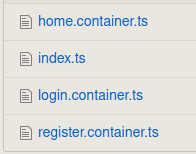
在index.js内部做一些类似的事情:
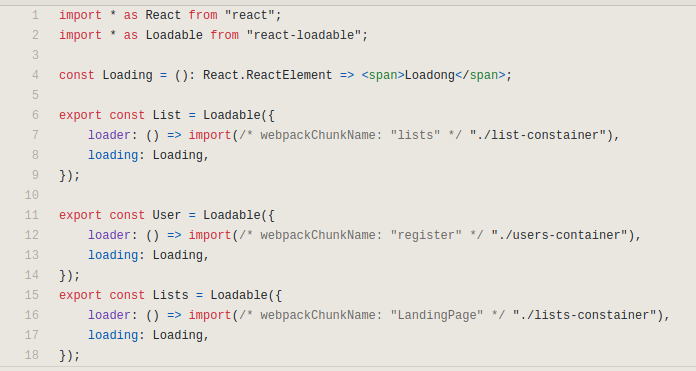
可加载对象有两个属性
export const List = Loadable({
    loader: () => import(/* webpackChunkName: "lists" */ "./list-constainer"),
    loading: Loading,
});- 加载器:动态导入的组件
- loadinh:在加载动态组件之前显示的组件。
最后,路由器设置每一个可装载到一条路线。
...
import { Lists, List, User } from "../../containers";
...
export function App (): React.ReactElement {
    return (
        <Layout>
            <BrowserRouter>
                <SideNav>
                    <nav>SideNav</nav>
                </SideNav>
                <Main>
                    <Header>
                        <div>Header</div>
                        <div>son 2</div>
                    </Header>
                    <Switch>
                        <Route exact path={ROUTE_LISTS} component={Lists} />
                        <Route path={ROUTE_LISTS_ID_USERS} component={List} />
                        <Route path={ROUTE_LISTS_ID_USERS_ID} component={User} />
                        <Redirect from="*" to={ROUTE_LISTS} />
                    </Switch>
                </Main>
            </BrowserRouter>
        </Layout>
    );
}
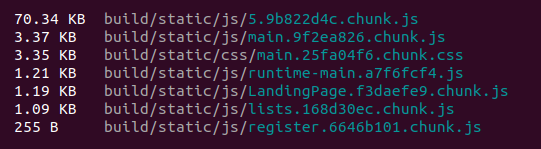
因此,当您捆绑yow代码时,我们会得到一些类似的信息:
https://stackoverflow.com/questions/61742577
复制相似问题
腾讯云开发者

Copyright © 2013 - 2026 Tencent Cloud. All Rights Reserved. 腾讯云 版权所有
深圳市腾讯计算机系统有限公司 ICP备案/许可证号:粤B2-20090059  粤公网安备44030502008569号
腾讯云计算(北京)有限责任公司 京ICP证150476号 | 京ICP备11018762号