
如何使用linux内核5.6.x中包含的MPTCP?
我正在尝试使用Linux5.6.x中包含的MPTCP。我认为这是https://www.multipath-tcp.org/的一个版本,但它似乎不一样。
内核中的MPTCP是否对应于https://www.multipath-tcp.org/的任何版本?
为了进行测试,我使用了一个小型程序mptcp.c和类似于VM的设置;
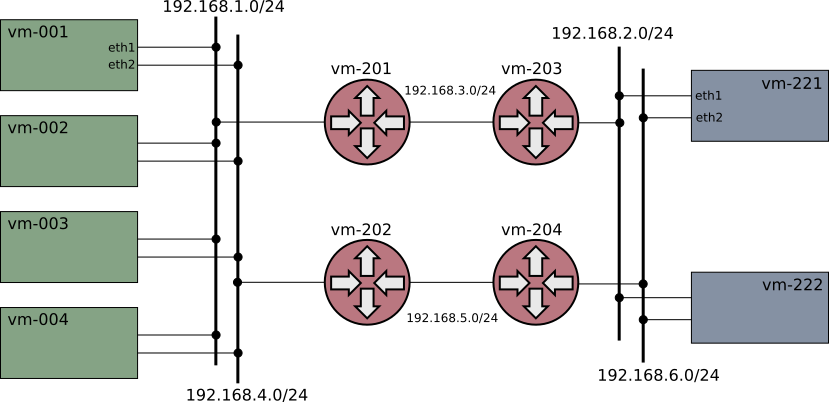
根据wireshark的说法,MPTCP是使用的,但在默认路径(上)上只有一个子流。
我必须做什么(配置?)如何使MPTCP意识到第二条路径的存在并加以利用?
回答 1
Stack Overflow用户
发布于 2020-06-22 12:35:23
如前所述,Linux5.6.x不支持多子流,而Linux5.7.x支持多子流。我没有发现任何文档,但是增加了新的测试程序;
linux-5.7 > ls ./tools/testing/selftests/net/mptcp
config    mptcp_connect.c    mptcp_join.sh*  pm_nl_ctl.c
Makefile mptcp_connect.sh* pm_netlink.sh* settings我猜pm_nl_ctl代表路径管理器-netlink控制。
可以检查这些脚本和程序,以获得有关如何配置子流的提示。
在上面的配置中,服务器运行在vm-001上,客户端从vm-221连接;
# On vm-001
pm_nl_ctl limits 2 2
mptcp server
# On vm-221
pm_nl_ctl limits 2 2
pm_nl_ctl add 192.168.6.221 flags subflow
mptcp client vm-001 7000现在,在较低的路径上设置子流。这是来自vm-202的一个捕获;
    4   0.000999 192.168.6.221 → 192.168.1.1  MPTCP 86 40241 → 7000 [SYN] Seq=0 Win=64240 Len=0 MSS=1460 SACK_PERM=1 TSval=1993176738 TSecr=0 WS=128
    5   0.001453 192.168.6.221 → 192.168.1.1  MPTCP 86 [TCP Out-Of-Order] 40241 → 7000 [SYN] Seq=0 Win=64240 Len=0 MSS=1460 SACK_PERM=1 TSval=1993176738 TSecr=0 WS=128
    6   0.003474 192.168.6.221 → 192.168.1.1  MPTCP 90 40241 → 7000 [ACK] Seq=1 Ack=1 Win=64256 Len=0 TSval=1993176744 TSecr=4157473679
    7   0.003987 192.168.6.221 → 192.168.1.1  MPTCP 90 [TCP Dup ACK 6#1] 40241 → 7000 [ACK] Seq=1 Ack=1 Win=64256 Len=0 TSval=1993176744 TSecr=4157473679
    8   2.015314 192.168.6.221 → 192.168.1.1  MPTCP 94 40241 → 7000 [FIN, ACK] Seq=1 Ack=1 Win=64256 Len=0 TSval=1993178755 TSecr=4157473682
    9   2.016525 192.168.6.221 → 192.168.1.1  MPTCP 94 [TCP Out-Of-Order] 40241 → 7000 [FIN, ACK] Seq=1 Ack=1 Win=64256 Len=0 TSval=1993178755 TSecr=4157473682
   10   2.021198 192.168.6.221 → 192.168.1.1  MPTCP 78 40241 → 7000 [ACK] Seq=2 Ack=2 Win=64256 Len=0 TSval=1993178762 TSecr=4157475697
   11   2.021811 192.168.6.221 → 192.168.1.1  MPTCP 78 [TCP Dup ACK 10#1] 40241 → 7000 [ACK] Seq=2 Ack=2 Win=64256 Len=0 TSval=1993178762 TSecr=4157475697
nstat on vm-001也显示了连接;
$ nstat -as
...
MPTcpExtMPCapableSYNRX          1                  0.0
MPTcpExtMPCapableACKRX          1                  0.0
MPTcpExtMPJoinSynRx             1                  0.0
MPTcpExtMPJoinAckRx 1 0.0在没有安装linux-5.7头的机器上编译pm_nl_ctl.c有点棘手(您很可能没有)。您必须安装并使用报头;
# In the kernel (or kernel-obj) dir do;
make INSTALL_HDR_PATH=(some-dir) headers_install
# Build;
gcc -o pm_nl_ctl -I(some-dir)/include pm_nl_ctl.c
流量数据仍然只使用第一个子流,如果禁用了上层数据路径,则不会出现故障转移。因此,对于有用的MPTCP还有更多的问题,但这是另一个问题。
https://stackoverflow.com/questions/61796994
复制相似问题
腾讯云开发者

Copyright © 2013 - 2026 Tencent Cloud. All Rights Reserved. 腾讯云 版权所有
深圳市腾讯计算机系统有限公司 ICP备案/许可证号:粤B2-20090059  粤公网安备44030502008569号
腾讯云计算(北京)有限责任公司 京ICP证150476号 | 京ICP备11018762号