
如何根据我当前的世界鼠标位置3D (等距视角)旋转我的播放器?
这个游戏是3d的,但视图是‘正字法’,请看下面的插图,以获得更清晰的视角。
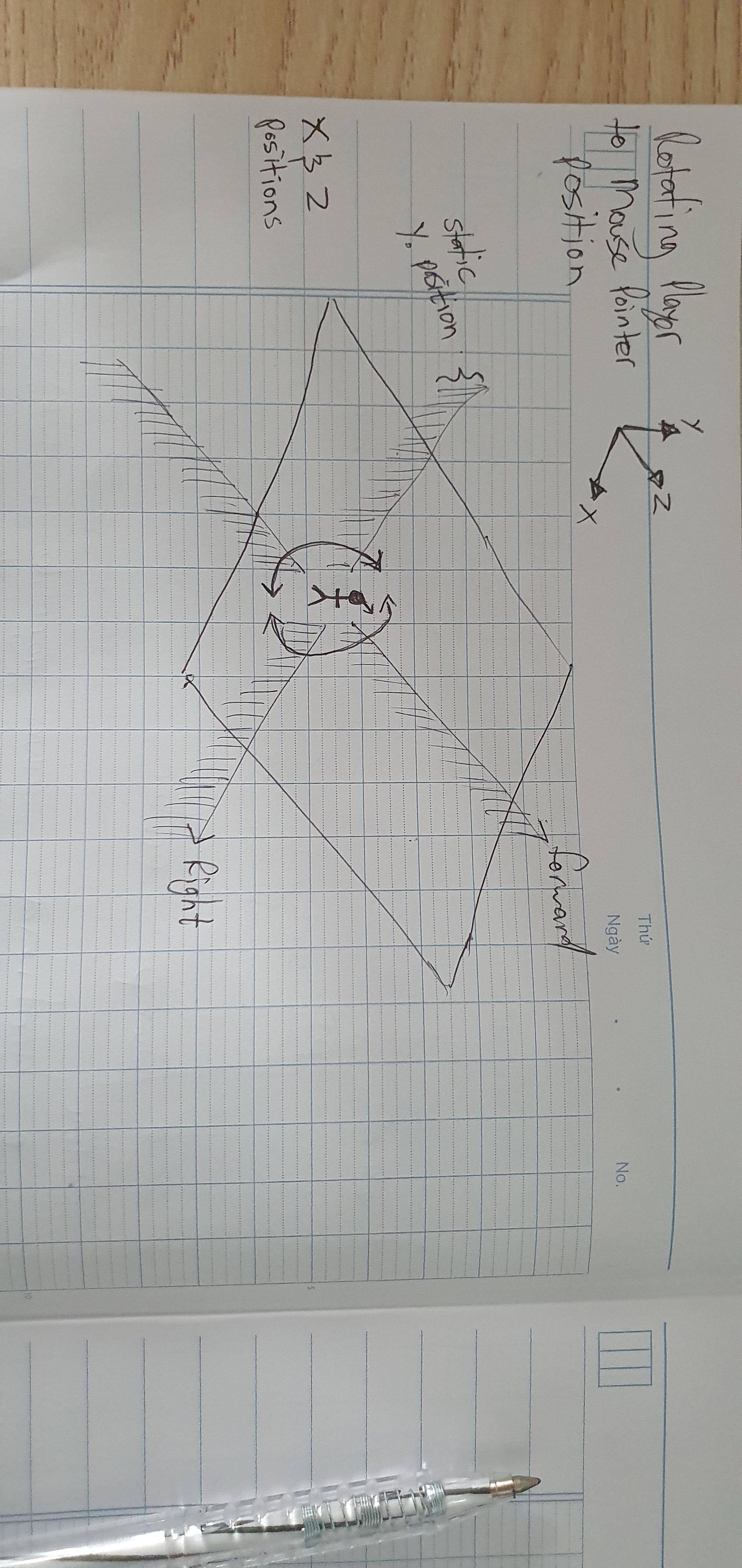
我试图设置我的球员的旋转,以始终面对鼠标的位置在游戏世界,但只旋转的球员围绕Y旋转轴。
我的伪码就像:
- 把鼠标定位到屏幕上。
- 去找世界上的球手。
- 将屏幕上的鼠标pos转换为世界上的鼠标pos。
- 确定从鼠标pos到播放器pos的距离。
- 使用x,z上的atan2计算角度。
- 使用角度不断调整玩家旋转到鼠标pos。
请参阅:插图

回答 2
Stack Overflow用户
发布于 2020-05-18 09:53:03
从您的伪代码开始,您可以通过简单地查看API找到其中的一些:
- 把鼠标定位到屏幕上。
统一已经提供了以下内容:Input.mousePosition
- 去找世界上的球手。
一旦您有了对相应GameObject的引用,或者更直接地访问Transform,您就可以直接访问它的position了。
- 将屏幕上的鼠标pos转换为世界上的鼠标pos。
有多种解决方案,如Camera.ScreenToWorldPoint。然而,在这种情况下,创建一个数学Plane,然后使用Camera.ScreenPointToRay来获取鼠标的射线并将其传递到Plane.Raycast会更容易。
- 确定从鼠标pos到播放器pos的距离。
- 使用x,z上的atan2计算角度。
- 使用角度不断调整玩家旋转到鼠标pos。
这些是不必要的,因为统一已经为你做了所有这一切;)
相反,您可以简单地计算从播放机到鼠标光线击中平面的点的矢量方向,删除Y轴上的差异,并使用Quaternion.LookRotation来旋转播放机,使其向相同的方向看去。
这样看起来就像。
// drag in your player object here via the Inspector
[SerializeField] private Transform _player;

// If possible already drag your camera in here via the Inspector
[SerializeField] private Camera _camera;

private Plane plane;

void Start()
{
    // create a mathematical plane where the ground would be
    // e.g. laying flat in XZ axis and at Y=0
    // if your ground is placed differently you'ld have to adjust this here
    plane = new Plane(Vector3.up, Vector3.zero);

    // as a fallback use the main camera
    if(!_camera) _camera = Camera.main;
}

void Update()
{
    // Only rotate player while mouse is pressed
    // change/remove this according to your needs
    if (Input.GetMouseButton(0))
    {
        //Create a ray from the Mouse position into the scene
        var ray = _camera.ScreenPointToRay(Input.mousePosition);

        // Use this ray to Raycast against the mathematical floor plane
        // "enter" will be a float holding the distance from the camera
        // to the point where the ray hit the plane
        if (plane.Raycast(ray, out var enter))
        {
            //Get the 3D world point where the ray hit the plane
            var hitPoint = ray.GetPoint(enter);

            // project the player position onto the plane so you get the position
            // only in XZ and can directly compare it to the mouse ray hit
            // without any difference in the Y axis
            var playerPositionOnPlane = plane.ClosestPointOnPlane(_player.position);

            // now there are multiple options but you could simply rotate the player so it faces
            // the same direction as the one from the playerPositionOnPlane -> hitPoint
            _player.rotation = Quaternion.LookRotation(hitPoint-playerPositionOnPlane);
        }
    }
}Stack Overflow用户
发布于 2020-05-18 07:52:40
我建议你两种方法: 1)使用光线投射,它击中你的表面的字符,类似于ScreePointToRay。从射线中获得“命中”并旋转你的角色到命中点,计算字符位置和命中点之间的角度。( 2)用Camera.WorldToScreenPoint将字符pos转换为屏幕点,并计算出鼠标点和字符点之间的计数角。在那之后,你会知道他们之间的角度。
注意被称为LookAt的函数,也许它会很方便。
https://stackoverflow.com/questions/61864195
复制相似问题
腾讯云开发者

Copyright © 2013 - 2026 Tencent Cloud. All Rights Reserved. 腾讯云 版权所有
深圳市腾讯计算机系统有限公司 ICP备案/许可证号:粤B2-20090059  粤公网安备44030502008569号
腾讯云计算(北京)有限责任公司 京ICP证150476号 | 京ICP备11018762号