
在TWA中隐藏Android软导航(Bubblewrap)
我遵循这个指南(https://developers.google.com/web/android/trusted-web-activity/quick-start)构建了一个TWA应用程序,但我需要隐藏安卓软导航栏(而不是地址栏)。
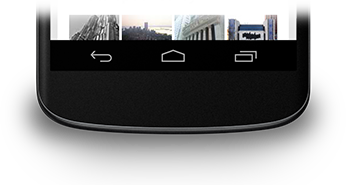
我找到了这个(https://developer.android.com/training/system-ui/navigation),但不知道将onResume()方法放在哪里。
我以前没有在Android做过任何东西,而且我对此完全陌生。会很感激你的帮助。
谢谢
回答 1
Stack Overflow用户
发布于 2020-05-18 11:52:14
更新:
你指的是安卓系统上的浸入式。从1.4.0版本开始,Bubblewrap在初始化应用程序时评估清单的display属性。如果值为fullscreen,它将自动将沉浸模式应用于您的TWA。确保在web清单中将display设置为fullscreen。
对于现有的应用程序,更新文件twa-manifest.json并将display属性添加/更新到fullscreen,然后运行bubblewrap update和bubblewrap build。
交替/手动方法:
还可以手动更新Bubblewrap创建的项目,以使用全屏/沉浸模式:
- 编辑
app/build.gradle以使用最新版本的android helper版本。文件底部的dependencies部分应该如下所示:
dependencies {
    implementation fileTree(include: ['*.jar'], dir: 'libs')
    implementation 'com.google.androidbrowserhelper:androidbrowserhelper:1.3.0'
}注意,雄激素浏览器助手的minumum版本应该是1.3.0。
- 编辑
app/src/main/AndroidManifest.xml并添加一个新的meta-data标记,其中android:name属性设置为android.support.customtabs.trusted.DISPLAY_MODE,android:value属性设置为immersive,以在activity标记中使用沉浸模式:
<activity android:name="com.google.androidbrowserhelper.trusted.LauncherActivity"
    android:label="@string/launcherName">

    ...

    <meta-data android:name="android.support.customtabs.trusted.FALLBACK_STRATEGY"
        android:value="@string/fallbackType" />

    <meta-data android:name="android.support.customtabs.trusted.DISPLAY_MODE"
    android:value="immersive"/>

    <intent-filter>
        <action android:name="android.intent.action.MAIN" />
        <category android:name="android.intent.category.LAUNCHER" />
    </intent-filter>

    ...
</activity>现在,当运行bubblewrap build时,应用程序将使用额外的元标记并以全屏/沉浸模式启动。
https://stackoverflow.com/questions/61863976
复制相似问题
腾讯云开发者

Copyright © 2013 - 2026 Tencent Cloud. All Rights Reserved. 腾讯云 版权所有
深圳市腾讯计算机系统有限公司 ICP备案/许可证号:粤B2-20090059  粤公网安备44030502008569号
腾讯云计算(北京)有限责任公司 京ICP证150476号 | 京ICP备11018762号