
如何从命令行或注册表设置中获取microsoft边缘铬版本
我必须在python中自动获得边缘铬浏览器版本。我尝试了这个HKEY_LOCAL_MACHINE\SOFTWARE\Policies\Microsoft\Edge中提到的注册表设置
.But注册表项不存在。
回答 1
Stack Overflow用户
发布于 2020-05-18 07:59:02
我必须在python中自动获得边缘铬浏览器版本。
您的意思是要使用selenium进行自动化测试吗?如果是这样的话,您可以参考这篇文章下载构建Microsoft的正确的WebDriver版本,并下载您选择的WebDriver语言绑定。
然后,使用driver.capabilities['browserVersion']命令在python中获取Microsoft版本,更详细,请检查以下代码(请记住更改您的路径):
import time

from selenium import webdriver
from selenium.webdriver.edge.options import Options

print("*******************")

option = Options()
option.set_capability("useAutomationExtension", "false")
option.binary_location = "C:\\Program Files (x86)\\Microsoft\\Edge\\Application\\msedge.exe"
driver = webdriver.Edge(executable_path=r'E:\webdriver\edgedriver_win64_81_0_416_72\edgedriver_win64\msedgedriver.exe', capabilities= option.to_capabilities());
print(driver.capabilities['browserVersion'])
driver.get("https://www.bing.com")

time.sleep(5)
print("*******************")
time.sleep(5)
产出:
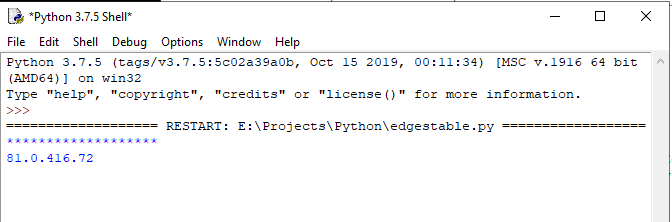
此外,这里还有另一种使用命令行获取边缘铬版本的方法,也许它可以帮助您。
您可以使用以下命令获取Microsoft铬版本:
对于Microsoft稳定版本(使用默认设置):
wmic datafile where name="C:\\Program Files (x86)\\Microsoft\\Edge\\Application\\msedge.exe" get Version /value
对于Microsoft Edge Dev或Beta版本,请将路径更改为您的:
wmic datafile where name="C:\\Program Files (x86)\\Microsoft\\Edge Dev\\Application\\msedge.exe" get Version /value
截图如下:

https://stackoverflow.com/questions/61863482
复制相似问题
腾讯云开发者

Copyright © 2013 - 2026 Tencent Cloud. All Rights Reserved. 腾讯云 版权所有
深圳市腾讯计算机系统有限公司 ICP备案/许可证号:粤B2-20090059  粤公网安备44030502008569号
腾讯云计算(北京)有限责任公司 京ICP证150476号 | 京ICP备11018762号