
BoxConstraints(w=Infinity,0.0<=h<=Infinity)如何纠正?
BoxConstraints(w=Infinity,0.0<=h<=Infinity)如何纠正?
提问于 2020-05-17 23:34:06
文本没有呈现在我的应用程序的主页上,这是我得到问题的地方。我对颤栗是陌生的,因此对约束也是陌生的。希望有人能提供一些洞察力,或者根据我得到的错误来调整代码。
对于进一步的上下文,当我启动“颤振运行”时,此页面将呈现。背景图像将出现,但文本不会显示。
提前谢谢。
错误是:
flutter: EXCEPTION CAUGHT BY RENDERING LIBRARY

flutter: The following assertion was thrown during performLayout():
flutter: BoxConstraints forces an infinite width.
flutter: These invalid constraints were provided to RenderPositionedBox's layout() function by the following
flutter: function, which probably computed the invalid constraints in question:
flutter:   RenderFlex.performLayout (package:flutter/src/rendering/flex.dart:746:15)
flutter: The offending constraints were:
flutter:   BoxConstraints(w=Infinity, 0.0<=h<=Infinity
有关守则如下:
        /*
*  home_widget.dart
import 'package:flutter/material.dart';
import 'package:stumble/slider1_widget/slider1_widget.dart';
import 'package:stumble/values/values.dart';


class HomeWidget extends StatelessWidget {

  void onGroup2Pressed(BuildContext context) => Navigator.push(context, MaterialPageRoute(builder: (context) => Slider1Widget()));

  @override
  Widget build(BuildContext context) {

    return Scaffold(
      body: Container(
        constraints: BoxConstraints.expand(),
        decoration: BoxDecoration(
          color: Color.fromARGB(255, 255, 255, 255),
        ),
        child: Stack(
          children: [
            Positioned(
              left: -133,
              top: -269,
              right: -255,
              child: Image.asset(
                "assets/images/group-5.png",
                fit: BoxFit.cover,
              ),
            ),
            Positioned(
              left: 28,
              top: 400,
              bottom: 67,
              child: Column(
                crossAxisAlignment: CrossAxisAlignment.stretch,
                children: [
                  Align(
                    alignment: Alignment.topLeft,
                    child: Opacity(
                      opacity: 0.85951,
                      child: Container(
                        decoration: BoxDecoration(
                          boxShadow: [
                            BoxShadow(
                              color: Color.fromARGB(128, 0, 0, 0),
                              offset: Offset(12, 4),
                              blurRadius: 20,
                            ),
                          ],
                        ),
                        child: Text(
                          "Look",
                          textAlign: TextAlign.left,
                          style: TextStyle(
                            color: Color.fromARGB(255, 255, 255, 255),
                            fontFamily: "Open Sans",
                            fontWeight: FontWeight.w700,
                            fontSize: 21,
                          ),
                        ),
                      ),
                    ),
                  ),
                  Spacer(),
                  Align(
                    alignment: Alignment.topLeft,
                    child: Opacity(
                      opacity: 0.58538,
                      child: Container(
                        width: 166,
                        margin: EdgeInsets.only(bottom: 51),
                        decoration: BoxDecoration(
                          boxShadow: [
                            BoxShadow(
                              color: Color.fromARGB(128, 0, 0, 0),
                              offset: Offset(0, 2),
                              blurRadius: 4,
                            ),
                          ],
                        ),
                        child: Text(
                          "I spent a year after College.
    ",
                          textAlign: TextAlign.left,
                          style: TextStyle(
                            color: Color.fromARGB(255, 255, 255, 255),
                            fontFamily: "Arial",
                            fontWeight: FontWeight.w700,
                            fontStyle: FontStyle.italic,
                            fontSize: 13,
                            height: 1.23077,
                          ),
                        ),
                      ),
                    ),
                  ),
                  Align(
                    alignment: Alignment.topLeft,
                    child: Container(
                      width: 140,
                      height: 44,
                      child: FlatButton(
                        onPressed: () => this.onGroup2Pressed(context),
                        color: Color.fromARGB(0, 0, 0, 0),
                        shape: RoundedRectangleBorder(
                          side: BorderSide(
                            color: Color.fromARGB(255, 255, 255, 255),
                            width: 3,
                            style: BorderStyle.solid,
                          ),
                          borderRadius: Radii.k8pxRadius,
                        ),
                        textColor: Color.fromARGB(255, 255, 255, 255),
                        padding: EdgeInsets.all(0),
                        child: Text(
                          "Get Started",
                          textAlign: TextAlign.left,
                          style: TextStyle(
                            color: Color.fromARGB(255, 255, 255, 255),
                            fontFamily: "Open Sans",
                            fontWeight: FontWeight.w700,
                            fontSize: 17,
                          ),
                        ),
                      ),
                    ),
                  ),
                ],
              ),
            ),
            Positioned(
              left: 28,
              top: 424,
              child: Column(
                crossAxisAlignment: CrossAxisAlignment.stretch,
                children: [
                  Align(
                    alignment: Alignment.topLeft,
                    child: Container(
                      decoration: BoxDecoration(
                        boxShadow: [
                          BoxShadow(
                            color: Color.fromARGB(128, 0, 0, 0),
                            offset: Offset(12, 11),
                            blurRadius: 27,
                          ),
                        ],
                      ),
                      child: Text(
                        "Personal\nTravel",
                        textAlign: TextAlign.left,
                        style: TextStyle(
                          color: Color.fromARGB(255, 255, 255, 255),
                          fontFamily: "Open Sans",
                          fontWeight: FontWeight.w700,
                          fontSize: 36,
                          height: 1.25,
                        ),
                      ),
                    ),
                  ),
                  Align(
                    alignment: Alignment.topLeft,
                    child: Container(
                      margin: EdgeInsets.only(top: 11),
                      child: Opacity(
                        opacity: 0.48268,
                        child: Text(
                          "“",
                          textAlign: TextAlign.left,
                          style: TextStyle(
                            color: Color.fromARGB(255, 255, 255, 255),
                            fontFamily: "Arial",
                            fontWeight: FontWeight.w400,
                            fontSize: 55,
                            height: 1,
                          ),
                        ),
                      ),
                    ),
                  ),
                ],
              ),
            ),
          ],
        ),
      ),
    );
  }
}
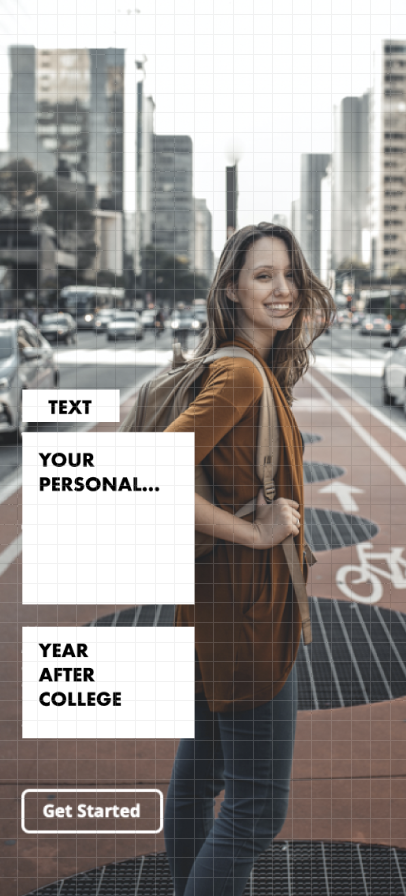
图片在下面。忽略文本后面的框,因为它们不应该出现在文本后面。这只是为了给出一个格式的想法。
回答 1
Stack Overflow用户
发布于 2020-05-18 00:49:59
下面是简单的例子。记住,堆栈是用来将小部件放在另一个上面的!您应该避免专门使用堆栈来创建布局。
body: Container(
        decoration: BoxDecoration(
          image: DecorationImage(
            image: AssetImage(
                'your/image'),
            fit: BoxFit.cover,
          ),
        ),
        child: Column(
            crossAxisAlignment: CrossAxisAlignment.stretch,
            mainAxisAlignment: MainAxisAlignment.end,
            children: <Widget>[
              Column(
                crossAxisAlignment: CrossAxisAlignment.start,
                children: <Widget>[
                  Container(
                    child: Text("Text1"),
                    color: Colors.white,
                  ),
                  SizedBox(
                    height: 5,
                  ),
                  Container(
                    child: Text("text2"),
                    color: Colors.white,
                  ),
                  OutlineButton(
                    child: Text('Button'),
                    onPressed: () {},
                  )
                ],
              ),
            ]),
),页面原文内容由Stack Overflow提供。腾讯云小微IT领域专用引擎提供翻译支持
原文链接:
https://stackoverflow.com/questions/61860174
复制相关文章
相似问题
腾讯云开发者

Copyright © 2013 - 2026 Tencent Cloud. All Rights Reserved. 腾讯云 版权所有
深圳市腾讯计算机系统有限公司 ICP备案/许可证号:粤B2-20090059  粤公网安备44030502008569号
腾讯云计算(北京)有限责任公司 京ICP证150476号 | 京ICP备11018762号