
Python:如何使用烧瓶api部署对象检测模型
我在笔记本电脑上使用了Tensorflow-GPU来检测物体。现在,管理团队希望在自己的地方用URL检查它。我从未在网络上发布/部署过模型,因为我不是,但是现在我必须做that.For,我尝试过一些关于Flask的在线教程,但是它们没有那么有用。
如何使用Flask发布模型?是否有任何指导/博客/视频部署对象检测模型上的URL使用瓶?
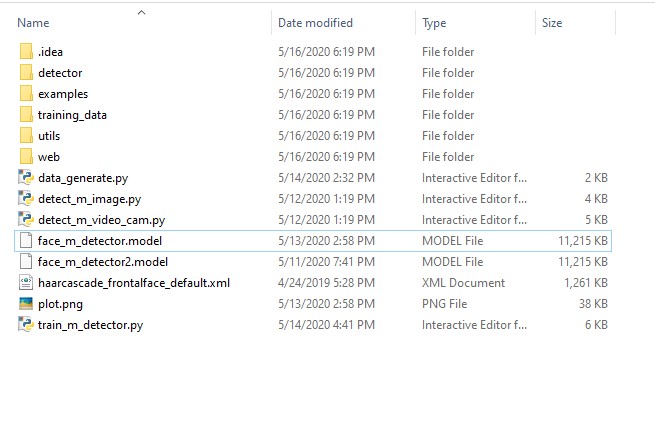
我的项目结构是这样的
回答 2
Stack Overflow用户
发布于 2020-05-19 09:00:48
您可以编写一个可以与任何其他服务一起使用的烧瓶restful。
- 用于基于图像的任务,在发出请求时使用
base64编码的图像总是明智的。这就减少了大量的带宽,overhead. - Here,,我使用我的虚拟模板,而原型化非常简单的ML/DL模型,只需要使用rest .
进行测试。
它有一个简单的test路由,用于测试服务器是否处于活动状态,最后,使用base64图像处理post请求的另一条路由,它将base64映像转换为numpy数组(方便传递到ML模型)。
你可以改变中间部分使它为你工作。
ml_app.py
from flask import Flask
from flask_restful import Resource, Api, reqparse
import werkzeug, os
import json
import numpy as np
import base64


class NumpyEncoder(json.JSONEncoder): # useful for sending numpy arrays
    def default(self, obj):
        if isinstance(obj, np.ndarray):
            return obj.tolist()
        return json.JSONEncoder.default(self, obj)


app = Flask(__name__)
api = Api(app)
parser = reqparse.RequestParser()
parser.add_argument('file', type=werkzeug.datastructures.FileStorage, location='files')
parser.add_argument('imgb64')
# add other arguments if needed

# test response, check if live
class Test(Resource):
    def get(self):
        return {'status': 'ok'}


class PredictB64(Resource): # for detecting from base64 images


    def post(self):
        data = parser.parse_args()
        if data['imgb64'] == "":
            return {
                    'data':'',
                    'message':'No file found',
                    'status':'error'
                    }

        img = data['imgb64']
        #print(img)


        br = base64.b64decode(img)
        im = np.frombuffer(br, dtype=np.uint8). reshape(-1, 416, 3) # width will be always 416, which is generally the bigger dimension
        # reshape with the actual dimension of your image
        #print(im.shape)


        #print(type(im))
        #print(im.shape)


        if img:
            r = # call your model here
            #print(r)

            return json.dumps({
                    'data': json.dumps(list(r)), #(images), # may change based on your output, could be a string too
                    'message':'darknet processed',
                    'status':'success'
                    }, cls=NumpyEncoder)
        return {
                'data':'',
                'message':'Something when wrong',
                'status':'error'
                }


api.add_resource(Test, '/test')
api.add_resource(PredictB64,'/predict_b64')

if __name__ == '__main__':
    app.run(debug=True, host = '0.0.0.0', port = 5000, threaded=True)
要运行,只需:
python ml_app.py
更多示例:https://github.com/zabir-nabil/flask_restful
暗色/yolo:https://github.com/zabir-nabil/tf-model-server4-yolov3
Stack Overflow用户
发布于 2022-06-08 07:12:38
我总是使用GCP来部署API。
按照官方文档在Google上托管API
https://cloud.google.com/run/docs/quickstarts/build-and-deploy/deploy-python-service
https://stackoverflow.com/questions/61886473
复制相似问题
腾讯云开发者

Copyright © 2013 - 2026 Tencent Cloud. All Rights Reserved. 腾讯云 版权所有
深圳市腾讯计算机系统有限公司 ICP备案/许可证号:粤B2-20090059  粤公网安备44030502008569号
腾讯云计算(北京)有限责任公司 京ICP证150476号 | 京ICP备11018762号