
GeometryReader使文本高度错误
GeometryReader使文本高度错误
提问于 2020-05-20 07:58:16
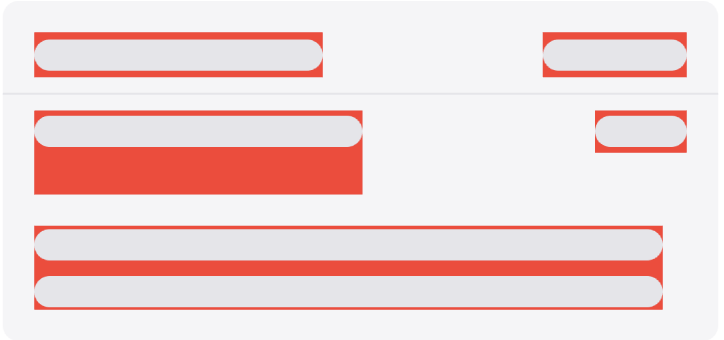
不是所有文本,而是特定长度的文本,GeometryReader决定文本应该包含两行:
public var body: some View {
    ZStack {
        if loading {
            Text(text)
                .foregroundColor(.clear)
                .background(rectReader($frame))
                .fixedSize(horizontal: false, vertical: true) //Setting vertical to false - solve unwanted behaviour, but I can have multiline text and it makes multiline text single line, so I can't solve it by this way

            VStack {
                RoundedRectangle(cornerRadius: 8)
                    .frame(width: frame.width, height: 16)
                    .foregroundColor(.colorDivider)

                if frame.height > 24 {
                    RoundedRectangle(cornerRadius: 8)
                        .frame(width: frame.width, height: 16)
                        .foregroundColor(.colorDivider)
                }
            }
        } else {
            Text(text)
                .accessibility(identifier: accessibilityIdentifier)
                .fixedSize(horizontal: false, vertical: true)
        }
    }
    .background(Color.red)
}

func rectReader(_ binding: Binding<CGRect>) -> some View {
    return GeometryReader { geometry -> AnyView in
        let rect = geometry.frame(in: .global)
        DispatchQueue.main.async {
            binding.wrappedValue = rect
        }
        return AnyView(Rectangle().fill(Color.clear))
    }
}
因此:
但应该是:
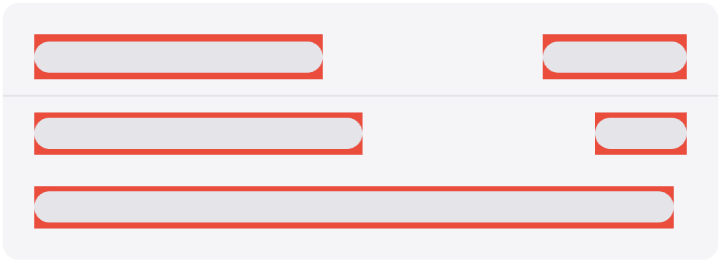
您可以在第一张图片中看到错误的第二行,但在第二张图像中看到错误的第三行(多行文本)。
回答 1
Stack Overflow用户
回答已采纳
发布于 2020-05-20 08:27:49
原因不在于Text,而在于形状。固定的变体是使用maxWidth而不是强宽度。用Xcode 11.4 / iOS 13.4测试
RoundedRectangle(cornerRadius: 8).stroke(Color.gray)
.frame(maxWidth: frame.width).frame(height: 16)页面原文内容由Stack Overflow提供。腾讯云小微IT领域专用引擎提供翻译支持
原文链接:
https://stackoverflow.com/questions/61907939
复制相关文章
相似问题
腾讯云开发者

Copyright © 2013 - 2026 Tencent Cloud. All Rights Reserved. 腾讯云 版权所有
深圳市腾讯计算机系统有限公司 ICP备案/许可证号:粤B2-20090059  粤公网安备44030502008569号
腾讯云计算(北京)有限责任公司 京ICP证150476号 | 京ICP备11018762号