
iPadOS:防止UIContextMenuInteraction在不使用指针时触发
UIMenu对UIContextMenuInteraction对UIPointerInteraction
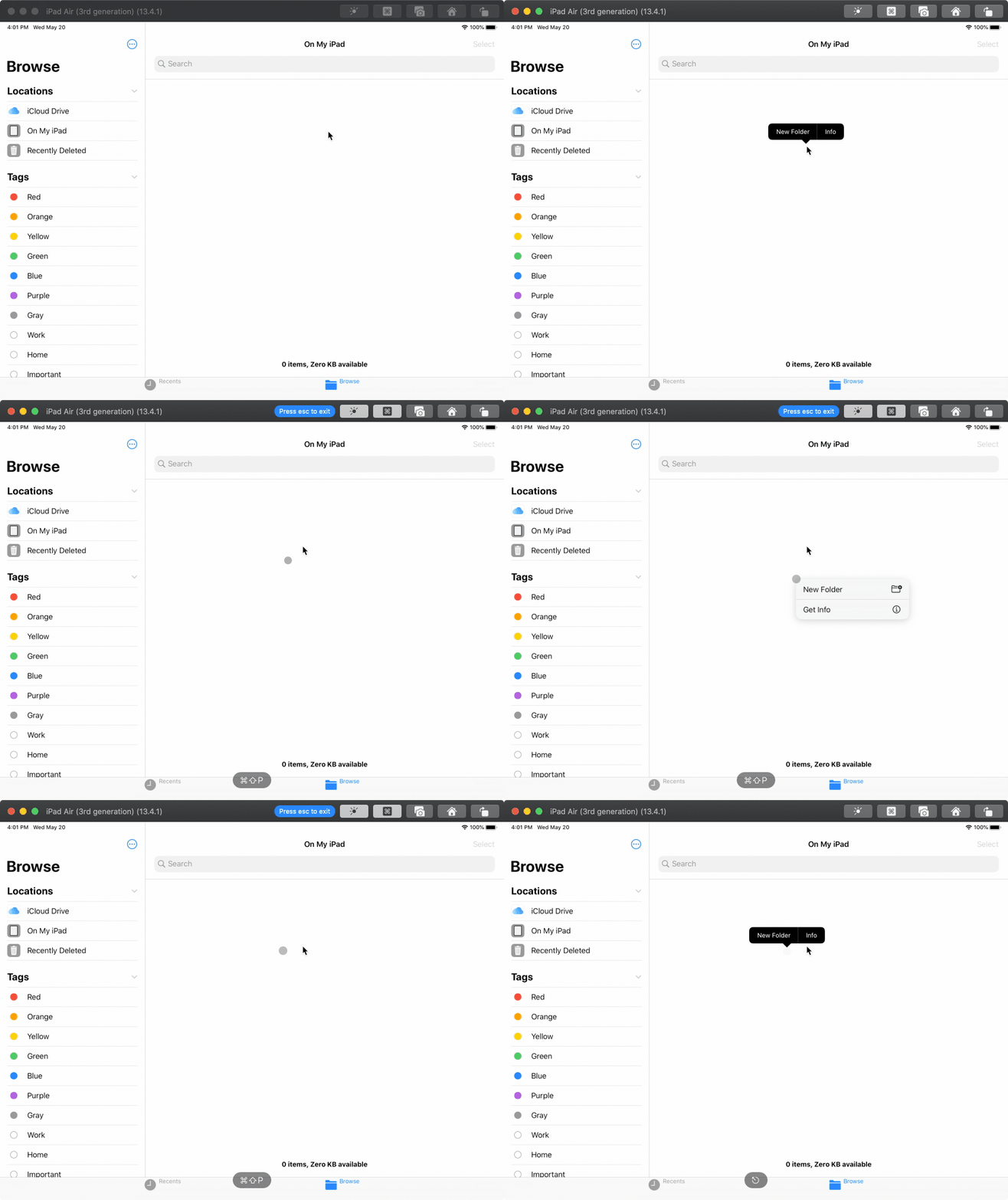
我试图以与文件或页面应用程序相同的方式设置UIContextMenuInteraction:
- (Long)点击空格中的任意位置显示黑色水平的
(右/控制)单击空格中任何位置的指针,显示上下文菜单
参见下面附加的GIF演示。
我能够设置UIContextMenuInteraction,并在它的UIContextMenuInteractionDelegate中用我想要显示的项返回UIContextMenuConfiguration。
同样,对于小型黑色UIMenu,我可以使用UILongPressGestureRecognizer并使用UIMenuController.shared.showMenu显示菜单。
但是,我无法阻止UIContextMenuInteraction在视图上长时间按下时触发和显示UITargetedPreview,而且现在似乎有办法通过提供给UIContextMenuInteractionDelegate的信息来识别不同的UITouchType。
在没有UIContextMenuInteraction的情况下,我也找不到如何以编程方式显示上下文菜单。有办法吗?
问题
这是如何在Files.app中实现的?
回答 1
Stack Overflow用户
发布于 2020-06-06 09:56:33
没有办法以编程方式触发上下文菜单,但是通过一些简单的簿记,您可以防止它在不需要的时候显示出来(例如,当触点在响应程序上处于活动状态时)。
若要隐藏预览,只需在UIContextMenuConfiguration的初始化程序中从previewProvider中返回零。
下面是一个以视图控制器的视图为目标的完整实现:
import UIKit

class ViewController: UIViewController {

    var touchesInSession = false

    override func viewDidLoad() {
        super.viewDidLoad()

        let interaction = UIContextMenuInteraction(delegate: self)
        view.addInteraction(interaction)

        let recognizer = UILongPressGestureRecognizer(target: self, action: #selector(longPressHandler))
        view.addGestureRecognizer(recognizer)
    }

    @objc func longPressHandler(recognizer: UILongPressGestureRecognizer) {
        guard recognizer.state == .began else { return }
        presentMenu(from: recognizer.location(in: view))
    }

    func presentMenu(from location: CGPoint) {
        view.becomeFirstResponder()
        let saveMenuItem = UIMenuItem(title: "New Folder", action: #selector(createFolder))
        let deleteMenuItem = UIMenuItem(title: "Get Info", action: #selector(getInfo))
        UIMenuController.shared.menuItems = [saveMenuItem, deleteMenuItem]
        UIMenuController.shared.showMenu(from: view, rect: .init(origin: location, size: .zero))
    }

    @objc func createFolder() {
        print("createFolder")
    }

    @objc func getInfo() {
        print("getInfo")
    }

    // MARK: UIResponder
    override var canBecomeFirstResponder: Bool { true }

    override func touchesBegan(_ touches: Set<UITouch>, with event: UIEvent?) {
        super.touchesBegan(touches, with: event)
        touchesInSession = true
    }

    override func touchesEnded(_ touches: Set<UITouch>, with event: UIEvent?) {
        super.touchesEnded(touches, with: event)
        touchesInSession = false
    }

    override func touchesCancelled(_ touches: Set<UITouch>, with event: UIEvent?) {
        super.touchesCancelled(touches, with: event)
        touchesInSession = false
    }
}

extension ViewController: UIContextMenuInteractionDelegate {
    func contextMenuInteraction(_ interaction: UIContextMenuInteraction, configurationForMenuAtLocation location: CGPoint) -> UIContextMenuConfiguration? {
        guard !touchesInSession else { return nil }
        let configuration = UIContextMenuConfiguration(identifier: "PointOnlyContextMenu" as NSCopying, previewProvider: { nil }, actionProvider: { suggestedActions in
            let newFolder = UIAction(title: "New Folder", image: UIImage(systemName: "folder.badge.plus")) { [weak self] _ in
                self?.createFolder()
            }
            let info = UIAction(title: "Get Info", image: UIImage(systemName: "info.circle")) { [weak self] _ in
                self?.getInfo()
            }
            return UIMenu(title: "", children: [newFolder, info])
        })
        return configuration
    }
}https://stackoverflow.com/questions/61915466
复制相似问题
腾讯云开发者

Copyright © 2013 - 2026 Tencent Cloud. All Rights Reserved. 腾讯云 版权所有
深圳市腾讯计算机系统有限公司 ICP备案/许可证号:粤B2-20090059  粤公网安备44030502008569号
腾讯云计算(北京)有限责任公司 京ICP证150476号 | 京ICP备11018762号