
是否可以将文本呈现为从qt5中的一个层中“裁剪”出来的文本?
是否可以将文本呈现为从qt5中的一个层中“裁剪”出来的文本?
提问于 2020-05-20 13:19:41
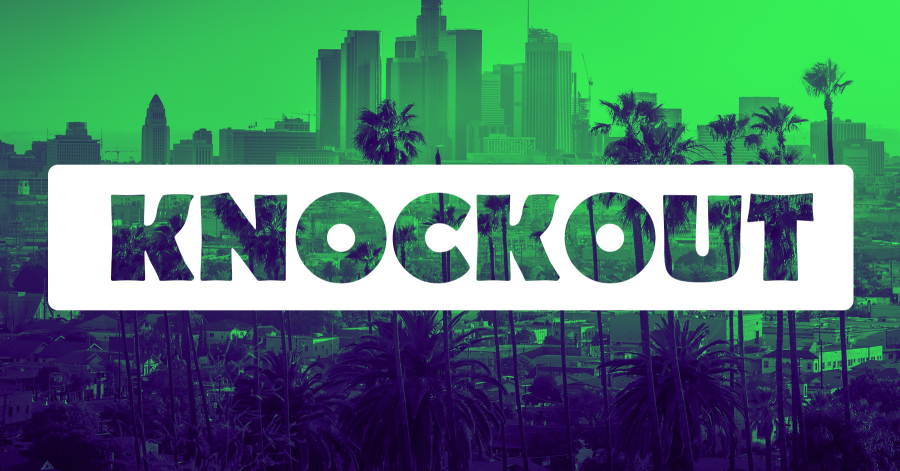
我是ui设计的新手,我想知道怎样才能达到这样的效果:如果可能的话,图层顶部的一些基于字体的文本被绘制为“删除”。
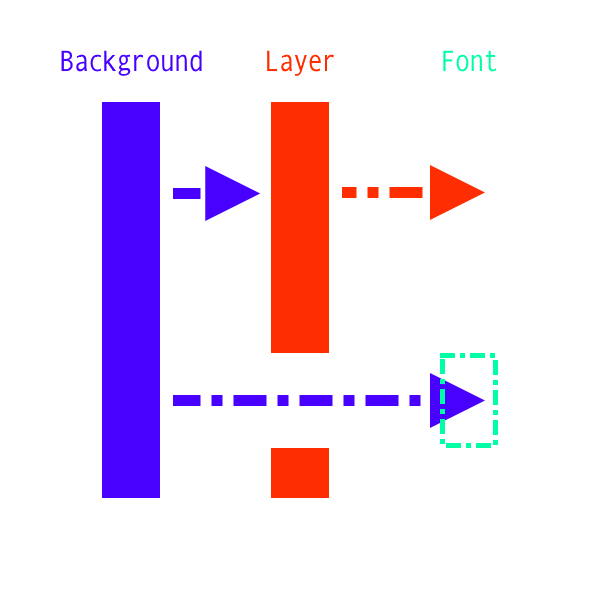
在理想情况下,文本被“裁剪”的图层本身可以产生效果,例如半透明和/或模糊,如果所述层具有跨背景的转换,则效果仍然有效。
回答 1
Stack Overflow用户
回答已采纳
发布于 2020-05-20 14:59:20
您可以使用QPainterPath和QPainter来实现这一点。
使用QPainterPath定义图像上的白色部分。首先,用rect (圆角直角)创建路径。然后,将字体正确的文本添加到路径中。默认情况下,填充规则将从rect中删除文本。
使用QPainter在背景图像上绘制路径。不要忘记启用反别名以获得更好的渲染效果。
举个例子:
class Widget(QWidget):
    def __init__(self, parent=None):
        super().__init__(parent)

        label = QLabel(self)
        label.setPixmap(self.makePixmap("knockout"))

    def makePixmap(self, text):
        background = QPixmap(600, 80)
        background.fill(Qt.red)      # Your background image

        textMask = QPainterPath()
        textMask.addRect(75, 20, 300, 40) # The white part
        textMask.addText(QPoint(90, 50), QFont("Helvetica [Cronyx]", 24), text) # the path will substract the text to the rect

        painter = QPainter(background)
        painter.setRenderHints(QPainter.Antialiasing | QPainter.TextAntialiasing)

        painter.fillPath(textMask, QBrush(Qt.white)) # Will draw the white part with the text "cut out"

        painter.end()
return background页面原文内容由Stack Overflow提供。腾讯云小微IT领域专用引擎提供翻译支持
原文链接:
https://stackoverflow.com/questions/61914123
复制相关文章
相似问题
腾讯云开发者

Copyright © 2013 - 2026 Tencent Cloud. All Rights Reserved. 腾讯云 版权所有
深圳市腾讯计算机系统有限公司 ICP备案/许可证号:粤B2-20090059  粤公网安备44030502008569号
腾讯云计算(北京)有限责任公司 京ICP证150476号 | 京ICP备11018762号