
如何通过拖动在SwiftUI ZStack中重新排列视图
如何通过将视图拖到另一个视图的上方或下方来重新排列视图在ZStack中的位置(例如,在这种情况下,我如何通过拖动一张卡片在另一张卡片之上或下面重新排列牌的顺序,以将拖到牌后面或前面的牌移到甲板上的牌前)。
我希望当卡在堆栈中向上或向下拖动时更改索引,并在拖动时在堆栈中的每一张卡片后面流畅地显示--并在鼠标上停留在那里。
换句话说,卡被拖动,上面的牌应该在我拖起的时候切换,下面的牌应该在我向下拖动的时候切换。
我认为这与改变ZStack在struct CardView: View中的顺序和通过评估卡被拖了多少(也许通过查看self.offset值)从DragGesture().onChanged内部更新位置有关,但我还没有想出如何以可靠的方式做到这一点。
我现在要说的是:
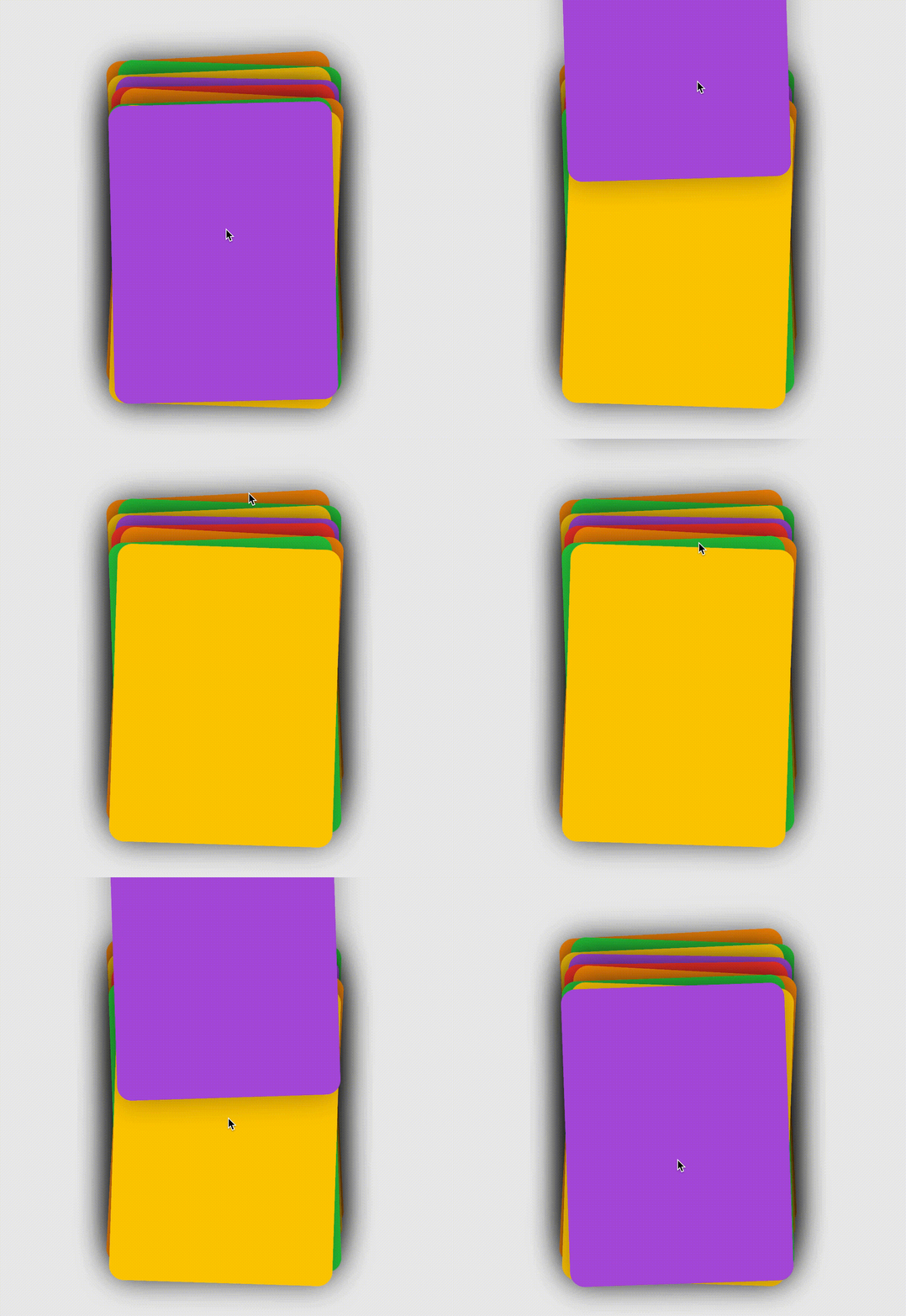
代码:
import SwiftUI

let cardSpace:CGFloat = 10

struct ContentView: View {
    @State var cardColors: [Color] = [.orange, .green, .yellow, .purple, .red, .orange, .green, .yellow, .purple]
    var body: some View {
            HStack {
                VStack {
                    CardView(colors: self.$cardColors)
                }
            }
            .frame(maxWidth: .infinity, maxHeight: .infinity)
            .position(x: 370, y: 300)
    }
}

struct CardView: View {
    @State var offset = CGSize.zero
    @State var dragging:Bool = false
    @State var tapped:Bool = false
    @State var tappedLocation:Int = -1
    @Binding var colors: [Color]
    @State var locationDragged:Int = -1
    var body: some View {
        GeometryReader { reader in
            ZStack {
                ForEach(0..<self.colors.count, id: \.self) { i in
                    ColorCard(reader:reader, i:i, colors: self.$colors, offset: self.$offset, tappedLocation: self.$tappedLocation, locationDragged:self.$locationDragged, tapped: self.$tapped, dragging: self.$dragging)
                }
            }
        }
        .animation(.spring())
    }
}

struct ColorCard: View {
    var reader: GeometryProxy
    var i:Int
    @State var offsetHeightBeforeDragStarted: Int = 0
    @Binding var colors: [Color]
    @Binding var offset: CGSize
    @Binding var tappedLocation:Int
    @Binding var locationDragged:Int
    @Binding var tapped:Bool
    @Binding var dragging:Bool
    var body: some View {
        VStack {
            Group {
            VStack {
                self.colors[i]
            }
            .frame(width: 300, height: 400)
            .cornerRadius(20).shadow(radius: 20)
            .offset(
                x: (self.locationDragged == i) ? CGFloat(i) * self.offset.width / 14
                    : 0,
                y: (self.locationDragged == i) ? CGFloat(i) * self.offset.height / 4
                    : 0
            )
            .offset(
                x: (self.tapped && self.tappedLocation != i) ? 100 : 0,
                y: (self.tapped && self.tappedLocation != i) ? 0 : 0
            )
            .position(x: reader.size.width / 2, y: (self.tapped && self.tappedLocation == i) ? -(cardSpace * CGFloat(i)) + 0 : reader.size.height / 2)
            }
                .rotationEffect(
                    (i % 2 == 0) ? .degrees(-0.2 * Double(arc4random_uniform(15)+1) ) : .degrees(0.2 * Double(arc4random_uniform(15)+1) )
                )

                .onTapGesture() { //Show the card
                    self.tapped.toggle()
                    self.tappedLocation = self.i
            }

            .gesture(
                DragGesture()
                    .onChanged { gesture in
                        self.locationDragged = self.i
                        self.offset = gesture.translation
                        self.dragging = true
                }
                .onEnded { _ in
                    self.locationDragged = -1 //Reset
                    self.offset = .zero
                    self.dragging = false
                    self.tapped = false //enable drag to dismiss
                    self.offsetHeightBeforeDragStarted = Int(self.offset.height)
                }
            )
        }.offset(y: (cardSpace * CGFloat(i)))
    }
}回答 3
Stack Overflow用户
发布于 2020-05-24 04:47:51
看看这个:
“诀窍”是,您只需重新排序z顺序的项目。因此,你必须在一个数组中“持有”卡片。
let cardSpace:CGFloat = 10

struct Card : Identifiable, Hashable, Equatable {

    static func == (lhs: Card, rhs: Card) -> Bool {
        lhs.id == rhs.id
    }


    func hash(into hasher: inout Hasher) {
        hasher.combine(id)
    }

    var id = UUID()

    var intID : Int

    static let cardColors: [Color] = [.orange, .green, .yellow, .purple, .red, .orange, .green, .yellow, .purple]

    var zIndex : Int
    var color : Color
}

class Data: ObservableObject {

    @Published var cards : [Card] = []

    init() {
        for i in 0..<Card.cardColors.count {
            cards.append(Card(intID: i, zIndex: i, color: Card.cardColors[i]))
        }
    }
}

struct ContentView: View {

    @State var data : Data = Data()

    var body: some View {
        HStack {
            VStack {
                CardView().environmentObject(data)
            }
        }
        .frame(maxWidth: .infinity, maxHeight: .infinity)
     //   .position(x: 370, y: 300)
    }
}

struct CardView: View {

    @EnvironmentObject var data : Data

    @State var offset = CGSize.zero
    @State var dragging:Bool = false
    @State var tapped:Bool = false
    @State var tappedLocation:Int = -1
    @State var locationDragged:Int = -1
    var body: some View {
        GeometryReader { reader in
            ZStack {
                ForEach(self.data.cards, id: \.self) { card in
                    ColorCard(card: card, reader:reader, offset: self.$offset, tappedLocation: self.$tappedLocation, locationDragged:self.$locationDragged, tapped: self.$tapped, dragging: self.$dragging)
                        .environmentObject(self.data)
                        .zIndex(Double(card.zIndex))
                }
            }
        }
        .animation(.spring())
    }
}

struct ColorCard: View {

    @EnvironmentObject var data : Data

    var card: Card

    var reader: GeometryProxy
    @State var offsetHeightBeforeDragStarted: Int = 0
    @Binding var offset: CGSize
    @Binding var tappedLocation:Int
    @Binding var locationDragged:Int
    @Binding var tapped:Bool
    @Binding var dragging:Bool
    var body: some View {
        VStack {
            Group {
                VStack {
                    card.color
                }
                .frame(width: 300, height: 400)
                .cornerRadius(20).shadow(radius: 20)
                .offset(
                    x: (self.locationDragged == card.intID) ? CGFloat(card.zIndex) * self.offset.width / 14
                        : 0,
                    y: (self.locationDragged == card.intID) ? CGFloat(card.zIndex) * self.offset.height / 4
                        : 0
                )
                    .offset(
                        x: (self.tapped && self.tappedLocation != card.intID) ? 100 : 0,
                        y: (self.tapped && self.tappedLocation != card.intID) ? 0 : 0
                )
                    .position(x: reader.size.width / 2, y: (self.tapped && self.tappedLocation == card.intID) ? -(cardSpace * CGFloat(card.zIndex)) + 0 : reader.size.height / 2)
            }
            .rotationEffect(
                (card.zIndex % 2 == 0) ? .degrees(-0.2 * Double(arc4random_uniform(15)+1) ) : .degrees(0.2 * Double(arc4random_uniform(15)+1) )
            )

                .onTapGesture() { //Show the card
                    self.tapped.toggle()
                    self.tappedLocation = self.card.intID
            }

            .gesture(
                DragGesture()
                    .onChanged { gesture in

                        self.locationDragged = self.card.intID
                        self.offset = gesture.translation

                        if self.offset.height > 60 ||
                        self.offset.height < -60 {
                            withAnimation {

                                if let index = self.data.cards.firstIndex(of: self.card) {
                                    self.data.cards.remove(at: index)
                                    self.data.cards.append(self.card)

                                    for index in 0..<self.data.cards.count {
                                        self.data.cards[index].zIndex = index
                                    }
                                }
                            }
                        }

                        self.dragging = true
                }
                .onEnded { _ in
                    self.locationDragged = -1 //Reset
                    self.offset = .zero
                    self.dragging = false
                    self.tapped = false //enable drag to dismiss
                    self.offsetHeightBeforeDragStarted = Int(self.offset.height)
                }
            )
        }.offset(y: (cardSpace * CGFloat(card.zIndex)))
    }
}

struct ContentView_Previews: PreviewProvider {
    static var previews: some View {
        ContentView().environmentObject(Data())
    }
}
Stack Overflow用户
发布于 2020-05-24 04:45:42
只是一个想法(原因需要重新思考/重新编码你的解决方案)。在您的情况下,重新排序需要使用/修改卡片zIndex,因此它需要存储在某个地方。
因此,您需要更显式的模型对象,而不是直接使用颜色作为模型。
struct Card {
   var color: Color
   var deckOrder: Int
}注意:下面的是伪代码,您必须自己修改它。
接下来,您可以按卡片进行保存和迭代(我会将它们分离为ObsesrvableObject视图模型)
ForEach(Array(vm.cards.enumerated()), id: \.element) { i, card in
    ColorCard(reader:reader, i:i, cards: self.$vm.cards,
              offset: self.$offset, tappedLocation: self.$tappedLocation,
              locationDragged:self.$locationDragged, tapped: self.$tapped,
              dragging: self.$dragging)
      .zIndex(card.deckOrder)
}现在,在拖动时更改card.deckOrder,您将在甲板上更改视图/卡片的zIndex。
Stack Overflow用户
发布于 2020-05-25 06:07:16
在克里斯回答的基础上,我想出了这个。一些缺点是:它需要每次移动一个阻力,而一个拖曳无限期地向上或向下移动。
演示:
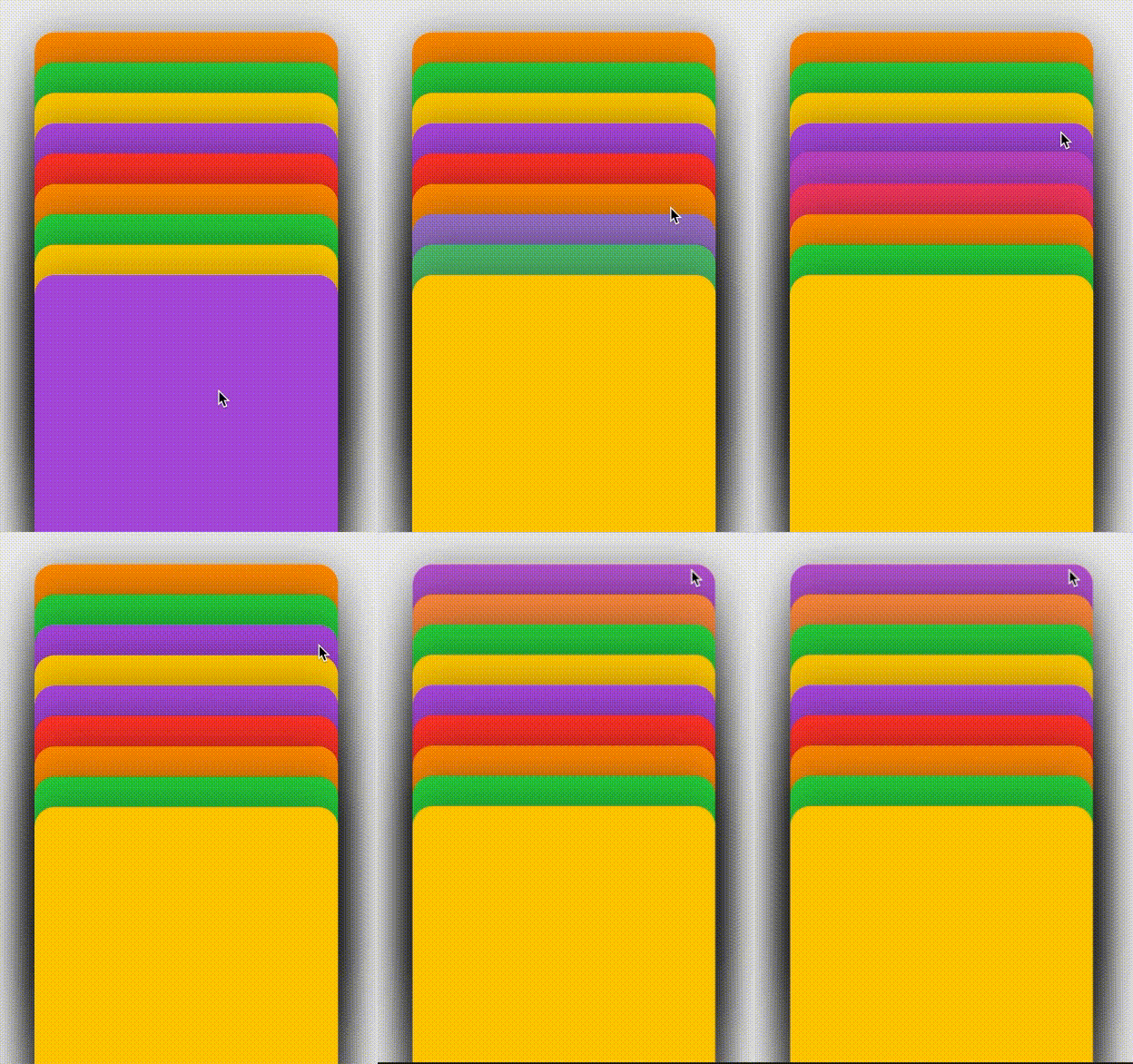
import SwiftUI

let cardSpace:CGFloat = 10 + 20

struct Card : Identifiable, Hashable, Equatable {

    static func == (lhs: Card, rhs: Card) -> Bool {
        lhs.id == rhs.id
    }


    func hash(into hasher: inout Hasher) {
        hasher.combine(id)
    }

    var id = UUID()

    var intID : Int

    static let cardColors: [Color] = [.orange, .green, .yellow, .purple, .red, .orange, .green, .yellow, .purple]

    var zIndex : Int
    var color : Color
}

class Data: ObservableObject {

    @Published var cards : [Card] = []

    init() {
        for i in 0..<Card.cardColors.count {
            cards.append(Card(intID: i, zIndex: i, color: Card.cardColors[i]))
        }
    }
}

struct ContentView: View {

    @State var data : Data = Data()

    var body: some View {
        HStack {
            VStack {
                CardView().environmentObject(data)
            }
        }
        .frame(maxWidth: .infinity, maxHeight: .infinity)
     //   .position(x: 370, y: 300)
    }
}

struct CardView: View {

    @EnvironmentObject var data : Data

    @State var offset = CGSize.zero
    @State var dragging:Bool = false
    @State var tapped:Bool = false
    @State var tappedLocation:Int = -1
    @State var locationDragged:Int = -1
    var body: some View {
        GeometryReader { reader in
            ZStack {
                ForEach((0..<self.data.cards.count), id: \.self) { i in
                    ColorCard(card: self.data.cards[i], reader:reader, offset: self.$offset, tappedLocation: self.$tappedLocation, locationDragged:self.$locationDragged, tapped: self.$tapped, dragging: self.$dragging, i: i)
                        .environmentObject(self.data)
                        .zIndex(Double(self.data.cards[i].zIndex))
                }
            }
        }
        .animation(.spring())
    }
}

struct ColorCard: View {

    @EnvironmentObject var data : Data

    var card: Card

    var reader: GeometryProxy
    @State var offsetHeightBeforeDragStarted: Int = 0
    @Binding var offset: CGSize
    @Binding var tappedLocation:Int
    @Binding var locationDragged:Int
    @Binding var tapped:Bool
    @Binding var dragging:Bool
    @State var i: Int
    @State var numTimesCalledSinceDragBegan: Int = 0
    var body: some View {
        VStack {
            Group {
                VStack {
                    card.color
                }
                .frame(width: 300, height: 400)
                .cornerRadius(20).shadow(radius: 20)
                .offset(
                    x: (self.numTimesCalledSinceDragBegan <= 1 && self.locationDragged == card.intID) ? CGFloat(card.zIndex) * self.offset.width / 14
                        : 0,
                    y: (self.numTimesCalledSinceDragBegan <= 1 && self.locationDragged == card.intID) ? CGFloat(card.zIndex) * self.offset.height / 4
                        : 0
                )
                    .offset(
                        x: (self.tapped && self.tappedLocation != card.intID) ? 100 : 0,
                        y: (self.tapped && self.tappedLocation != card.intID) ? 0 : 0
                )
                    .position(x: reader.size.width / 2, y: (self.tapped && self.tappedLocation == card.intID) ? -(cardSpace * CGFloat(card.zIndex)) + 0 : reader.size.height / 2)
            }
//            .rotationEffect(
//                (card.zIndex % 2 == 0) ? .degrees(-0.2 * Double(arc4random_uniform(15)+1) ) : .degrees(0.2 * Double(arc4random_uniform(15)+1) )
//            )

//                .onTapGesture() { //Show the card
//                    self.tapped.toggle()
//                    self.tappedLocation = self.card.intID
//
//            }

                .gesture(
                    DragGesture()
                        .onChanged { gesture in
                            self.numTimesCalledSinceDragBegan += 1

                            self.locationDragged = self.card.intID
                            self.offset = gesture.translation

                            if(self.numTimesCalledSinceDragBegan == 1) {
                                if let index = self.data.cards.firstIndex(of: self.card) {
                                    if(self.offset.height >= 0) {self.i += 1 } else {self.i -= 1}
                                    self.data.cards.remove(at: index)
                                    self.data.cards.insert(self.card, at:

                                        (self.offset.height >= 0) ?  self.i :  self.i
                                    )


                                    for index in 0..<self.data.cards.count {
                                        self.data.cards[index].zIndex = index
                                    }
                                }
                            }


                            self.dragging = true
                    }
                    .onEnded { _ in
                        self.locationDragged = -1 //Reset
                        self.offset = .zero
                        self.dragging = false
                        self.tapped = false //enable drag to dismiss
                        self.offsetHeightBeforeDragStarted = Int(self.offset.height)
                        self.numTimesCalledSinceDragBegan = 0
                    }
            )
        }.offset(y: (cardSpace * CGFloat(card.zIndex)))
    }
}

struct ContentView_Previews: PreviewProvider {
    static var previews: some View {
        ContentView().environmentObject(Data())
    }
}https://stackoverflow.com/questions/61980355
复制相似问题
腾讯云开发者

Copyright © 2013 - 2026 Tencent Cloud. All Rights Reserved. 腾讯云 版权所有
深圳市腾讯计算机系统有限公司 ICP备案/许可证号:粤B2-20090059  粤公网安备44030502008569号
腾讯云计算(北京)有限责任公司 京ICP证150476号 | 京ICP备11018762号