
WebAssembly: builder.Services.AddMsalAuthentication抛出异常=>无法读取未定义的属性“联接”
我第一次尝试使用MSAL授权,但在Blazor中失败了。有什么线索(我想这将是一个简单的答案?)
小型回购可用这里
客户端文件: Program.cs
var builder = WebAssemblyHostBuilder.CreateDefault(args);
builder.RootComponents.Add<App>("app");

builder.Services.AddMsalAuthentication(options => //THROWS EXCEPTION!!!!!
{
    options.ProviderOptions.AdditionalScopesToConsent.Add($"https://graph.microsoft.com/User.Read");
});

var baseAddress = builder.HostEnvironment.BaseAddress;
builder.Services.AddHttpClient(baseAddress, client => client.BaseAddress = new Uri(baseAddress))
        .AddHttpMessageHandler<BaseAddressAuthorizationMessageHandler>();
意外结果:抛出异常
暴击:
Microsoft.AspNetCore.Components.WebAssembly.Rendering.WebAssemblyRenderer100未处理异常呈现组件:无法读取未定义TypeError的属性“联接”:无法读取未定义的Function.createUserManager (content/Microsoft.AspNetCore.Components.WebAssembly.Authentication/AuthenticationService.js:1:6020) at Function.initializeCore (content/Microsoft.AspNetCore.Components.WebAssembly.Authentication/AuthenticationService.js:1:5035) at Function.init (content/Microsoft.AspNetCore.Components.WebAssembly.Authentication/AuthenticationService.js:1:4575) at .:1:9873 at Object.beginInvokeJSFromDotNet (
C7< )的属性“联接”( /code>) at _mono_wasm_invoke_js_marshalled (框架/wasm/dotnet.3.2.0.js:1:171294) at do_icall (wasm-function1120 6049:0x10f8b1) at do_icall_wrapper (wasm-function1120 1896:0x50b6a) at interp_exec_method (wasm-function1120 1120:0x2588e)
回答 2
Stack Overflow用户
发布于 2020-05-27 15:18:41
试试这样的..。
builder.Services.AddMsalAuthentication(options =>
{
    ...

    options.ProviderOptions.AdditionalScopesToConsent.Add(
        "https://graph.microsoft.com/Mail.Send");
    options.ProviderOptions.AdditionalScopesToConsent.Add(
        "https://graph.microsoft.com/User.Read");
}
希望能帮上忙!
编辑1: My client Program.cs
using System.Net.Http; using Microsoft.AspNetCore.Components.WebAssembly.Authentication;
在Index.html页面中添加以下引用
<script src="_content/Microsoft.AspNetCore.Components.WebAssembly.Authentication/AuthenticationService.js"></script>public static async Task Main(string[] args)
{
var builder = WebAssemblyHostBuilder.CreateDefault(args);
builder.RootComponents.Add<App>("app");
builder.Services.AddHttpClient("BlazorWasmAADMsal.ServerAPI", client => client.BaseAddress = new Uri(builder.HostEnvironment.BaseAddress))
.AddHttpMessageHandler<BaseAddressAuthorizationMessageHandler>();
// Supply HttpClient instances that include access tokens when making requests to the server project
builder.Services.AddTransient(sp => sp.GetRequiredService<IHttpClientFactory>().CreateClient("BlazorWasmAADMsal.ServerAPI"));
builder.Services.AddMsalAuthentication(options =>
{
builder.Configuration.Bind("AzureAd", options.ProviderOptions.Authentication);
options.ProviderOptions.DefaultAccessTokenScopes.Add("api://XXXXXXXXXXXXXXXXXX/API.Access");
});
await builder.Build().RunAsync();
}编辑2:做了一些小改动。工作项目已经上传到这里。成功的登录屏幕快照添加了答案,以供参考。:-)
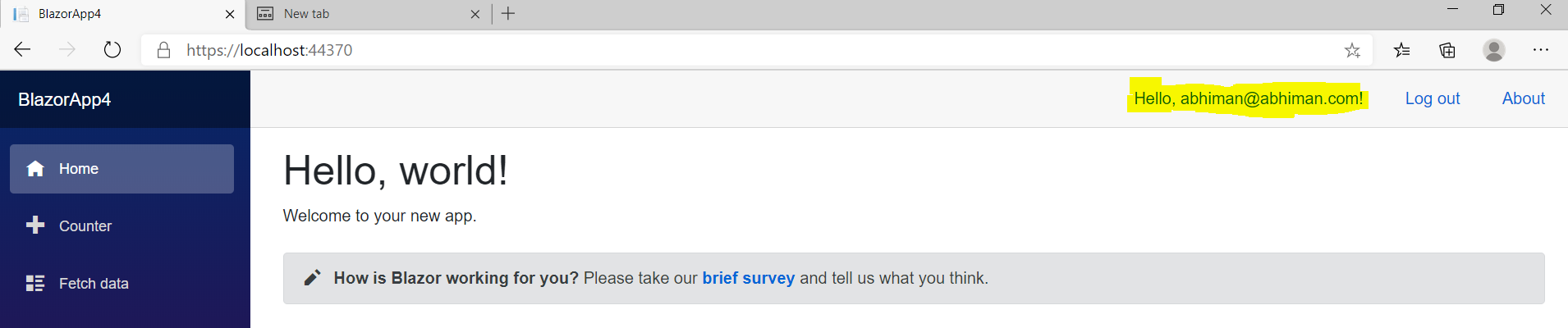
编辑3:
应用程序需要Azure Active Directory (AAD) Microsoft作用域来读取用户数据和发送邮件。在Azure AAD门户中添加Microsoft权限后,将在客户端应用程序中配置其他作用域。
上一次我错过了下面的“启用”,我在Program.cs中启用了它
  builder.Services.AddMsalAuthentication(options =>
       {
options.ProviderOptions.DefaultAccessTokenScopes.Add("https://graph.microsoft.com/User.Read");
     }
这是一个奇怪的错误,从来没有预料到,也从未见过。
AuthenticationService.js在Index.html中的参考值不正确。我把它修正为..。
<script src="_content/Microsoft.Authentication.WebAssembly.Msal/AuthenticationService.js"></script>我还上传了最新的代码这里
IAccessTokenProvider.RequestToken方法提供了一个重载,允许应用程序提供具有给定范围集的访问令牌。
在Razor组件中,您可以编写如下内容:
@using Microsoft.AspNetCore.Components.WebAssembly.Authentication
@inject IAccessTokenProvider TokenProvider

...

var tokenResult = await TokenProvider.RequestAccessToken(
    new AccessTokenRequestOptions
    {
        Scopes = new[] { "https://graph.microsoft.com/Mail.Send",
            "https://graph.microsoft.com/User.Read" }
    });

if (tokenResult.TryGetToken(out var token))
{
    ...
}
AccessTokenResult.TryGetToken返回:
带有使用令牌的true。如果令牌未被检索,则为false。
希望它能帮到你。
Stack Overflow用户
发布于 2022-09-09 10:18:23
检查MSAL脚本是否位于索引页面中:
<script src="_content/Microsoft.Authentication.WebAssembly.Msal/AuthenticationService.js"></script>
这解决了我同样的问题,当我将MSAL追溯到一个现有的Blazor应用程序中时,它引用了JS文件:
<script src="_content/Microsoft.AspNetCore.Components.WebAssembly.Authentication/AuthenticationService.js"></script>
如果存在此JS ref,请将其删除并替换为MSAL版本。
https://stackoverflow.com/questions/62045696
复制相似问题
腾讯云开发者

Copyright © 2013 - 2026 Tencent Cloud. All Rights Reserved. 腾讯云 版权所有
深圳市腾讯计算机系统有限公司 ICP备案/许可证号:粤B2-20090059  粤公网安备44030502008569号
腾讯云计算(北京)有限责任公司 京ICP证150476号 | 京ICP备11018762号