
GeometryReader与ScrollView的结合
GeometryReader与ScrollView的结合
提问于 2020-05-28 09:33:27
我试图使用GeometryReader将maxHeight分配给Scrollview中的列表。
为了解决这个问题,我创建了以下项目:GeometryReaderTesting。
它使用以下参数设置ContentView:
- 文本。
- 列表。
- 文本。
我使用
@ViewBuilder将列表和最后文本提取到自己的视图中,并希望将列表的maxHeight设置为用户屏幕高度的.5。
问题是,应用程序不会生成以下错误,而且GeometryReader似乎没有计算出正确的高度:
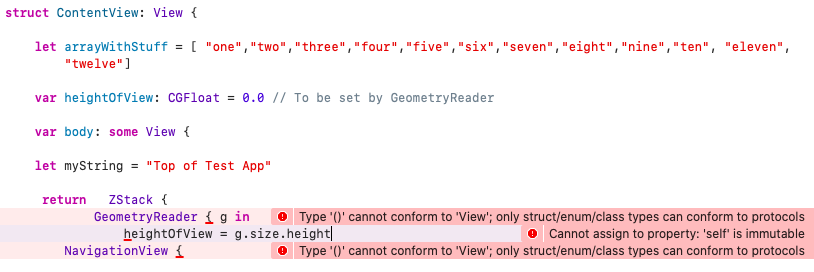
这是我的ContentView代码,如果有人知道我做错了什么…
struct ContentView: View {

    let arrayWithStuff = [ "one","two","three","four","five","six","seven","eight","nine","ten", "eleven", "twelve"]

    var heightOfView: CGFloat = 0.0 // To be set by GeometryReader

    var body: some View {

    let myString = "Top of Test App"

     return   ZStack {
            GeometryReader { g in
                heightOfView = g.size.height
        NavigationView {

            print("height of view : \(heightOfView)")
             ScrollView {
                VStack {
                    Text(myString)
                    .padding()
                    Divider()
                    self.ViewBody()
                } // END of Vstack
                    .navigationBarTitle("Test App", displayMode: .inline)
            } // END of Scrollview
                }//End of NavigationView
            } // End of Geometry reader
        } // End of Zstack

  } // End of body


    @ViewBuilder func ViewBody() -> some View {
        VStack {
            List {
                ForEach (self.arrayWithStuff, id: \.self) { item in
                    Text(item) }
            } // END of List
                .frame(maxHeight: heightOfView*0.5)
            Divider()
            Text("Bottom of TEST APP")
        }
        .padding()
    }
}
再一次,任何帮助都将不胜感激。
回答 1
Stack Overflow用户
回答已采纳
发布于 2020-05-28 09:57:36
下面是一个可能的解决方案的演示。用Xcode 11.4测试。
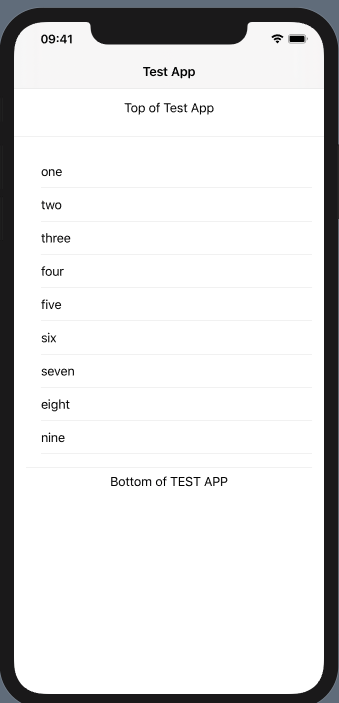
struct ContentView: View {

    let arrayWithStuff = [ "one","two","three","four","five","six","seven","eight","nine","ten", "eleven", "twelve"]

    var body: some View {

        let myString = "Top of Test App"

        return   ZStack {
            GeometryReader { g in
                NavigationView {
                    ScrollView {
                        VStack {
                            Text(myString)
                                .padding()
                            Divider()
                            self.ViewBody(height: g.size.height)
                        } // END of Vstack
                            .navigationBarTitle("Test App", displayMode: .inline)
                    } // END of Scrollview
                }//End of NavigationView
            } // End of Geometry reader
        } // End of Zstack

    } // End of body


    func ViewBody(height: CGFloat) -> some View {
        print("height of view : \(height)")
        return VStack {
            List {
                ForEach (self.arrayWithStuff, id: \.self) { item in
                    Text(item) }
            } // END of List
                .frame(height: height*0.5)
            Divider()
            Text("Bottom of TEST APP")
        }
        .padding()
    }
}页面原文内容由Stack Overflow提供。腾讯云小微IT领域专用引擎提供翻译支持
原文链接:
https://stackoverflow.com/questions/62061420
复制相关文章
相似问题
腾讯云开发者

Copyright © 2013 - 2026 Tencent Cloud. All Rights Reserved. 腾讯云 版权所有
深圳市腾讯计算机系统有限公司 ICP备案/许可证号:粤B2-20090059  粤公网安备44030502008569号
腾讯云计算(北京)有限责任公司 京ICP证150476号 | 京ICP备11018762号