
在Rappid框架内。元素在用fromJSON方法重新创建时未能指向端口。
在Rappid框架内。元素在用fromJSON方法重新创建时未能指向端口。
提问于 2020-05-30 13:00:41
我仅使用以下定义在模具区域中创建元素
joint.util.defaultsDeep({
        type: 'app.RectangularModel',
        attrs: {
            root: {
                magnet: false
            }
        },
        ports: {
            groups: {
                'in': {
                    markup: [{
                        tagName: 'path',
                        selector: 'portBody',
                        attributes: {
                            'd': 'M0 -10 L-5 -10 Q-10 0 -5 10 L 0 10 Z'
                        }
                    }],
                    attrs: {
                        portBody: {
                            magnet: true,
                            fill: '#61549c',
                            strokeWidth: 0
                        },
                        portLabel: {
                            fontSize: 11,
                            fill: '#61549c',
                            fontWeight: 800
                        }
                    },
                    position: {
                        name: 'left'
                    },
                    label: {
                        position: {
                            name: 'left',
                            args: {
                                y: 0
                            }
                        }
                    }
                },
                'out': {
                    markup: [{
                        tagName: 'path',
                        selector: 'portBody',
                        attributes: {
                            'd': 'M0 -10 L5 -10 Q10 0 5 10 L 0 10 Z',
                            'fill': 'purple',
                            'stroke': 'purple'
                        }
                    }],
                    position: {
                        name: 'right'
                    },
                    attrs: {
                        portBody: {
                            magnet: true,
                            fill: '#61549c',
                            strokeWidth: 0
                        },
                        portLabel: {
                            fontSize: 11,
                            fill: '#61549c',
                            fontWeight: 800
                        }
                    },
                    label: {
                        position: {
                            name: 'right',
                            args: {
                                y: 0
                            }
                        }
                    }
                }
            }
        }
    }, joint.shapes.standard.Rectangle.prototype.defaults);
在像往常一样完成纸张区域的绘图(一切正常)之后,我在工具栏上有一个保存按钮。该按钮的功能是将绘图数据保存到API服务器中,以便稍后加载。
我使用函数graph.toJSON()方法在服务器上保存图形数据。但是,当我试图复制相同的图形JSON数据时,使用函数graph.fromJSON,链接并没有正确地指向端口。
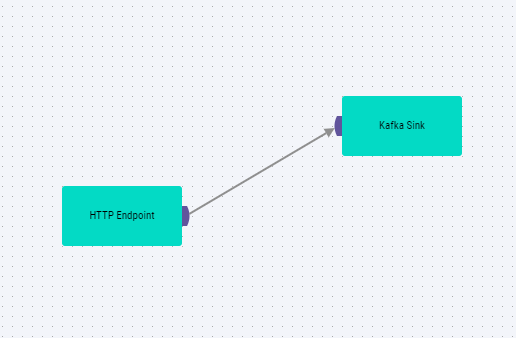
这是原始图像绘制的
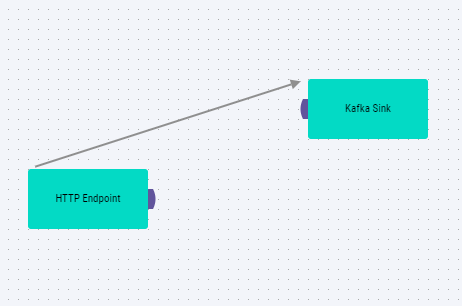
这是用graph.fromJSON method再现的图像
问题:
当使用函数graph.fromJSON函数在图形中再现图形数据时,您可以在图像中看到,如果元素而不是元素中绘制的端口,则链接指向0,0位置。
回答 1
Stack Overflow用户
回答已采纳
发布于 2020-06-16 16:05:33
解决了这个问题。在将文件附加到DOM之前,我添加了图形数据。在创建纸张并将其附加到DOM之后,当我使用graph.addCells时,该图形呈现得很好。
页面原文内容由Stack Overflow提供。腾讯云小微IT领域专用引擎提供翻译支持
原文链接:
https://stackoverflow.com/questions/62102791
复制相关文章
相似问题
腾讯云开发者

Copyright © 2013 - 2026 Tencent Cloud. All Rights Reserved. 腾讯云 版权所有
深圳市腾讯计算机系统有限公司 ICP备案/许可证号:粤B2-20090059  粤公网安备44030502008569号
腾讯云计算(北京)有限责任公司 京ICP证150476号 | 京ICP备11018762号