
无法将数据格式写入excel
无法将数据格式写入excel
提问于 2020-06-06 15:31:17
我试图对数据格式进行样式化,并试图将结果写入excel工作表。但当我试图写的结果,以excel,它没有保留样式。这是我尝试过的。
import pandas as pd
df1 = pd.DataFrame({'Data': ["Hello", "Hai", "Hello", "Hai", "Hello", "Hai", "Hello"],'Data1': [10, 20, 30, 20, 15, 30, 45], })
df2 = pd.DataFrame({'Data': ["Hello", "Hai", "Hello", "Hai", "Hello", "Hai", "Hello"],'Data1': [10, 20, 30, 20, 15, 30, 45], })
data_to_be_colored = "Hello"

df1 = df1.style.apply(lambda x: ['background:lightblue' if x == data_to_be_colored else 'background:lightgrey' for x in df1.Data], axis=0)

df3 = {'Test 1': df1, 'Test 2': df2}

writer = pd.ExcelWriter(r'Styled_Excel.xlsx')
for sheetname, df in df3.items():
    df.to_excel(writer, sheet_name=sheetname, index = False)
    worksheet = writer.sheets[sheetname]
writer.save()
接收错误:
AttributeError:'Styler‘对象没有属性’样式‘
有人能告诉我,上面的代码有什么问题吗?如何编写出类拔萃的保存样式?
回答 2
Stack Overflow用户
回答已采纳
发布于 2020-06-06 19:30:29
我试着从这里复制答案,here。问题似乎在于您需要设置background-color而不是background。
from IPython.display import HTML

def highlight(x):
    r = '#ADD8E6'
    g = '#B0B0B0'

    m1 = x["Data"] == "Hello"
    m2 = x["Data"] != "Hello"
    df1 = pd.DataFrame('', index=x.index, columns=x.columns)
    for col in x:
        df1[col] = np.where(m1, 'background-color: {}'.format(r), df1[col])
        df1[col] = np.where(m2, 'background-color: {}'.format(g), df1[col])

    return df1

df1.style.apply(highlight, axis=None).to_excel('df.xlsx', engine='openpyxl')
输出:
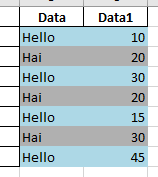
但是,如果我尝试使用lightblue和淡灰色,它就不能工作,所以我尝试使用HTML颜色。
更新
如果要对不同的列着色,请尝试如下:
def highlight(x):
    r = '#ADD8E6'
    g = '#B0B0B0'
    red  = "#FF0000"

    m1 = x["A"] == "Hello"
    m2 = x["A"] != "Hello"
    df1 = pd.DataFrame('', index=x.index, columns=x.columns)
    for col in x[["A","B"]]:
        df1[col] = np.where(m1, 'background-color: {}'.format(r), df1[col])
        df1[col] = np.where(m2, 'background-color: {}'.format(g), df1[col])

    for col in x[["C","D"]]:
        df1[col] = 'background-color: {}'.format(red)

    return df1

df1.style.apply(highlight, axis=None)
输出:
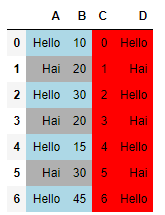
Stack Overflow用户
发布于 2020-06-06 17:20:19
试试这个:
import pandas as pd
df1 = pd.DataFrame({'Data': ["Hello", "Hai", "Hello", "Hai", "Hello", "Hai", "Hello"],'Data1': [10, 20, 30, 20, 15, 30, 45], })
df2 = pd.DataFrame({'Data': ["Hello", "Hai", "Hello", "Hai", "Hello", "Hai", "Hello"],'Data1': [10, 20, 30, 20, 15, 30, 45], })
data_to_be_colored = "Hello"

df1 = df1.style.applymap(lambda x: 'background-color : lightblue' if x == data_to_be_colored else '', subset = ['Data'])

df3 = {'Test 1': df1, 'Test 2': df2}

writer = pd.ExcelWriter(r'Styled_Excel.xlsx')
for sheetname, df in df3.items():
    df.to_excel(writer, sheet_name=sheetname, index = False)
    worksheet = writer.sheets[sheetname]
writer.save()保存后需要(),可以指定要用subset突出显示的特定列。
页面原文内容由Stack Overflow提供。腾讯云小微IT领域专用引擎提供翻译支持
原文链接:
https://stackoverflow.com/questions/62233948
复制相关文章
相似问题
腾讯云开发者

Copyright © 2013 - 2026 Tencent Cloud. All Rights Reserved. 腾讯云 版权所有
深圳市腾讯计算机系统有限公司 ICP备案/许可证号:粤B2-20090059  粤公网安备44030502008569号
腾讯云计算(北京)有限责任公司 京ICP证150476号 | 京ICP备11018762号