
使用子组件状态响应提交数据
我目前正在研究React,我对如何为我的项目组织组件的布局提出了疑问。基本上,我有一个父组件和两个子组件。我能够将状态发送到父组件,并尝试将数据(从子组件接收)提交到数据库。按钮位于父组件上。但是,每当我提交数据时,它就会发送以前提交的数据。我将画出我所做的逻辑,并把它放在这个问题下面。
Note
通过道具从父到子发送函数,并在选中框或下拉菜单上调用onchange后调用子程序上的支持。onchange将首先设置状态,并调用道具。
我是新的反应,所以请告诉我,如果有更好的布局。我愿意从我的错误中吸取教训。
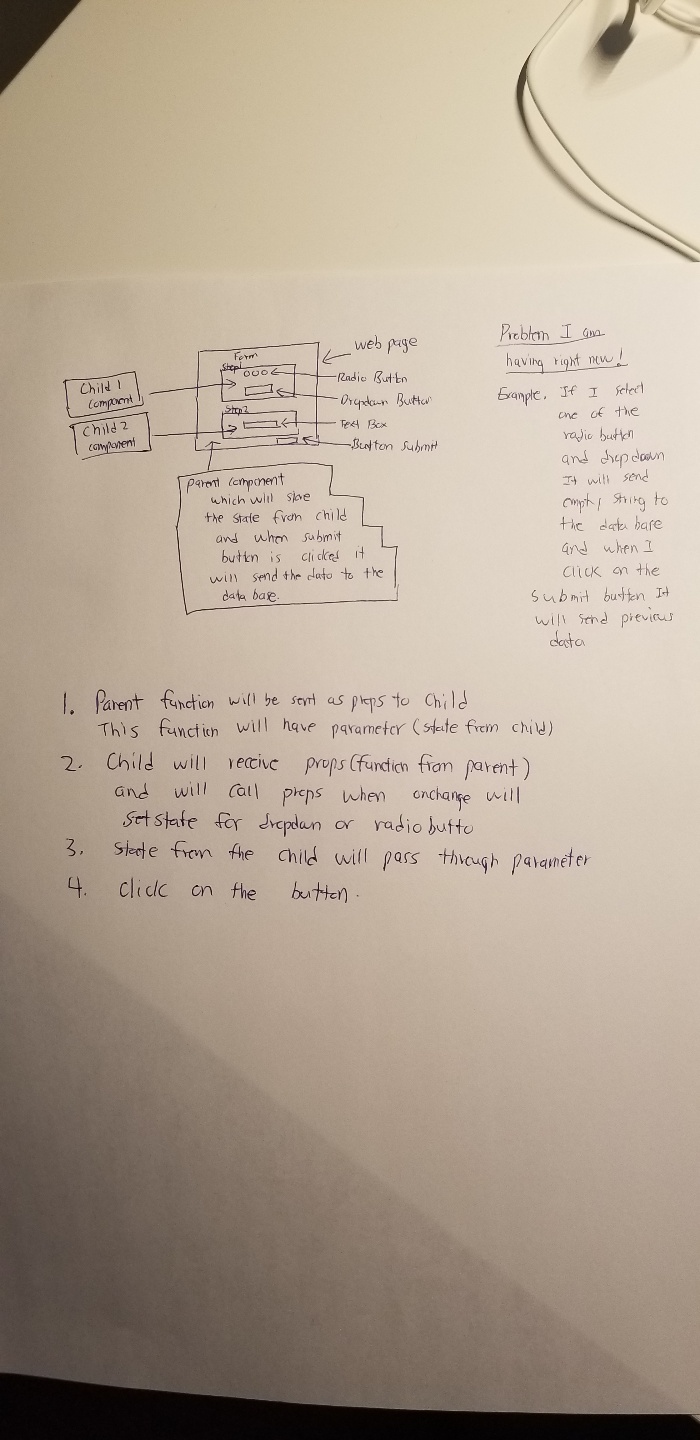
(父级组件)
class Vten extends Component {

constructor(props) {
    super(props);
    this.state = {
        cbValue: "",
        cValue: ""
      }
}

handleClick = (event) => {
    event.preventDefault();
    var passOne = this.state.cbValue;
    var passTwo = this.state.cValue;
    const data = {passOne,passTwo};
    const options = {
        method: 'POST',
        headers: {
            'Content-Type': 'application/json'
        },
        body: JSON.stringify(data)
    }
    fetch('/api/vten',options);
}

handleInputValue = (val, val2) => {
     alert(val);
     alert(val2);
    this.setState({
        cbValue: val,
        cValue: val2
    });
}

render(){
    return(
        <div>
            <Container>
                <Row>
                    <Col><h3>V-10 - Vendor / Partner / Client Registration</h3></Col>
                </Row>

                <Row>
                    <Col>
                        <VtenTwo handleInput={this.handleInputValue}/>
                    </Col>
                </Row>

                <Row>
                    <Col>
                        <Button variant="primary" type="submit">
                            Save for Later
                        </Button>
                    </Col>
                    <Col>
                        <Button variant="primary" type="submit" onClick={this.handleClick}>
                            Submit for Review
                        </Button>
                    </Col>
                </Row>
            </Container>
        </div>
    );
}
}

export default Vten;
(儿童部分)
class VtenTwo extends Component {

constructor(props) {
    super(props);
    this.state = {
        checkVendor: true,
        checkPartner: false,
        checkClient: false,
        checkBoxValue: "checkVendor",
        CountryDropdown: "USA"
      }
}

onCheckChange = (e) =>{
    if("checkVendor" === e.target.name){
        this.setState({
            checkVendor: true,
            checkPartner: false,
            checkClient: false,
            checkBoxValue: e.target.value
        })
    }else if("checkPartner" === e.target.name){
        this.setState({
            checkVendor: false,
            checkPartner: true,
            checkClient: false,
            checkBoxValue: e.target.value
        })
    }else{
        this.setState({
            checkVendor: false,
            checkPartner: false,
            checkClient: true,
            checkBoxValue: e.target.value
        })
    }
    //this.props.handleInput(this.state.checkBoxValue);
    this.changedValue();
}

handleCountryChange = e => {
    this.setState({
        CountryDropdown: e.target.value
    })
    //this.props.handleInput2(this.state.CountryDropdown);
    this.changedValue();
}

//this is called from save button(child) and call function on parent
changedValue = () => {
    let ck = this.state.checkBoxValue;
    let dp = this.state.CountryDropdown;
    this.props.handleInput(ck,dp);
}

render(){
    return(
        <div>
             <label>
               <b>Step 2. Enter Entity Information</b>
            </label> <br/>

            <label>General Information</label> <br/>
            <label><b>{this.state.checkBoxValue}</b></label><br/>
            <label><b>{this.state.CountryDropdown}</b></label><br/>
            <Container>
                <Row>
                    <Col>
                        <label>Select Account Type</label>
                        <div className="radio">
                            <Form.Check inline label="Vendor" type="checkbox" name="checkVendor" value="Vendor" checked={this.state.checkVendor} onChange={this.onCheckChange} />
                            <Form.Check inline label="Partner" type="checkbox" name="checkPartner" value= "Partner" checked={this.state.checkPartner} onChange={this.onCheckChange}/>
                            <Form.Check inline label="Client" type="checkbox" name="checkClient" value= "Client" checked={this.state.checkClient} onChange={this.onCheckChange}/>
                        </div>
                    </Col>
                    <Col>
                        <label>Country</label>
                        <Form.Group controlId="exampleForm.ControlSelect1">
                            <Form.Control as="select" value={this.state.CountryDropdown} onChange={this.handleCountryChange}>
                                {/* <option value="">None</option> */}
                                <option value="USA">USA</option>
                                <option value="KOREA">KOREA</option>
                                <option value="JAPAN">JAPAN</option>
                            </Form.Control>
                        </Form.Group>
                    </Col>
                    {/* <Col>
                        <Button variant="primary" type="submit" onClick={this.changedValue}>
                            Save
                        </Button>
                    </Col> */}
                </Row>
            </Container>


        </div>
    );
}
 }

export default VtenTwo;回答 2
Stack Overflow用户
发布于 2020-06-08 02:12:32
在这里,您可以参考React官方文档:https://reactjs.org/docs/lifting-state-up.html#lifting-state-up
提高你的孩子的状态是一个可能的解决方案:
- 将您的状态定义为父状态,而不是在子
- 中,将状态传递给您的子程序。在父进程中,
- 确实设置状态,如果您的孩子需要进行设置状态,也可以在道具中将您的set状态函数传递给您的孩子。在set状态之后,您的父级将重新呈现,您的孩子也将被重新呈现,因为道具值更改了
g 210。
您所提到的发送之前的数据,很可能与错误的状态处理有关。在这里共享您的代码可以更好地解决您的问题。
Stack Overflow用户
发布于 2020-06-08 04:24:49
您正在获取前一个状态,因为setState是一个异步函数,您正在尝试在状态数据设置为状态之前获取状态数据。
您可以使用setState内部的回调来等待状态更新,然后调用其他函数才能解决您的问题。
    onCheckChange = (e) =>{
        if("checkVendor" === e.target.name){
            this.setState({
                checkVendor: true,
                checkPartner: false,
                checkClient: false,
                checkBoxValue: e.target.value
            }, () => {
                 this.changedValue();
            })
        }else if("checkPartner" === e.target.name){
            this.setState({
                checkVendor: false,
                checkPartner: true,
                checkClient: false,
                checkBoxValue: e.target.value
            }, () => {
                this.changedValue();
            })
        }else{
            this.setState({
                checkVendor: false,
                checkPartner: false,
                checkClient: true,
                checkBoxValue: e.target.value
            }, () => {
               this.changedValue();
            })
        }

    }

    handleCountryChange = e => {
        this.setState({
            CountryDropdown: e.target.value
        }, () => {
           this.changedValue();
        });

}https://stackoverflow.com/questions/62253902
复制相似问题
腾讯云开发者

Copyright © 2013 - 2026 Tencent Cloud. All Rights Reserved. 腾讯云 版权所有
深圳市腾讯计算机系统有限公司 ICP备案/许可证号:粤B2-20090059  粤公网安备44030502008569号
腾讯云计算(北京)有限责任公司 京ICP证150476号 | 京ICP备11018762号