
根据一个col中的唯一值更新列&另一个col中的最大重复值
根据一个col中的唯一值更新列&另一个col中的最大重复值
提问于 2020-06-07 18:50:44
我试图根据最大重复值来转换数据。
- I有A类卡车号,B族中列有“卡车类型”。
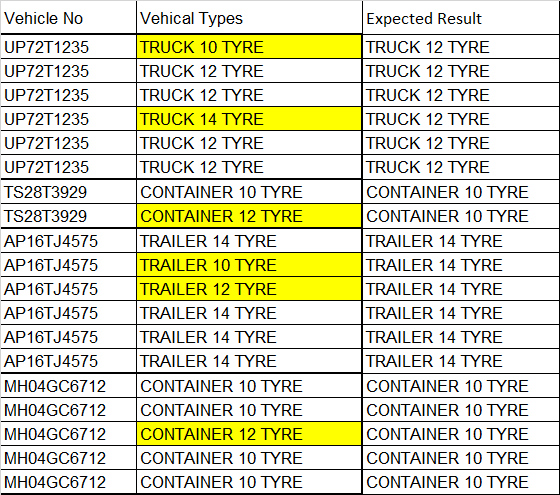
- 对于每个唯一的卡车号码,卡车类型应该是相同的。(这是预期的结果)通过计算最大no值,可以实现
- 。的卡车类型独特的“卡车不”,和那个单元要更新的最大。重复的“卡车类型”。
- ,如果有相同的no。“卡车类型”是可用的,它应该更新为第一个可用的卡车类型。
就像这样,有数千行需要更新。这可以更好地理解通过看到附加的图像。
我已经附上了这张图片&预期结果在C栏中。
我搜索了很多,但是我找不到相关的解决方案。请帮帮忙。
回答 2
Stack Overflow用户
回答已采纳
发布于 2020-06-07 19:56:32
你什么都不说..。
请测试下一段代码。它的工作假设,列是排序的,我们可以在图片中看到。它非常快,因为结果被放在一个数组中,并立即放到工作表上:
Sub findMaxCountVehType_Array()
  Dim sh As Worksheet, lastRow As Long, rngVeh As Range, rngTemp As Range, arrFin As Variant
  Dim i As Long, j As Long, w As Long, count As Long, maxCount As Long, ar As Long, maxStr As String

   Set sh = ActiveSheet 'use here your sheet
   lastRow = sh.Range("A" & Rows.count).End(xlUp).row
   Set rngVeh = sh.Range("A2:C" & lastRow)
   ReDim arrFin(1 To lastRow, 1 To 1)
   arrFin(1, 1) = "Result": ar = 1

   For i = 2 To lastRow
        If sh.Range("A" & i).Value = sh.Range("A" & i + 1).Value Then
            For j = i To j + 1000 'create a range of type cells for the same vehicle no
                If sh.Range("A" & j).Value = sh.Range("A" & i).Value Then
                    If rngTemp Is Nothing Then
                        Set rngTemp = sh.Range("B" & j)
                    Else
                        Set rngTemp = Union(rngTemp, sh.Range("B" & j))
                    End If
                Else
                  Exit For
                End If
            Next j
            If rngTemp Is Nothing Then
               ar = ar + 1: arrFin(ar, 1) = sh.Range("B" & i)
            Else
                For w = 1 To rngTemp.Cells.count 'determine the max occurrences string
                    count = WorksheetFunction.CountIf(rngTemp, rngTemp.Cells(w, 1).Value)
                    If count > maxCount Then maxCount = count: maxStr = rngTemp.Cells(w, 1).Value
                Next
                For w = 1 To rngTemp.Cells.count
                    ar = ar + 1: arrFin(ar, 1) = maxStr    'fill the max count in the array
                Next
            End If
            Set rngTemp = Nothing: maxCount = 0: count = 0 'reinitialize variables
            i = i + w - 2 'move the iteration to the following vehicle
        Else
            ar = ar + 1: arrFin(ar, 1) = sh.Range("B" & i)
        End If
   Next i
   'drop the result array at once
    sh.Range("C1").Resize(UBound(arrFin, 1), UBound(arrFin, 2)).Value = arrFin
End SubStack Overflow用户
发布于 2020-06-08 00:45:14
下面是一个VBA例程,它使用:
- 类对象,它具有
- key:=车辆号
- item:=字典,关联车辆类型的
- key:=车辆类型
- 项目:= Vehicle
- 的计数
在收集完这些信息后,我们只需遍历字典,并为任何给定的车辆ID提取具有最大计数的车辆类型。
这个例程,因为它完全适用于VBA数组,应该运行得相当快,即使有大量的数据。
此外,使用这种方法,不需要排序。
necessary)
- ASSUMES
- 假设数据从单元格
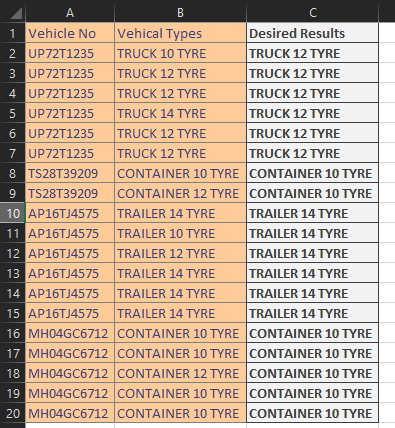
A1开始(如果结果如C列中的Desired Result所示,则可能发生更改)
确保设置对Microsoft 的引用(工具/引用)
类模块(重命名此模块cVehicle__)
Option Explicit
Private pVehicleType As String
Private pVehicleTypes As Dictionary

Public Property Get VehicleType() As String
    VehicleType = pVehicleType
End Property
Public Property Let VehicleType(Value As String)
    pVehicleType = Value
End Property

Public Property Get VehicleTypes() As Dictionary
    Set VehicleTypes = pVehicleTypes
End Property
Public Function addVehicleTypesItem(Value)
    If pVehicleTypes.Exists(Value) Then
        pVehicleTypes(Value) = pVehicleTypes(Value) + 1
    Else
        pVehicleTypes.Add Key:=Value, Item:=1
    End If
End Function

Private Sub Class_Initialize()
    Set pVehicleTypes = New Dictionary
        pVehicleTypes.CompareMode = TextCompare

End Sub
正则模块
'Set Reference to Microsoft Scripting Runtime
Option Explicit
Sub vehicle()
    Dim dV As Dictionary, cV As cVehicle
    Dim wsData As Worksheet, vData As Variant, rRes As Range
    Dim V As Variant, I As Long, sKey As String, cKey As String, Cnt As Long

'set data worksheet
'read data into vba array
Set wsData = Worksheets("Sheet3")
With wsData
    'add extra column for the "desired results"
    vData = .Range(.Cells(1, 1), .Cells(.Rows.Count, 1).End(xlUp)).Resize(columnsize:=3)
    Set rRes = .Cells(1, 1)
End With

'loop through the data and count the types
'no sorting necessary
Set dV = New Dictionary
For I = 2 To UBound(vData, 1)
    Set cV = New cVehicle
    With cV
        sKey = vData(I, 1)
        .VehicleType = vData(I, 2)
        If Not dV.Exists(sKey) Then
            .addVehicleTypesItem .VehicleType
            dV.Add sKey, cV
        Else
            dV(sKey).addVehicleTypesItem .VehicleType
        End If
    End With
Next I

'Output the data
I = 1
'Header
vData(I, 3) = "Desired Result"

'Data
For I = 2 To UBound(vData, 1)
    sKey = vData(I, 1)
    With dV(sKey)

        'which type has the highest count
        Cnt = 0
        For Each V In .VehicleTypes.Keys
            If .VehicleTypes(V) > Cnt Then
                Cnt = .VehicleTypes(V)
                cKey = V
            End If
        Next V
        vData(I, 3) = cKey
    End With
Next I

'write the results
Set rRes = rRes.Resize(UBound(vData, 1), UBound(vData, 2))

rRes = vData

End Sub
页面原文内容由Stack Overflow提供。腾讯云小微IT领域专用引擎提供翻译支持
原文链接:
https://stackoverflow.com/questions/62250128
复制相关文章
相似问题
腾讯云开发者

Copyright © 2013 - 2026 Tencent Cloud. All Rights Reserved. 腾讯云 版权所有
深圳市腾讯计算机系统有限公司 ICP备案/许可证号:粤B2-20090059  粤公网安备44030502008569号
腾讯云计算(北京)有限责任公司 京ICP证150476号 | 京ICP备11018762号