
Asp.Net核心3.0MVC-文化饼干的脚手架标识页路由
我已经在我的Asp.Net CoreMVC3.0应用程序中实现了这个nuget包的本地化,并且发现它很棒。
https://github.com/LazZiya/ExpressLocalization
对于所有的网页,除了我的脚手架身份页面,它是工作良好的。
当我导航到我的脚手架Register.cshtml页面时,我遇到了一个问题,就是我的本地化cookie没有被放置到URL中。但是,如果我键入区域性(如de或en等)手动进入URL,本地化工作得很好。
例如,当我单击寄存器链接时,应该是

但是相反,它总是

Startup.cs
using System;
using System.Collections.Generic;
using System.Globalization;
using System.Linq;
using System.Threading.Tasks;
using Microsoft.AspNetCore.Builder;
using Microsoft.AspNetCore.Identity;
using Microsoft.AspNetCore.Identity.UI;
using Microsoft.AspNetCore.Hosting;
using Microsoft.AspNetCore.HttpsPolicy;
using Microsoft.EntityFrameworkCore;
using MyApp.Data;
using Microsoft.Extensions.Configuration;
using Microsoft.Extensions.DependencyInjection;
using Microsoft.Extensions.Hosting;
using LazZiya.ExpressLocalization;
using Microsoft.AspNetCore.Localization;
using MyApp.LocalizationResources;
using MyApp.Models;

namespace MyApp
{
    public class Startup
    {
        public Startup(IConfiguration configuration)
        {
            Configuration = configuration;
        }

        public IConfiguration Configuration { get; }

        // This method gets called by the runtime. Use this method to add services to the container.
        public void ConfigureServices(IServiceCollection services)
        {
            services.AddDbContext<ApplicationDbContext>(options => options.UseSqlServer( Configuration.GetConnectionString("DefaultConnection")));
            services.AddDefaultIdentity<ApplicationUser>( options => { options.SignIn.RequireConfirmedAccount = true; }).AddEntityFrameworkStores<ApplicationDbContext>();
            services.AddControllersWithViews();
            services.AddRazorPages();

            var cultures = new []
            {
                new CultureInfo("de"),
                new CultureInfo("en"),
            };

            services.AddControllersWithViews()
                .AddExpressLocalization<LocSource>(ops =>
                    {
                        ops.UseAllCultureProviders = false;
                        ops.ResourcesPath = "LocalizationResources";
                        ops.RequestLocalizationOptions = o =>
                        {
                            o.SupportedCultures = cultures;
                            o.SupportedUICultures = cultures;
                            o.DefaultRequestCulture = new RequestCulture("en");
                        };
                    });
        }

        // This method gets called by the runtime. Use this method to configure the HTTP request pipeline.
        public void Configure(IApplicationBuilder app, IWebHostEnvironment env)
        {
            if (env.IsDevelopment())
            {
                app.UseDeveloperExceptionPage();
                app.UseDatabaseErrorPage();
            }
            else
            {
                app.UseExceptionHandler("/Home/Error");

                // The default HSTS value is 30 days. You may want to change this for production scenarios, see https://aka.ms/aspnetcore-hsts.
                app.UseHsts();
            }
            app.UseHttpsRedirection();
            app.UseStaticFiles();

            app.UseRouting();

            app.UseAuthentication();
            app.UseAuthorization();
            app.UseRequestLocalization();

            app.UseEndpoints(endpoints =>
            {
                endpoints.MapControllerRoute(
                    name: "default",
                    pattern: "{culture=en}/{controller=Home}/{action=Index}/{id?}");
                endpoints.MapControllerRoute(
                    name: "Features",
                    pattern: "{culture=en}/{controller=Features}/{action=Features}/{id?}");
                endpoints.MapControllerRoute(
                    name: "About",
                    pattern: "{culture=en}/{controller=About}/{action=About}/{id?}");
                endpoints.MapControllerRoute(
                    name: "Help",
                    pattern: "{culture=en}/{controller=Help}/{action=Help}/{id?}");
                endpoints.MapRazorPages();
            });
        }
    }
}
Register.cshtml.cs (我认为这里有些问题,因为我的MVC页面没有空returnUrl )
using System;
using System.Collections.Generic;
using System.ComponentModel.DataAnnotations;
using System.Linq;
using System.Text;
using System.Text.Encodings.Web;
using System.Threading.Tasks;
using Microsoft.AspNetCore.Authentication;
using Microsoft.AspNetCore.Authorization;
using MyApp.Data;
using Microsoft.AspNetCore.Identity;
using Microsoft.AspNetCore.Identity.UI.Services;
using Microsoft.AspNetCore.Mvc;
using Microsoft.AspNetCore.Mvc.RazorPages;
using Microsoft.AspNetCore.WebUtilities;
using Microsoft.Extensions.Logging;
using LocSourceNameReferenceLibrary;
using Microsoft.AspNetCore.Localization;
using Microsoft.AspNetCore.Http;

namespace MyApp.Areas.Identity.Pages.Account
{
    [AllowAnonymous]
    public class RegisterModel : PageModel
    {
        private readonly SignInManager<ApplicationUser> _signInManager;
        private readonly UserManager<ApplicationUser> _userManager;
        private readonly ILogger<RegisterModel> _logger;
        private readonly IEmailSender _emailSender;
        RegisterPageLocSourceNames _locSourceRegisterPageNameReferenceLibrary = new RegisterPageLocSourceNames();
        SharedCrossPageLocSourceNames _locSourceSharedCrossPageNameReferenceLibrary = new SharedCrossPageLocSourceNames();

        public RegisterModel(
            UserManager<ApplicationUser> userManager,
            SignInManager<ApplicationUser> signInManager,
            ILogger<RegisterModel> logger,
            IEmailSender emailSender)
        {
            _userManager = userManager;
            _signInManager = signInManager;
            _logger = logger;
            _emailSender = emailSender;
        }

        [BindProperty]
        public InputModel Input { get; set; }
        public string ReturnUrl { get; set; }
        public string PageTabTitle { get; set; }
        public string Title { get; set; }
        public string SubTitle { get; set; }
        public string Heading { get; set; }
        public string ServiceHeading { get; set; }
        public string EmailHeading { get; set; }
        public string PasswordHeading { get; set; }
        public string ConfirmPassword { get; set; }
        public string RegisterButtonName { get; set; }
        public string NavBarHome { get; set; }
        public string NavBarFeatures { get; set; }
        public string NavBarAbout { get; set; }
        public string NavBarHelpCenter { get; set; }

        public IList<AuthenticationScheme> ExternalLogins { get; set; }

        public class InputModel
        {
            [Required]
            [EmailAddress]
            [Display(Name = "Email")]
            public string Email { get; set; }

            [Required]
            [StringLength(100, ErrorMessage = "The {0} must be at least {2} and at max {1} characters long.", MinimumLength = 6)]
            [DataType(DataType.Password)]
            [Display(Name = "Password")]
            public string Password { get; set; }

            [DataType(DataType.Password)]
            [Display(Name = "Confirm Password")]
            [Compare("Password", ErrorMessage = "The password and confirmation password do not match.")]
            public string ConfirmPassword { get; set; }
        }

        public async Task OnGetAsync(string returnUrl = null)
        {
            PageTabTitle = _locSourceRegisterPageNameReferenceLibrary.GetLocSourcePageTabTitleNameReferenceForRegisterPage();
            Title = _locSourceRegisterPageNameReferenceLibrary.GetLocSourceTitleNameReferenceForRegisterPage();
            SubTitle = _locSourceRegisterPageNameReferenceLibrary.GetLocSourceSubtitleNameReferenceForRegisterPage();
            Heading = _locSourceRegisterPageNameReferenceLibrary.GetLocSourceHeadingNameReferenceForRegisterPage();
            ServiceHeading = _locSourceRegisterPageNameReferenceLibrary.GetLocSourceServiceHeadingNameReferenceForRegisterPage();
            EmailHeading = _locSourceRegisterPageNameReferenceLibrary.GetLocSourceEmailHeadingNameReferenceForRegisterPage();
            PasswordHeading = _locSourceRegisterPageNameReferenceLibrary.GetLocSourcePasswordHeadingNameReferenceForRegisterPage();
            ConfirmPassword = _locSourceRegisterPageNameReferenceLibrary.GetLocSourceConfirmPasswordHeadingNameReferenceForRegisterPage();
            RegisterButtonName = _locSourceRegisterPageNameReferenceLibrary.GetLocSourceRegisterButtonNameReferenceForRegisterPage();
            NavBarHome = _locSourceRegisterPageNameReferenceLibrary.GetLocSourceNavBarHomeReferenceForRegisterPage();
            NavBarFeatures = _locSourceRegisterPageNameReferenceLibrary.GetLocSourceNavBarFeaturesReferenceForRegisterPage();
            NavBarAbout = _locSourceRegisterPageNameReferenceLibrary.GetLocSourceNavBarAboutReferenceForRegisterPage();
            NavBarHelpCenter = _locSourceRegisterPageNameReferenceLibrary.GetLocSourceNavBarHelpCenterReferenceForRegisterPage();

            ReturnUrl = returnUrl;
            ExternalLogins = (await _signInManager.GetExternalAuthenticationSchemesAsync()).ToList();
        }

        public async Task<IActionResult> OnPostAsync(string returnUrl = null)
        {
            returnUrl ??= Url.Content("~/");
            ExternalLogins = (await _signInManager.GetExternalAuthenticationSchemesAsync()).ToList();
            if (ModelState.IsValid)
            {
                var user = new ApplicationUser { UserName = Input.Email, Email = Input.Email };
                var result = await _userManager.CreateAsync(user, Input.Password);
                if (result.Succeeded)
                {
                    _logger.LogInformation("User created a new account with password.");

                    var code = await _userManager.GenerateEmailConfirmationTokenAsync(user);
                    code = WebEncoders.Base64UrlEncode(Encoding.UTF8.GetBytes(code));
                    var callbackUrl = Url.Page(
                        "/Account/ConfirmEmail",
                        pageHandler: null,
                        values: new { area = "Identity", userId = user.Id, code },
                        protocol: Request.Scheme);

                    await _emailSender.SendEmailAsync(Input.Email, "Confirm your email",
                        $"Please confirm your account by <a href='{HtmlEncoder.Default.Encode(callbackUrl)}'>clicking here</a>.");

                    if (_userManager.Options.SignIn.RequireConfirmedAccount)
                    {
                        return RedirectToPage("RegisterConfirmation", new { email = Input.Email });
                    }
                    else
                    {
                        await _signInManager.SignInAsync(user, isPersistent: false);
                        return LocalRedirect(returnUrl);
                    }
                }
                foreach (var error in result.Errors)
                {
                    ModelState.AddModelError(string.Empty, error.Description);
                }
            }

            // If we got this far, something failed, redisplay form
            return Page();
        }
    }
}
区域>标识>页面>帐户> _ViewImports.cshtml
@using MyApp
@using MyApp.Areas.Identity.Pages.Account
@using LazZiya.ExpressLocalization
@inject ISharedCultureLocalizer _loc
@addTagHelper *, Microsoft.AspNetCore.Mvc.TagHelpers
@addTagHelper *, LazZiya.TagHelpers
@addTagHelper *, LazZiya.ExpressLocalization我还按照这些指示添加了一个这些指示类,但我认为它没有做任何事情。它在注释中说,应该自动调用它。我把它放在根~/RouteTemplateModelConvention.cs中
这是我的文件夹结构:
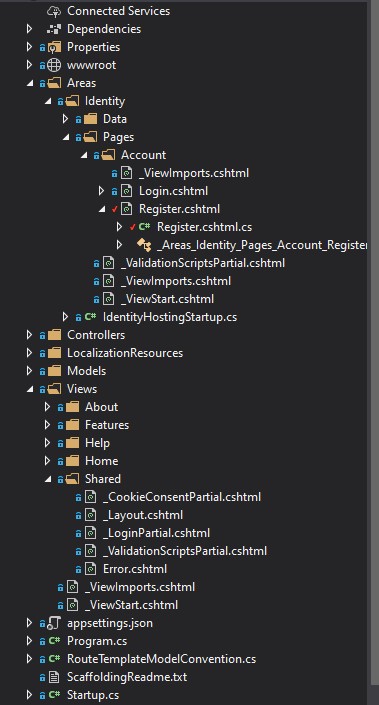
我猜是因为身份页面的脚手架自动使用Razor页面来注册和登录,所以我的MVC本地化实现对这些不起作用。
如果我手动将区域性("en“或"de”)添加到浏览器URL中,则But...it 正在工作,它只是不自动将其拾取起来。
我已经尝试了许多不同的方法来实现这个功能,但是我确信这是我在cookie...Any想法的路由中所缺少的一些简单的东西,请吧?
更新:
我尝试使用共享的<a></a>文件中的asp-route-culture=“@CultureInfo.CurrentCulture.Name”将区域性参数添加到_Layout.cshtml链接中,但是在当前上下文中@CultureInfo不存在的情况下出现了一个错误。
更新:
好的进展..。我将@using System.Globalization命名空间添加到布局文件中。现在这个网址是https://localhost:44305/"de"/Identity/Account/Register,我想弄清楚为什么引号在URL中。有什么想法吗?
回答 1
Stack Overflow用户
发布于 2020-06-15 06:06:21
使用asp-route-culture="@CultureInfo.CurrentCulture.Name"应该可以解决这个问题。
在您的代码中,您似乎使用的是倒逗号“...”,它们应该是引号"..." :)
https://stackoverflow.com/questions/62376407
复制相似问题
腾讯云开发者

Copyright © 2013 - 2026 Tencent Cloud. All Rights Reserved. 腾讯云 版权所有
深圳市腾讯计算机系统有限公司 ICP备案/许可证号:粤B2-20090059  粤公网安备44030502008569号
腾讯云计算(北京)有限责任公司 京ICP证150476号 | 京ICP备11018762号