
火基手机8月无法在APK释放模式下工作
火基手机8月无法在APK释放模式下工作
提问于 2020-06-15 08:35:41
我读到以下两个问题,但这些问题都不能解决我的问题:
这两个问题中提到的解决方案都说,我需要从游戏控制台复制SHA-1,并将它放在Firebase控制台SHA-1中,用于我的应用程序。问题是My app is not on play store, I just signed it and build the apks,正如我们通常对apk.relase所做的一样。我还将firebase_auth和firebase_core依赖项更新为最新版本。
下面是我的电话号码:
  verificationCompleted() {
    return (AuthCredential credential) async {
      await _auth.signInWithCredential(credential).then((AuthResult value) {
        if (value.user != null) {
          Navigator.pop(context);
          Navigator.push(
              context,
              new MaterialPageRoute(
                  builder: (context) => AddContacts(
                        user: value.user,
                      )));
        }
      });
    };
  }

  verificationFailed() {
    return (AuthException exception) {
      Toast.show('Verification Failed: ${exception.code}', context,
          backgroundColor: Colors.red,
          duration: 3,
          backgroundRadius: 5,
          gravity: Toast.BOTTOM);
    };
  }

  codeSent() {
    return (String verificationID, [int forceResendingToken]) {
      showDialog(
          context: context,
          barrierDismissible: false,
          builder: (context) {
            return AlertDialog(
              shape: RoundedRectangleBorder(
                  borderRadius: BorderRadius.circular(12)),
              title: Text('Enter 6-Digit Code'),
              content: Column(
                mainAxisSize: MainAxisSize.min,
                children: <Widget>[
                  TextField(
                    style: TextStyle(
                        fontSize: MediaQuery.of(context).size.height * 0.025),
                    controller: _controllerCode,
                    keyboardType: TextInputType.number,
                    maxLength: 6,
                    cursorColor: Colors.black,
                    decoration: InputDecoration(
                      errorText: validateCode(_controllerCode.text),
                      hintText: 'Enter Code',
                      enabledBorder: OutlineInputBorder(
                          borderRadius: BorderRadius.circular(12.0)),
                      focusedBorder: OutlineInputBorder(
                          borderRadius: BorderRadius.circular(12.0)),
                      errorBorder: OutlineInputBorder(
                          borderRadius: BorderRadius.circular(12.0),
                          borderSide: BorderSide(color: Colors.red)),
                      focusedErrorBorder: OutlineInputBorder(
                          borderRadius: BorderRadius.circular(12.0),
                          borderSide: BorderSide(color: Colors.red)),
                    ),
                  ),
                  SizedBox(
                    height: MediaQuery.of(context).size.height * 0.01,
                  ),
                  Row(
                    mainAxisSize: MainAxisSize.min,
                    children: <Widget>[
                      Icon(
                        Icons.info,
                        color: Colors.red,
                        size: MediaQuery.of(context).size.height * 0.03,
                      ),
                      SizedBox(
                        width: MediaQuery.of(context).size.width * 0.02,
                      ),
                      Text(
                        'Wait for Automatic Detection!',
                        style: TextStyle(
                            fontFamily: 'Sogoe',
                            color: Colors.red,
                            fontSize:
                                MediaQuery.of(context).size.height * 0.017),
                      ),
                    ],
                  ),
                  SizedBox(
                    height: MediaQuery.of(context).size.height * 0.01,
                  ),
                  Container(
                    height: MediaQuery.of(context).size.height * 0.06,
                    width: MediaQuery.of(context).size.width,
                    child: FlatButton(
                      padding: EdgeInsets.symmetric(
                          horizontal: MediaQuery.of(context).size.width * .05),
                      shape: RoundedRectangleBorder(
                          borderRadius: BorderRadius.circular(5)),
                      child: Text(
                        "Confirm",
                      ),
                      textColor: Colors.white,
                      color: Colors.lightBlue,
                      onPressed: () async {
                        setState(() {
                          _controllerCode.text.isEmpty
                              ? codeValidate = true
                              : codeValidate = false;
                        });
                        _auth.currentUser().then((user) {
                          if (user != null) {
                            Navigator.pop(context);
                            Navigator.push(
                                context,
                                MaterialPageRoute(
                                    builder: (context) => AddContacts(
                                          user: user,
                                        )));
                          } else {
                            _verifyCode();
                          }
                        });
                        _controllerCode.clear();
                      },
                    ),
                  )
                ],
              ),
            );
          });
      _verificationId = verificationID;
    };
  }

  codeAutoRetrievalTimeout() {
    return (String verificationID) {
      _verificationId = verificationID;
    };
  }

  Future<void> _verifyPhoneNumber(String phone) async {
    _auth.verifyPhoneNumber(
      phoneNumber: phone,
      timeout: const Duration(seconds: 60),
      verificationCompleted: verificationCompleted(),
      verificationFailed: verificationFailed(),
      codeSent: codeSent(),
      codeAutoRetrievalTimeout: codeAutoRetrievalTimeout(),
    );
  }

  Future<void> _verifyCode() async {
    final AuthCredential credential = PhoneAuthProvider.getCredential(
        verificationId: _verificationId, smsCode: _controllerCode.text);
    final FirebaseUser user =
        (await _auth.signInWithCredential(credential)).user;
    final FirebaseUser currentUser = await _auth.currentUser();
    assert(user.uid == currentUser.uid);
    if (user != null) {
      Navigator.pop(context);
      Navigator.push(
          context,
          MaterialPageRoute(
              builder: (context) => AddContacts(
                    user: user,
                  )));
    }
}回答 2
Stack Overflow用户
回答已采纳
发布于 2020-06-16 14:20:35
找到解决办法
是的,我添加了SHA-1键,但是我知道SHA-1用于调试和发布模式是分开的,并且这个answer is solution。
Stack Overflow用户
发布于 2021-04-14 17:19:29
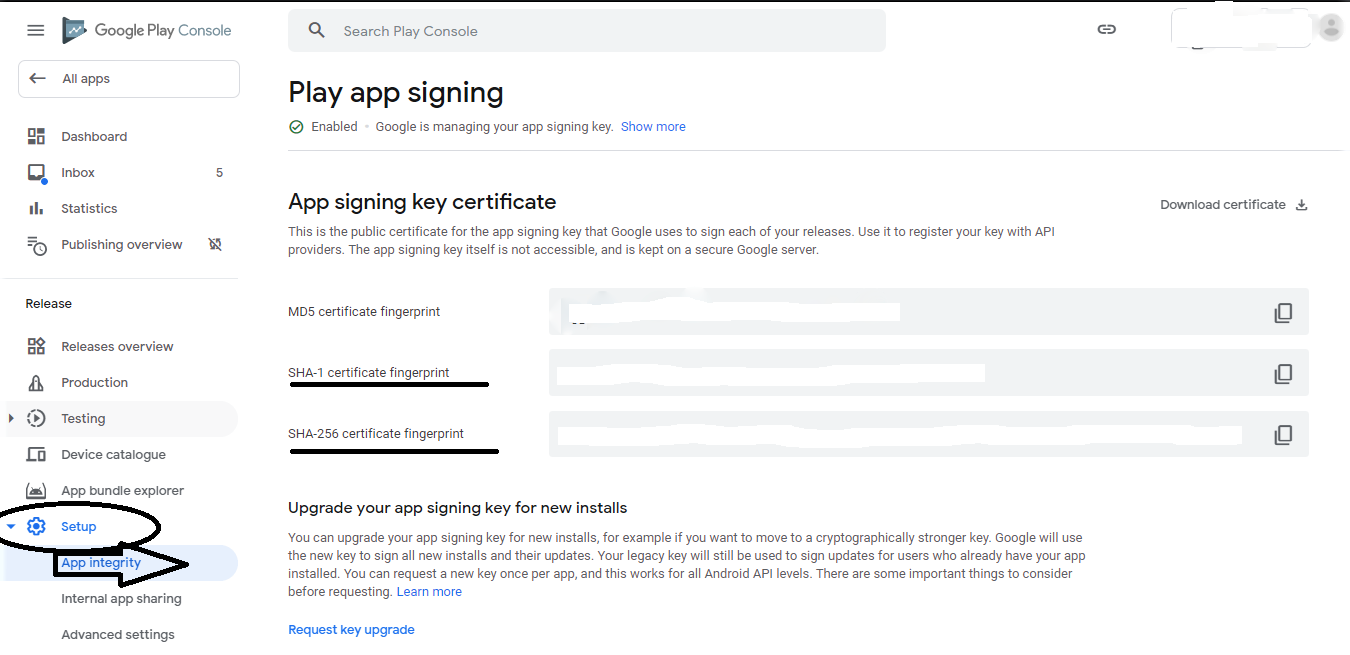
将您的PLAYSTORE签名密钥证书添加到FIREBASE、SHA1和SHA256证书中。
您将在
googele播放控制台>在发布-安装>应用程序完整性>应用签署密钥证书
页面原文内容由Stack Overflow提供。腾讯云小微IT领域专用引擎提供翻译支持
原文链接:
https://stackoverflow.com/questions/62384384
复制相关文章
相似问题
腾讯云开发者

Copyright © 2013 - 2026 Tencent Cloud. All Rights Reserved. 腾讯云 版权所有
深圳市腾讯计算机系统有限公司 ICP备案/许可证号:粤B2-20090059  粤公网安备44030502008569号
腾讯云计算(北京)有限责任公司 京ICP证150476号 | 京ICP备11018762号