
DataGridViewImageColumn背景是黑色的
DataGridViewImageColumn背景是黑色的
提问于 2020-06-15 23:33:55
我有一个表,其中一个列是图像类型的。当使用"ImageLayout“属性作为”拉伸“时,背景是黑色的。我怎么才能把它换成白色?
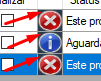
我正在使用转换为bipmap的"SystemIcons“图标集。
 private Bitmap GetIcone()
 {
    return SystemIcons.Warning.ToBitmap();
 }
并以这种方式插入:
row.Cells["ColStatusIcone"].Value = GetIcone(status.icone);回答 1
Stack Overflow用户
回答已采纳
发布于 2020-06-16 00:03:33
编辑:如果要将背景颜色更改为白色图像单元格,则为İ:
     dataGridView1.CellFormatting += (x, y) =>
         {
             if (y.DesiredType == typeof(Image)){
                y.CellStyle.BackColor = Color.White;
           }
};您可以尝试在CellFormattingEvent.上将图像列的颜色更改为白色。试试这个:
 dataGridView1.CellFormatting += (x, y) =>
         {
             if (y.ColumnIndex != 1) //your image cell index
             {
                 return;
             }
             y.CellStyle.BackColor = Color.White;
};页面原文内容由Stack Overflow提供。腾讯云小微IT领域专用引擎提供翻译支持
原文链接:
https://stackoverflow.com/questions/62398678
复制相关文章
相似问题
腾讯云开发者

Copyright © 2013 - 2026 Tencent Cloud. All Rights Reserved. 腾讯云 版权所有
深圳市腾讯计算机系统有限公司 ICP备案/许可证号:粤B2-20090059  粤公网安备44030502008569号
腾讯云计算(北京)有限责任公司 京ICP证150476号 | 京ICP备11018762号