
响应引导Table2排序和搜索
响应引导Table2排序和搜索
提问于 2020-06-17 03:10:20
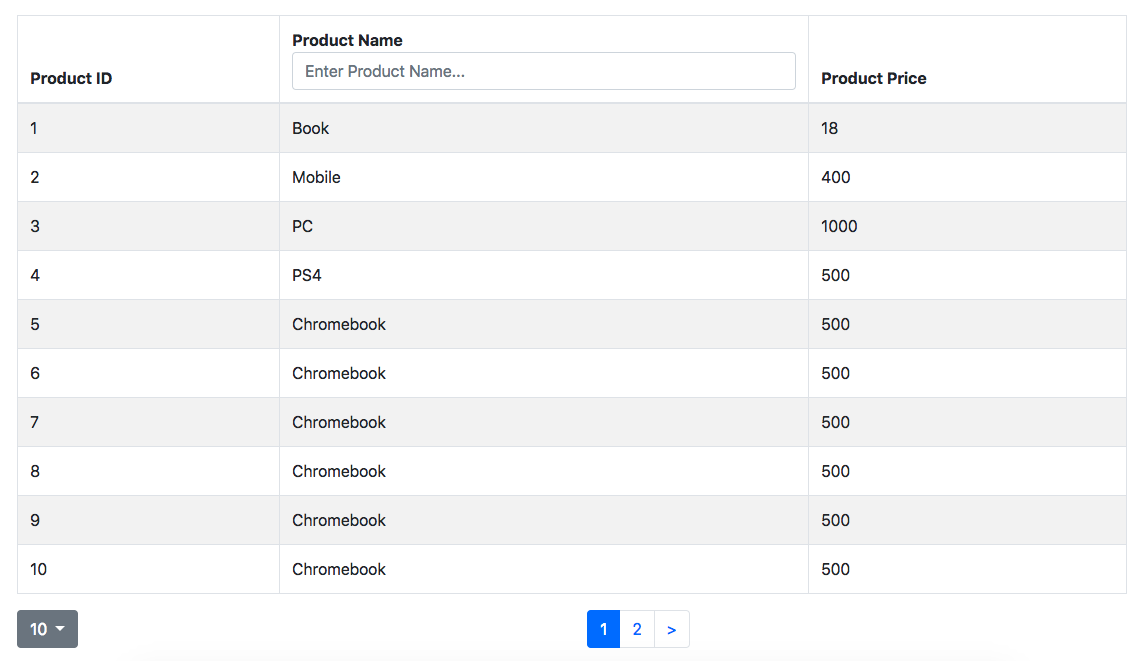
我使用React-Bootstrap-Table-2来开发表显示等等,所以今天我已经成功地将表添加到我的代码中,现在我想在表头上添加两个功能--排序和搜索功能。
我的代码如下:
render() {

    const colStyle = {
      backgroundColor: '#6c757d',
      color: '#ffffff',
      width: '100px'
    }

// *what should I add here for search and sorting?


const columns = [{
  dataField: 'ProductID',
  text: 'ProductID',
  headerStyle: colStyle
}, {
  dataField: 'ProductName',
  text: 'ProductName',
  headerStyle: colStyle
}, {
  dataField: 'ProductPrice',
  text: 'ProductPrice',
  headerStyle: colStyle
}];
const {
  filter,data
} = this.state;
我试图通过以下方式来完成我的专栏:
const columns = [{
      dataField: 'ProductID',
      text: 'ProductID',
      sort: true
      headerStyle: colStyle
},添加sort: true,至少它是可点击的,但它似乎没有任何排序操作
至于搜索功能,如果我添加到上面的代码位置,是否正确?
输出的示例图像:
回答 1
Stack Overflow用户
回答已采纳
发布于 2020-06-29 10:04:30
您只需在列数组中添加这两个参数:
const columns = [{
  dataField: 'ProductID',
  text: 'ProductID',
  headerStyle: colStyle,
  sort: true,
  filter: numberFilter(),
  headerSortingStyle
}, {
  dataField: 'ProductName',
  text: 'ProductName',
  headerStyle: colStyle,
  filter: textFilter(),
  sort : true,
  headerSortingStyle
}, {
  dataField: 'ProductPrice',
  text: 'ProductPrice',
  headerStyle: colStyle
  sort: true,
  filter: numberFilter(),
  headerSortingStyle
}];

////

<BootstrapTable
   keyField='id'
   data={ this.state.missions }
   columns={ this.state.tableColumn }
   filter={ filterFactory() }
   pagination={ paginationFactory(this.state.paginationOption) }
   defaultSortDirection="asc"
   sort={ {
       //I did this to save the previous sort in the state
       dataField: this.state.filter.field,
       order: this.state.filter.order
   }}
/>
之后,您存储的值可能会发生排序函数无法理解的情况。因此,您可以在列参数中添加一个shortValue:
sortValue: (cell, row) => methodToHaveRightValue()页面原文内容由Stack Overflow提供。腾讯云小微IT领域专用引擎提供翻译支持
原文链接:
https://stackoverflow.com/questions/62420851
复制相关文章
相似问题
腾讯云开发者

Copyright © 2013 - 2026 Tencent Cloud. All Rights Reserved. 腾讯云 版权所有
深圳市腾讯计算机系统有限公司 ICP备案/许可证号:粤B2-20090059  粤公网安备44030502008569号
腾讯云计算(北京)有限责任公司 京ICP证150476号 | 京ICP备11018762号