
如何设置vscode插件的环境变量?
如何设置vscode插件的环境变量?
提问于 2020-06-21 02:25:13
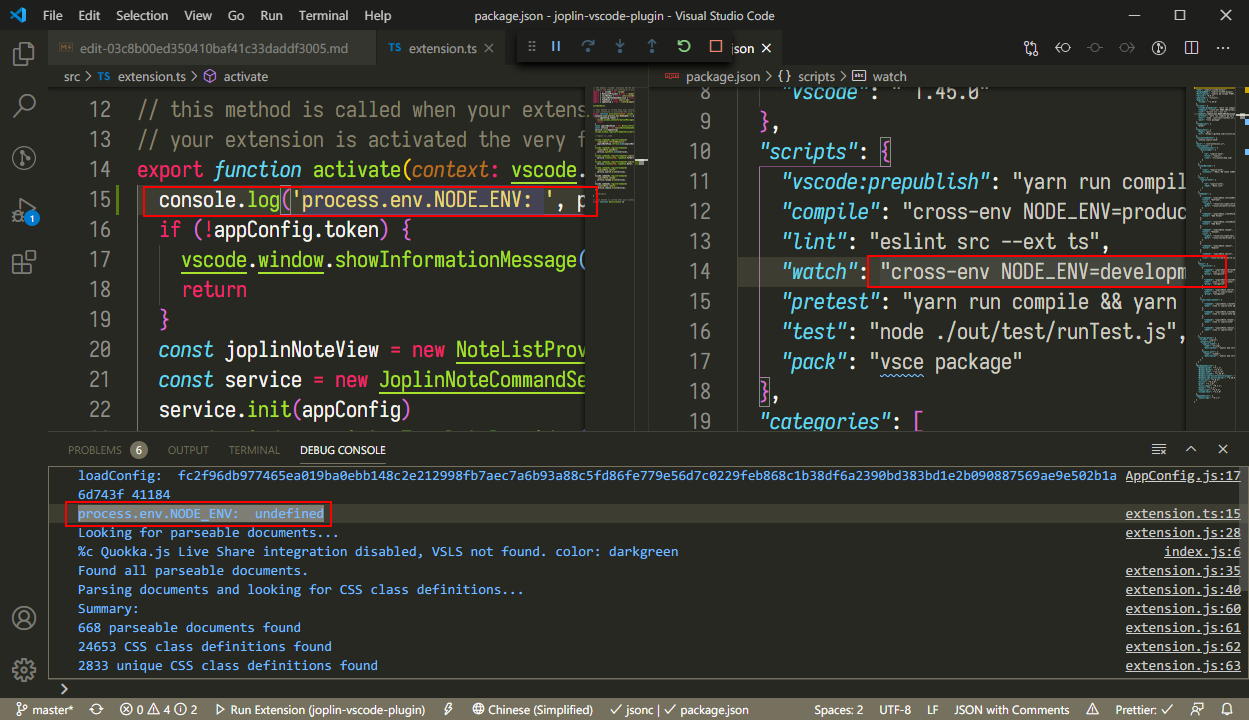
我试着用交叉env设置它,但是在使用VSCode运行之后,它没有定义。我怎么才能修好它?
回答 1
Stack Overflow用户
回答已采纳
发布于 2020-06-21 02:37:23
您可以通过启动配置将环境变量传递给在本地运行的VS代码扩展:
./.vscode/launch.json
// A launch configuration that compiles the extension and then opens it inside a new window
// Use IntelliSense to learn about possible attributes.
// Hover to view descriptions of existing attributes.
// For more information, visit: https://go.microsoft.com/fwlink/?linkid=830387
{
    "version": "0.2.0",
    "configurations": [
        {
            "name": "Run Extension",
            "type": "extensionHost",
            "request": "launch",
            "runtimeExecutable": "${execPath}",
            "args": [
                "--extensionDevelopmentPath=${workspaceFolder}"
            ],
            "outFiles": [
                "${workspaceFolder}/dist/extension.js"
            ],
            "preLaunchTask": "${defaultBuildTask}",
            "env": {
                "DEBUG": "true" // <---- EXAMPLE ENVIRONMENT VARIABLE
            }
        }
    ]
}页面原文内容由Stack Overflow提供。腾讯云小微IT领域专用引擎提供翻译支持
原文链接:
https://stackoverflow.com/questions/62493776
复制相关文章
相似问题
腾讯云开发者

Copyright © 2013 - 2026 Tencent Cloud. All Rights Reserved. 腾讯云 版权所有
深圳市腾讯计算机系统有限公司 ICP备案/许可证号:粤B2-20090059  粤公网安备44030502008569号
腾讯云计算(北京)有限责任公司 京ICP证150476号 | 京ICP备11018762号