
为什么"matplotlib.pyplot.imshow“会返回周围有框架的形状?
我的问题很简单:为什么我下面写的两段代码会给出两个稍微不同的输出?
更具体地说,第一种方法是使用形状为"1.0“的numpy.ndarray (1000,1000)填充”1.0“np.float64值,但我希望有一个”正方形“的区域除外,该区域中填充了"0.45”np.float64值。当我在轴上调用plt.imshow方法时,使用颜色映射"nipy_spectral",它返回一个正方形,,但周围有一个奇怪的框架.
请参阅下面的代码和末尾的左边图片:
#Code1:
foreground = np.ones((1000, 1000))
foreground = foreground.astype(np.float64)

def drawSquare(centerYX : tuple = (0, 0), radius : int = 1):
    squareCoordinates = np.meshgrid([y for y in range(centerYX[0]-radius, centerYX[0]+radius+1, 1)],
                                    [x for x in range(centerYX[1]-radius, centerYX[1]+radius+1, 1)])
    return squareCoordinates

square1 = drawSquare((round(foreground.shape[0]/2), round(foreground.shape[1]/2)), 200)
foreground[square1[0], square1[1]] = 0.45

fig, ax = plt.subplots(1)
ax.imshow(foreground, cmap = "nipy_spectral", vmin = 0.0, vmax = 1.0, , interpolation = None)
plt.show();
在第二段代码中,我使用了一个形状的numpy.ndarray (1000、1000、4),其中填充了与"nipy_spectral“颜色映射的最后一个颜色相对应的RGBA序列(我的背景),除了正方形区域,该区域填充了通过使用参数"0.45”调用"nipy_spectral“颜色映射获得的RGBA序列。
在这种情况下,我已经有了一个RGBA映像/数组,它不需要通过Axes.imshow方法的"cmap“参数进行任何转换。在本例中,输出是预期的输出:是一个方形,周围没有任何奇怪的框架。
请参阅下面的代码和后面的正确图片:
#Code2:
foreground = np.zeros((1000, 1000, 4))
foreground[:, :] = [0.8, 0.8, 0.8, 1.0]
foreground = foreground.astype(np.float64)

def drawSquare(centerYX : tuple = (0, 0), radius : int = 1):
    squareCoordinates = np.meshgrid([y for y in range(centerYX[0]-radius, centerYX[0]+radius+1, 1)],
                                    [x for x in range(centerYX[1]-radius, centerYX[1]+radius+1, 1)])
    return squareCoordinates

square1 = drawSquare((round(foreground.shape[0]/2), round(foreground.shape[1]/2)), 200)

nipy_spectral_cm = matplotlib.cm.get_cmap("nipy_spectral")
foreground[square1[0], square1[1]] = nipy_spectral_cm(0.45)

fig, ax = plt.subplots(1)
ax.imshow(foreground)
plt.show();
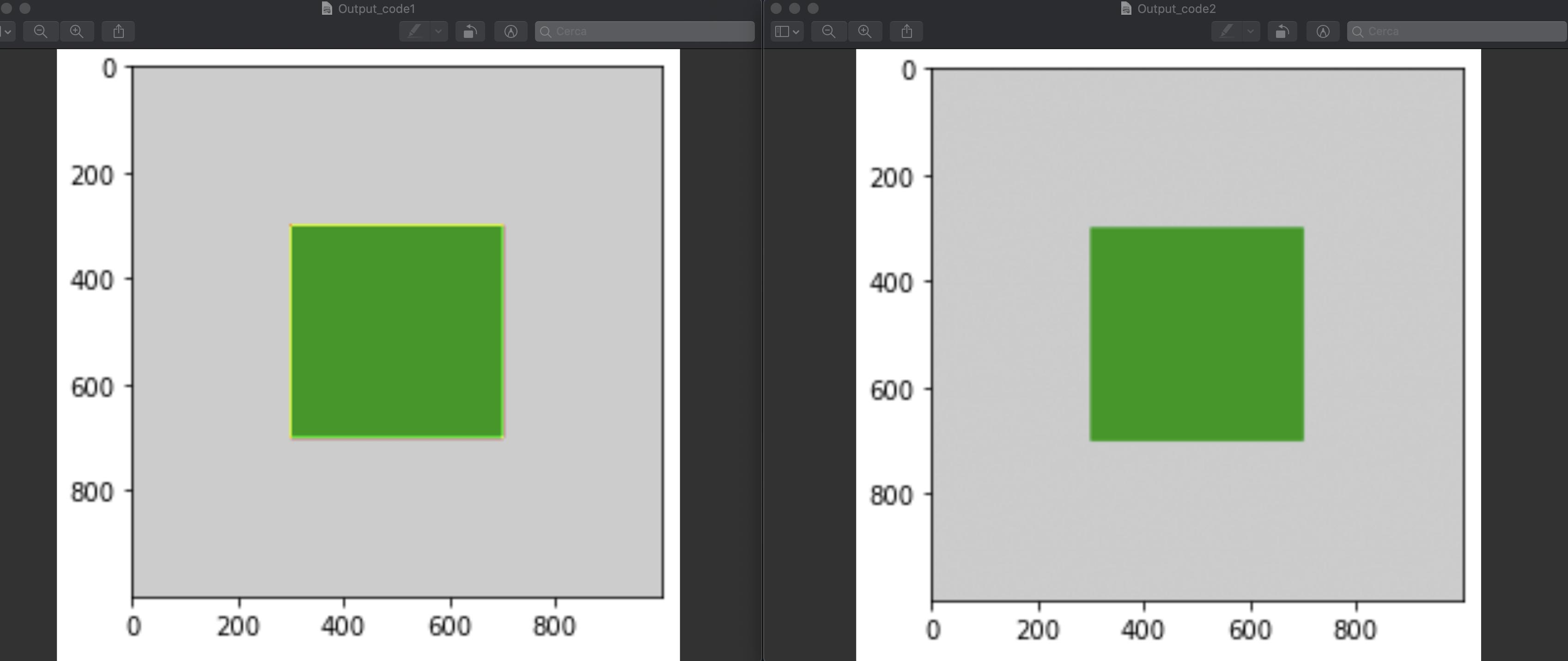
为什么第一段代码(Code1)会给出一个正方形,周围有一个奇怪的框架?
回答 1
Stack Overflow用户
发布于 2020-06-21 21:16:54
该框架是由插值造成的。它也出现在第二个代码中(只要放大图像,您就会看到它),但由于它的颜色更接近绿色方块的颜色,所以不太可见:
代码2->插入到蓝绿色:
foreground[299:301,299:301,0]
#array([[0.8, 0.8],
#       [0.8, 0. ]])

foreground[299:301,299:301,1]
#array([[0.8       , 0.8       ],
#       [0.8       , 0.60261373]])

foreground[299:301,299:301,2]
#array([[0.8, 0.8],
#       [0.8, 0. ]])
代码1->插入到黄色:
foreground[299:301,299:301]
#array([[1.  , 1.  ],
# [1. , 0.45]])使用interpolate='none'关闭插补,得到一个清晰的切割角。您使用的是None而不是'none'。None是默认的,并预设为'antialiased',有关详细信息,请参阅这里。
https://stackoverflow.com/questions/62503089
复制相似问题
腾讯云开发者

Copyright © 2013 - 2026 Tencent Cloud. All Rights Reserved. 腾讯云 版权所有
深圳市腾讯计算机系统有限公司 ICP备案/许可证号:粤B2-20090059  粤公网安备44030502008569号
腾讯云计算(北京)有限责任公司 京ICP证150476号 | 京ICP备11018762号