
用InputGroupAddon在仪表板上垂直对齐
用InputGroupAddon在仪表板上垂直对齐
提问于 2020-06-23 13:03:14
我在做一个仪表板。我正在使用一些dash_bootstrap_components InputGroup。到目前为止,我都是这样做的:
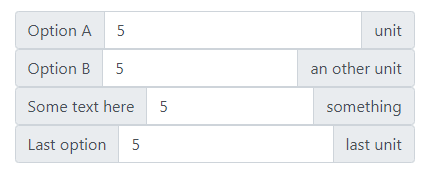
我想垂直对齐InputGroupAddon 'prepend'和InputGroupAddon 'append' of InputGroup,如下所示:
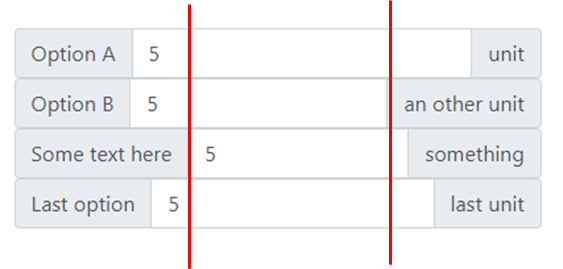
我想扩展dbc.InputGroupAddon 'prepend'和dbc.InputGroupAddon 'append'宽度,让dbc.Input自动调整以填充宽度。
我想保持400的整体宽度。
这是我的代码:
import dash
import dash_html_components as html
import dash_bootstrap_components as dbc


n = 19
v_min = 0
v_max = 10
v_step = 1
v_0 = 5


app = dash.Dash(external_stylesheets = [dbc.themes.BOOTSTRAP])

app.layout = html.Div(id = 'general_div',
                      children = [html.Div(id = 'options_div',
                                           children = [dbc.InputGroup([dbc.InputGroupAddon(children = 'Option A',
                                                                                           addon_type = 'prepend'),
                                                                       dbc.Input(id = 't_ON_input',
                                                                                 type = 'number',
                                                                                 min = v_min,
                                                                                 max = v_max,
                                                                                 step = v_step,
                                                                                 value = v_0),
                                                                       dbc.InputGroupAddon(children = 'unit',
                                                                                           addon_type = 'append')]),

                                                       dbc.InputGroup([dbc.InputGroupAddon(children = 'Option B',
                                                                                           addon_type = 'prepend'),
                                                                       dbc.Input(id = 't_OFF_input',
                                                                                 type = 'number',
                                                                                 min = v_min,
                                                                                 max = v_max,
                                                                                 step = v_step,
                                                                                 value = v_0),
                                                                       dbc.InputGroupAddon(children = 'an other unit',
                                                                                           addon_type = 'append')]),

                                                       dbc.InputGroup([dbc.InputGroupAddon(children = 'Some text here',
                                                                                           addon_type = 'prepend'),
                                                                       dbc.Input(id = 'T_start_input',
                                                                                 type = 'number',
                                                                                 min = v_min,
                                                                                 max = v_max,
                                                                                 step = v_step,
                                                                                 value = v_0),
                                                                       dbc.InputGroupAddon(children = 'something',
                                                                                           addon_type = 'append')]),

                                                       dbc.InputGroup([dbc.InputGroupAddon(children = 'Last option',
                                                                                           addon_type = 'prepend'),
                                                                       dbc.Input(id = 'voltage_input',
                                                                                 type = 'number',
                                                                                 min = v_min,
                                                                                 max = v_max,
                                                                                 step = v_step,
                                                                                 value = v_0),
                                                                       dbc.InputGroupAddon(children = 'last unit',
                                                                                           addon_type = 'append')])],

                                           style = {'display': 'inline-block',
                                                    'vertical-align': 'top',
                                                    'margin-left': '3vw',
                                                    'margin-top': '3vw',
                                                    'width': 400})])

if __name__ == "__main__":
app.run_server()我尝试在style参数下指定如下所示的style:
dbc.InputGroupAddon(children = 'Option A',
                    addon_type = 'prepend',
                    style = {'width': 200}),
dbc.Input(id = 't_ON_input',
          type = 'number',
          min = v_min,
          max = v_max,
          step = v_step,
          value = v_0),
dbc.InputGroupAddon(children = 'unit',
                    addon_type = 'append')
但我明白了:
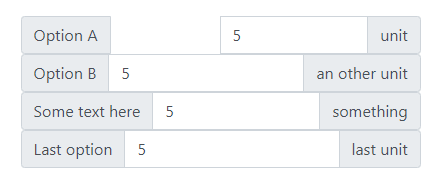
dbc.InputGroup在dbc.InputGroupAddon和dbc.Input之间被打破。
版本信息
Python                       3.7.0
dash                         1.12.0
dash-bootstrap-components    0.10.1
dash-html-components 1.0.3回答 1
Stack Overflow用户
回答已采纳
发布于 2020-06-25 08:38:10
我终于设法解决了这个问题。
我为文本跨跨分配了一个类,并链接了一个本地css样式表(位于assets\文件夹中):
import dash
import dash_html_components as html
import dash_bootstrap_components as dbc


n = 19
v_min = 0
v_max = 10
v_step = 1
v_0 = 5


app = dash.Dash(external_stylesheets = [dbc.themes.BOOTSTRAP, 'box_style.css'])


app.layout = html.Div(id = 'general_div',
                      children = [html.Div(id = 'options_div',
                                           children = [dbc.InputGroup([dbc.InputGroupAddon(children = html.Span(children = 'Option A',
                                                                                                                className = 'prepend-text'),
                                                                                           addon_type = 'prepend'),
                                                                       dbc.Input(id = 't_ON_input',
                                                                                 type = 'number',
                                                                                 min = v_min,
                                                                                 max = v_max,
                                                                                 step = v_step,
                                                                                 value = v_0),
                                                                       dbc.InputGroupAddon(children = html.Span(children = 'unit',
                                                                                                                className = 'append-text'),
                                                                                           addon_type = 'append')]),

                                                       dbc.InputGroup([dbc.InputGroupAddon(children = html.Span(children = 'Option B',
                                                                                                                className = 'prepend-text'),
                                                                                           addon_type = 'prepend'),
                                                                       dbc.Input(id = 't_OFF_input',
                                                                                 type = 'number',
                                                                                 min = v_min,
                                                                                 max = v_max,
                                                                                 step = v_step,
                                                                                 value = v_0),
                                                                       dbc.InputGroupAddon(children = html.Span(children = 'another unit',
                                                                                                                className = 'append-text'),
                                                                                           addon_type = 'append')]),

                                                       dbc.InputGroup([dbc.InputGroupAddon(children = html.Span(children = 'Some text here',
                                                                                                                className = 'prepend-text'),
                                                                                           addon_type = 'prepend'),
                                                                       dbc.Input(id = 'T_start_input',
                                                                                 type = 'number',
                                                                                 min = v_min,
                                                                                 max = v_max,
                                                                                 step = v_step,
                                                                                 value = v_0),
                                                                       dbc.InputGroupAddon(children = html.Span(children = 'something',
                                                                                                                className = 'append-text'),
                                                                                           addon_type = 'append')]),

                                                       dbc.InputGroup([dbc.InputGroupAddon(children = html.Span(children = 'Last option',
                                                                                                                className = 'prepend-text'),
                                                                                           addon_type = 'prepend'),
                                                                       dbc.Input(id = 'voltage_input',
                                                                                 type = 'number',
                                                                                 min = v_min,
                                                                                 max = v_max,
                                                                                 step = v_step,
                                                                                 value = v_0),
                                                                       dbc.InputGroupAddon(children = html.Span(children = 'last unit',
                                                                                                                className = 'append-text'),
                                                                                           addon_type = 'append')])],

                                           style = {'display': 'inline-block',
                                                    'vertical-align': 'top',
                                                    'margin-left': '3vw',
                                                    'margin-top': '3vw',
                                                    'width': 400})])


if __name__ == "__main__":
app.run_server()我从dash默认值中复制了样式表类,并添加了width、border-radius和text-align属性(width是解决上述问题的关键属性,其余用于进一步的美学调整)。这里我的本地css:
.prepend-text {
    display: -ms-flexbox;
    display: flex;
    -ms-flex-align: center;
    align-items: center;
    padding: .375rem .75rem;
    margin-bottom: 0;
    font-size: 1rem;
    font-weight: 400;
    line-height: 1.5;
    color: #495057;
    text-align: center;
    white-space: nowrap;
    background-color: #e9ecef;
    border: 1px solid #ced4da;
    width: 150px;
    border-top-left-radius: 0.25rem;
    border-top-right-radius: 0rem;
    border-bottom-right-radius: 0rem;
    border-bottom-left-radius: 0.25rem;
}

.form-control {
    display: block;
    width: 100%;
    height: calc(1.5em + .75rem + 2px);
    padding: .375rem .75rem;
    font-size: 1rem;
    font-weight: 400;
    line-height: 1.5;
    color: #495057;
    background-color: #fff;
    background-clip: padding-box;
    border: 1px solid #ced4da;
    border-radius: 0rem;
    transition: border-color .15s ease-in-out,box-shadow .15s ease-in-out;
    width: 130px;
    text-align: right;
}

.append-text {
    display: -ms-flexbox;
    display: flex;
    -ms-flex-align: center;
    align-items: center;
    padding: .375rem .75rem;
    margin-bottom: 0;
    font-size: 1rem;
    font-weight: 400;
    line-height: 1.5;
    color: #495057;
    text-align: center;
    white-space: nowrap;
    background-color: #e9ecef;
    border: 1px solid #ced4da;
    width: 120px;
    border-top-left-radius: 0rem;
    border-top-right-radius: 0.25rem;
    border-bottom-right-radius: 0.25rem;
    border-bottom-left-radius: 0rem;
}
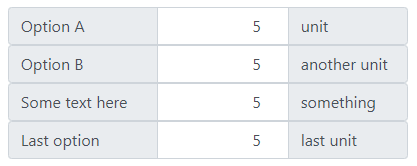
这给了我这个布局:
页面原文内容由Stack Overflow提供。腾讯云小微IT领域专用引擎提供翻译支持
原文链接:
https://stackoverflow.com/questions/62535418
复制相关文章
相似问题
腾讯云开发者

Copyright © 2013 - 2026 Tencent Cloud. All Rights Reserved. 腾讯云 版权所有
深圳市腾讯计算机系统有限公司 ICP备案/许可证号:粤B2-20090059  粤公网安备44030502008569号
腾讯云计算(北京)有限责任公司 京ICP证150476号 | 京ICP备11018762号