
用回归线法和正态分布叠加法绘制and图
用回归线法和正态分布叠加法绘制and图
提问于 2020-06-24 09:25:16
我试图做一个图谋,以显示逻辑(或概率)回归背后的直觉。我怎样才能制作出这样的情节呢?
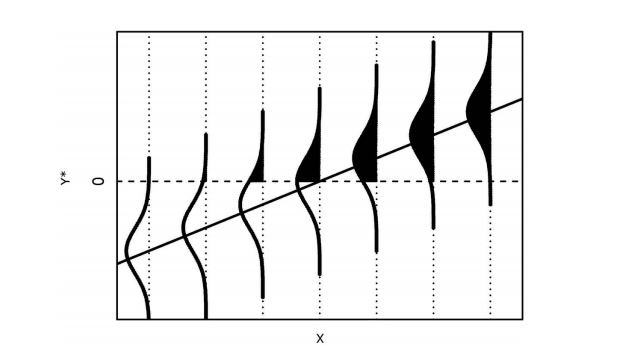
(Wolf & Best,“分析和因果推理的智者手册”,2015年,第155页)
实际上,我更愿意做的是,沿着y轴显示一个单一的正态分布,平均值= 0,还有一个特定的方差,这样我就可以画出从线性预测器到y轴的水平线,并且横向正态分布。就像这样:
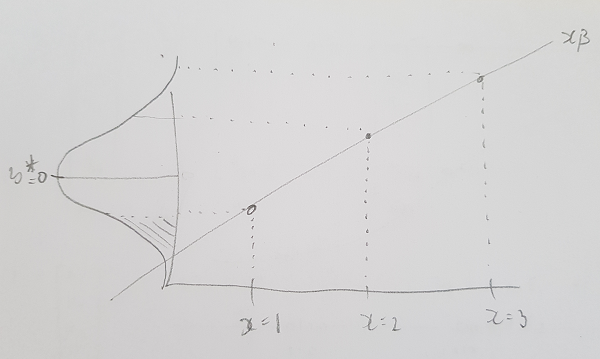
这表明(假设我没有误解什么)

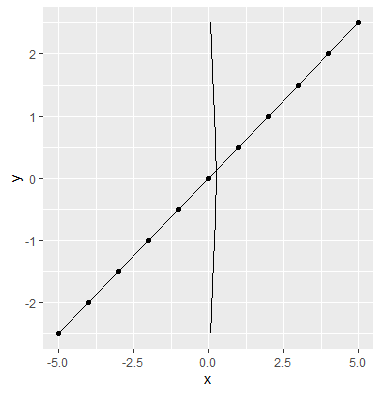
。到目前为止我还没有取得多少成功..。
library(ggplot2)

x <- seq(1, 11, 1)
y <- x*0.5

x <- x - mean(x)
y <- y - mean(y)

df <- data.frame(x, y)

# Probability density function of a normal logistic distribution
pdfDeltaFun <- function(x) {
  prob = (exp(x)/(1 + exp(x))^2)
  return(prob)
}

# Tried switching the x and y to be able to turn the
# distribution overlay 90 degrees with coord_flip()
ggplot(df, aes(x = y, y = x)) +
  geom_point() +
  geom_line() +
  stat_function(fun = pdfDeltaFun)+
  coord_flip()
回答 1
Stack Overflow用户
发布于 2020-06-24 11:17:28
我认为这与你给出的第一个例子非常接近。如果这是一件您不需要重复多次的事情,那么最好在绘制之前先计算密度曲线,然后使用单独的数据来绘制这些曲线。
library(ggplot2)

x <- seq(1, 11, 1)
y <- x*0.5

x <- x - mean(x)
y <- y - mean(y)

df <- data.frame(x, y)

# For every row in `df`, compute a rotated normal density centered at `y` and shifted by `x`
curves <- lapply(seq_len(NROW(df)), function(i) {
  mu <- df$y[i]
  range <- mu + c(-3, 3)
  seq <- seq(range[1], range[2], length.out = 100)
  data.frame(
    x = -1 * dnorm(seq, mean = mu) + df$x[i],
    y = seq,
    grp = i
  )
})
# Combine above densities in one data.frame
curves <- do.call(rbind, curves)


ggplot(df, aes(x, y)) +
  geom_point() +
  geom_line() +
  # The path draws the curve
  geom_path(data = curves, aes(group = grp)) +
  # The polygon does the shading. We can use `oob_squish()` to set a range.
  geom_polygon(data = curves, aes(y = scales::oob_squish(y, c(0, Inf)),group = grp))
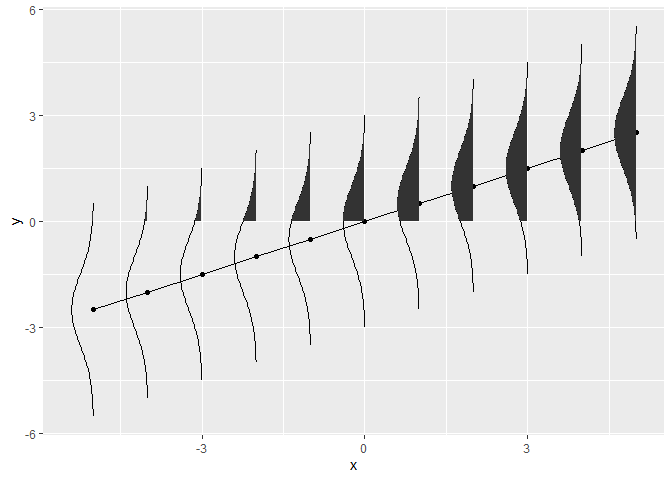
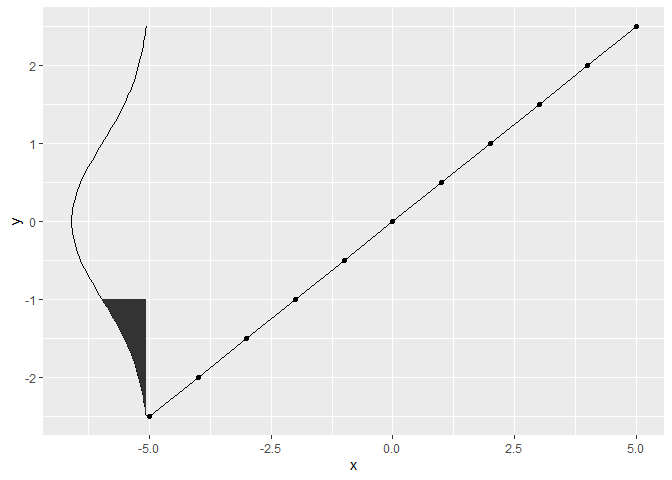
第二个例子非常接近您的代码。我将您的密度函数简化为标准的正常密度函数,并在stat函数中添加了一些额外参数:
library(ggplot2)

x <- seq(1, 11, 1)
y <- x*0.5

x <- x - mean(x)
y <- y - mean(y)

df <- data.frame(x, y)

ggplot(df, aes(x, y)) +
  geom_point() +
  geom_line() +
  stat_function(fun = dnorm,
                aes(x = after_stat(-y * 4 - 5), y = after_stat(x)),
                xlim = range(df$y)) +
  # We fill with a polygon, squishing the y-range
  stat_function(fun = dnorm, geom = "polygon",
                aes(x = after_stat(-y * 4 - 5),
                    y = after_stat(scales::oob_squish(x, c(-Inf, -1)))),
                xlim = range(df$y))
页面原文内容由Stack Overflow提供。腾讯云小微IT领域专用引擎提供翻译支持
原文链接:
https://stackoverflow.com/questions/62551795
复制相关文章
相似问题
腾讯云开发者

Copyright © 2013 - 2026 Tencent Cloud. All Rights Reserved. 腾讯云 版权所有
深圳市腾讯计算机系统有限公司 ICP备案/许可证号:粤B2-20090059  粤公网安备44030502008569号
腾讯云计算(北京)有限责任公司 京ICP证150476号 | 京ICP备11018762号