
使用VBA抓取网页表数据
使用VBA抓取网页表数据
提问于 2020-06-24 16:12:10
我已经创建了一个脚本,它可以从网站的表中抓取数据,并将其复制到excel表中。基本上,它做了以下工作
- 转到链接,
- 填充一个文本框,然后从下拉菜单中选择一个值,按a按钮,
- 将生成数据。前两部分工作得很好,但是数据抓取不起作用。下面是我的代码
Private Sub CommandButton1_Click()
Sheets("Sheet1").Select
Range(Cells(7, 1), Cells(ActiveSheet.UsedRange.Rows.Count, ActiveSheet.UsedRange.Columns.Count)).Delete
 'Sheets("Sheet1").Range("A3") = "Symbol"
 'Cells(3, 1).Font.Bold = True
Dim i As Long, strText As String

Dim doc As Object, hTable As Object, hBody As Object, hTR As Object, hTD As Object
 Dim tb As Object, bb As Object, Tr As Object, Td As Object

Dim y As Long, z As Long, wb As Excel.Workbook, ws As Excel.Worksheet

'Shell "RunDll32.exe Inetcpl.cpl,ClearMyTracksByProcess 11"

Set wb = Excel.ActiveWorkbook
 Set ws = wb.ActiveSheet

Set ie = CreateObject("InternetExplorer.Application")
    my_url = "https://www1.nseindia.com/products/content/equities/equities/eq_security.htm"

    With ie
        .Visible = True
        .navigate my_url
        .Top = 50
        .Left = 530
        .Height = 400
        .Width = 400

    Do Until Not ie.busy And ie.readyState = 4
        DoEvents
    Loop

    End With
' Input the userid and password
    'ie.document.getElementById("symbol").Value = Worksheets("Sheet1").Range("B1")
    ie.document.getElementById("symbol").Value = TextBox1.Text
    ie.document.getElementById("dateRange").selectedIndex = "4"
    ie.document.getElementById("get").Click


While ie.busy
 DoEvents
 Wend


 Set doc = ie.document
 Set hTable = doc.getElementsByTagName("table")


 y = 2 'Column B in Excel
 z = 3 'Row 3 in Excel
 For Each tb In hTable
 Set hHead = tb.getElementsByTagName("th")
 For Each hh In hHead
 Set hTR = hh.getElementsByTagName("tr")
 For Each Tr In hTR


 Set hTD = Tr.getElementsByTagName("th")
 y = 1 ' Resets back to column A
 For Each th In hTD
 ws.Cells(z, y).Value = th.innerText
 y = y + 1
 Next th
 DoEvents
 z = z + 1
 Next Tr
 Exit For
 Next hh
 Exit For

 Set hBody = tb.getElementsByTagName("tbody")
 For Each bb In hBody

 Set hTR = bb.getElementsByTagName("tr")
 For Each Tr In hTR


 Set hTD = Tr.getElementsByTagName("td")
 y = 1 ' Resets back to column A
 For Each Td In hTD
 ws.Cells(z, y).Value = Td.innerText
 y = y + 1
 Next Td
 DoEvents
 z = z + 1
 Next Tr
 Exit For
 Next bb
 z = z + 1
 Exit For
 Next tb
End Sub
有人能帮帮我吗..!
回答 1
Stack Overflow用户
回答已采纳
发布于 2020-06-25 05:28:49
尝试使用F12开发工具检查Table元素,我们可以看到只有一个<table>标记和一个<tbody>元素,在tbody中,第一行是标题行,其他是数据行。在标题行中,我们可以看到<th>元素不包含<tr>标记
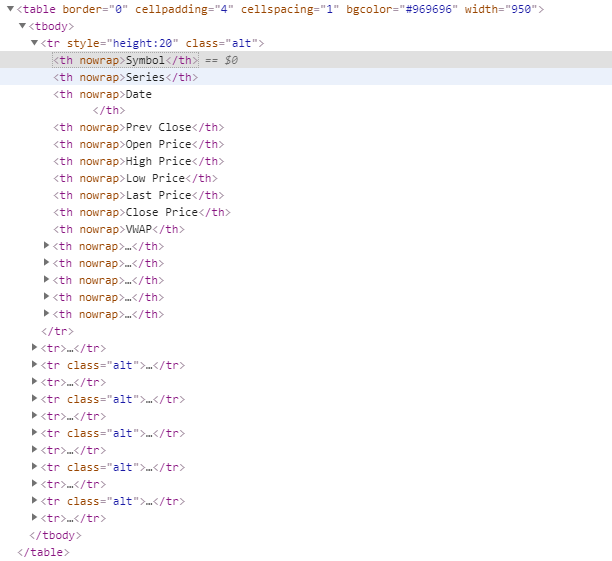
Set hTable = doc.getElementsByTagName("table") y=2‘列B
因此,如果我们使用上面的代码,在找到<th>元素之后,就不会深入遍历表。
尝试引用以下代码:
Sub Test()
    Dim IE As Object

    Sheets("Sheet1").Select
    Dim i As Long, strText As String

    'Dim doc As Object, hTable As Object, hBody As Object, hTR As Object, hTD As Object
    'Dim tb As Object, bb As Object, tr As Object, Td As Object

    Dim y As Long, z As Long, wb As Excel.Workbook, ws As Excel.Worksheet

    'Shell "RunDll32.exe Inetcpl.cpl,ClearMyTracksByProcess 11"

    Set wb = Excel.ActiveWorkbook
    Set ws = wb.ActiveSheet

    Set IE = CreateObject("InternetExplorer.Application")
    my_url = "https://www1.nseindia.com/products/content/equities/equities/eq_security.htm"

    With IE
        .Visible = True
        .navigate my_url
        .Top = 50
        .Left = 530
        .Height = 800
        .Width = 800

    Do Until Not IE.busy And IE.readyState = 4
        DoEvents
    Loop

    End With
    ' Input the userid and password
    'ie.document.getElementById("symbol").Value = Worksheets("Sheet1").Range("B1")
    IE.document.getElementById("symbol").Value = "BAJFINANCE"
    IE.document.getElementById("dateRange").selectedIndex = "4"
    IE.document.getElementById("get").Click


    While IE.busy
        DoEvents
    Wend

    Set doc = IE.document

    y = 2
    z = 3

    Dim table As Object, tbody As Object, datarow As Object, thlist As Object, trlist As Object

    Application.Wait Now + TimeValue("00:00:02")

    'find the tbody. Since it only conatin one table and tbody
    Set tbody = IE.document.getElementsByTagName("table")(0).getElementsByTagName("tbody")(0)
    'find tha theader
    Set thlist = tbody.getElementsByTagName("tr")(0).getElementsByTagName("th")

    'Debug.Print thlist.Length

    'loop through the header column and capture the value.
    Dim ii As Integer
    For ii = 0 To thlist.Length - 1
        ws.Cells(z, y).Value = thlist(ii).innerText
        y = y + 1
    Next ii

    'get all data row
    Set datarow = tbody.getElementsByTagName("tr")

    'init the data row index and column index.
    y = 2
    z = 4

    'loop through the data row and get all td. and then capture the value.
    Dim jj As Integer
    Dim datarowtdlist As Object

    For jj = 1 To datarow.Length - 1
        Set datarowtdlist = datarow(jj).getElementsByTagName("td")

        'the x variable is used to set the column index.
        Dim hh As Integer, x As Integer
        x = y
        For hh = 0 To datarowtdlist.Length - 1
            ws.Cells(z, x).Value = datarowtdlist(hh).innerText
            x = x + 1
        Next hh
        z = z + 1
    Next jj

    Set IE = Nothing

End Sub
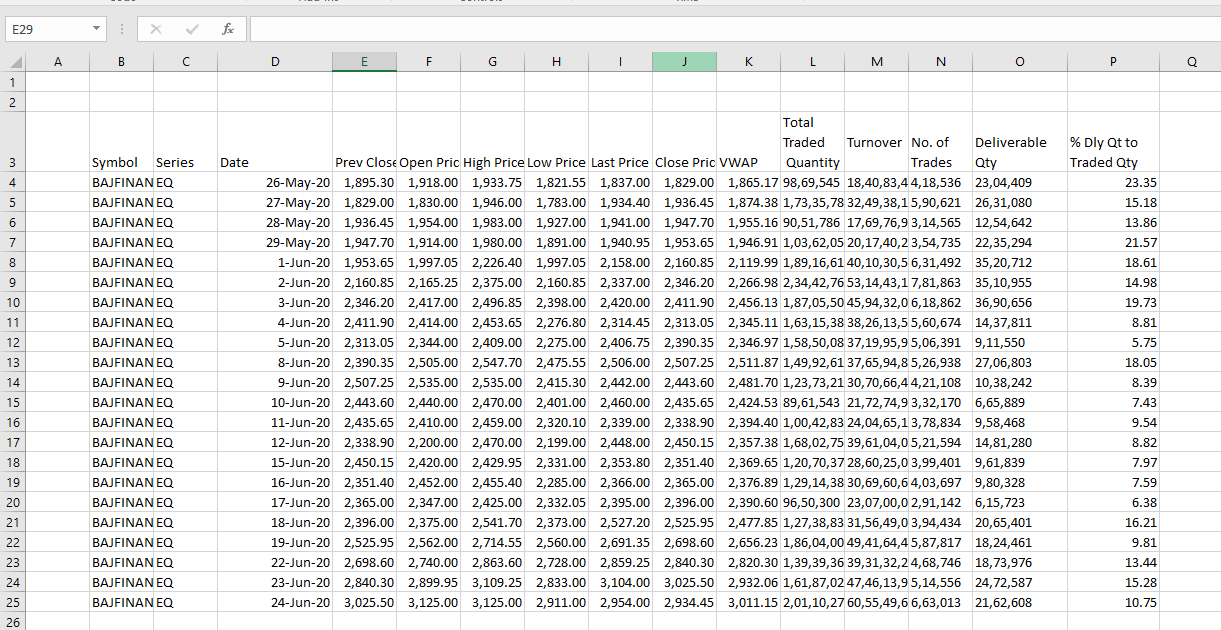
结果:
页面原文内容由Stack Overflow提供。腾讯云小微IT领域专用引擎提供翻译支持
原文链接:
https://stackoverflow.com/questions/62559502
复制相关文章
相似问题
腾讯云开发者

Copyright © 2013 - 2026 Tencent Cloud. All Rights Reserved. 腾讯云 版权所有
深圳市腾讯计算机系统有限公司 ICP备案/许可证号:粤B2-20090059  粤公网安备44030502008569号
腾讯云计算(北京)有限责任公司 京ICP证150476号 | 京ICP备11018762号